This section introduces the user to the concept of approvals in STEP, and provides detailed information on how to carry out approvals in the STEP Workbench. Approval of objects in the Web UI is handled via addition of an Approve action button to a screen.
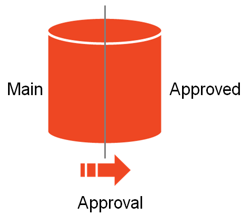
The data in STEP is logically divided into two workspaces named Main and Approved.
The Main Workspace is the editable "draft" Workspace where data is initially born and enriched. The Approved workspace, on the other hand, holds approved data deemed ready for production.
In a typical STEP setup, data from the Approved workspace is made available to downstream systems. Data cannot be edited directly in the Approved workspace. Instead, data is reflected in the workspace via an operation called approval.
Approvals can be carried out manually by a user, or programmatically by a business rule, import process, or other operation.
The approval operation only applies to objects that are workspace revisable. These are:
All other objects in STEP (like attributes, references, etc.) will be identical in the Main and Approved Workspaces and changes made to these will be reflected automatically in both workspaces. These objects are known as being 'Globally revisable'.
Detailed information on how to carry out approvals in the STEP Workbench can be found in the Approving an Object topic in this guide here. This guide also contains a detailed description of the approval symbols that are visible in the different object editors in the Approval Symbols topic
Note: All actions in STEP are controlled via privileges. Some users may not have access to approve objects, or may only have options to approve specific object types, hierarchies, or attribute values. The information in the subsequent topics assumes that all required privileges are available to carry out the described actions. More information on privileges is available in the Privilege Rules topic in the System Setup / Super User documentation here.
2018, Stibo Systems