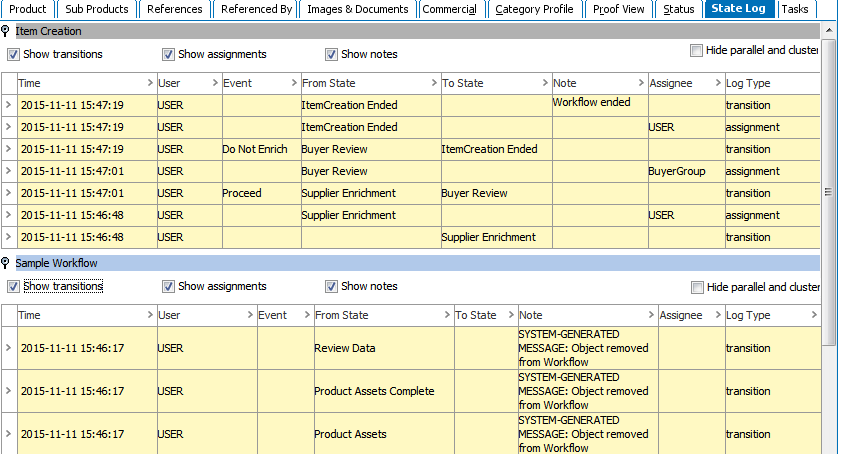
Every type of object for which a workflow can be configured has an editor tab named State Log. This is useful to aid with tracking the recent history of an object across all workflows on the system that include the object. Initiating an object into a new workflow creates a flipper under which recent history is housed in accordance to that particular workflow.
All transitions, assignments, and added notes will be represented with an entry via a row in the table. For each entry there will be a timestamp, a type (transition, assignment, or notes), and the name of the user causing the entry. Note that only the latest 50 entries per workflow will show on the State Log.
Since entering and leaving parallels and clusters result in a lot of entries, it is possible to hide entries related to entering and leaving states with these characteristics by checking the Hide parallel and cluster box in the top right of each table if desired. Furthermore, it is possible to toggle the three entry types (transitions, assignments, and notes) on and off as well. For example, hide all the transitions and notes to only look at assignments.
Show Transitions: Is a log that gets recorded to display the “From” state to the “To” state of a Particular product in a workflow. Upon having the checkbox “Checked”, it will display only the Transition state.
Show Assignments: Is a log that gets recorded to show the current user to whom the task has been assigned.
Show Notes: Displays if there are any notes that the user has entered while transitioning a product from one state to another state in a workflow
Hide Parallel and Cluster States: If there are any states in a workflow which has Parallel of Cluster states, then having this checkbox checked, will hide these states.
Note: Checkboxes mentioned above are nothing but a filter to format the view of state log. This allows a user to view information which is necessary based on the requirement by checking or unchecking the checkbox.
Note: The log is not reset with every new workflow instance. Thus, if an object has been removed from a workflow and then later initiated into the same workflow again, entries from the first instance will still be displayed.
2017, Stibo Systems