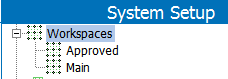
A workspace can be perceived as a set of independent ‘copies’ of workspace revisable database objects. A workspace is thus an area in the database that provides a snapshot of all objects in the database. Objects that are subject to approval can be maintained within one workspace without affecting the snapshot in other workspaces.
Standard STEP installations come with two workspaces, Main and Approved, where Main is the editable 'draft' workspace and Approved is a non-editable workspace representing the version of data exposed to downstream systems. Data is reflected in the Approved workspace via the approval functionality.
Workspaces are maintained in System Setup > Workspaces.
Important: Data maintained in System setup, such as attributes, LOVs, units, and so forth are valid for all workspaces. Objects that are not subject to approval appear identically in all workspaces.
There are two standard workspaces:
The following describes the basic workspace types:
|
Workspace |
Description |
Example |
|---|---|---|
|
Main |
Maintenance area (editable) |
Used as a the standard maintenance area for objects. |
|
Approved |
Approved area (uneditable) |
Used for objects that have been formally approved and are ready for e.g. translation or publishing. Objects are copied to the Approved Workspace from the menu option: Object ->Approve object, or automatically upon system approval events. |
Note the following:
2017, Stibo Systems