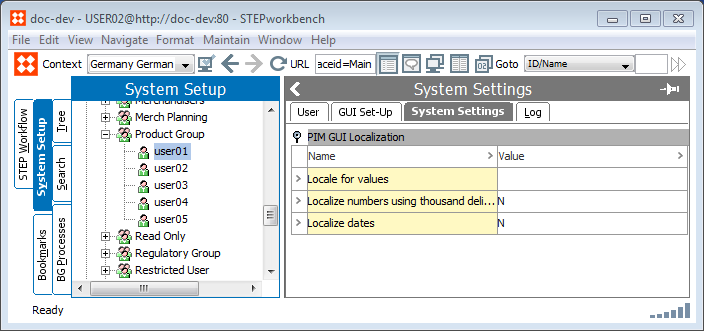
GUI Localization is maintained in System Setup > Users & Groups > Users on the System Settings tab.
In the Workbench when viewing and maintaining Numbers and Dates, they will as default be maintained and viewed using the English - US locale. A number like 1234.56 will appear with a dot to indicate the decimal. When editing and saving numbers and dates in the database, only an English-US locale is allowed to be used.
In the User editor in the System Settings tab, you have an option to select a specific locale to be used for a User. This locale will change the behavior in the Workbench to match a selected locale for the specific user. This option is useful for users working in other countries and where they want to view and maintain values in the Workbench with a different locale than the English - US.
Important: A locale applied a User will only change the view of numbers and dates according to the locale in the Workbench and it will change dialogs to allow saving numbers and dates based on the locale. A number can e.g. be saved with a comma as a decimal separator using a German - de locale. Behind the scenes it is always the English - US locale that is used to save numbers and dates into the database.
GUI Localization is maintained in [System Setup]: Users & Groups -> Users in the System Settings tab.
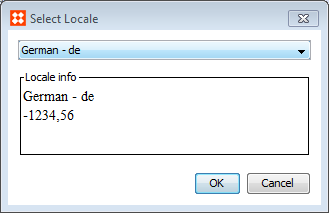
Note: Users without any locale applied will as default use the English - US locale to enter values or viewing values in the Workbench editors.
Note: The thousand delimiter is only a display setting for values shown in the Workbench. Saving numbers and integers will not be saved in the database with a dot as a thousand delimiter.
2017, Stibo Systems