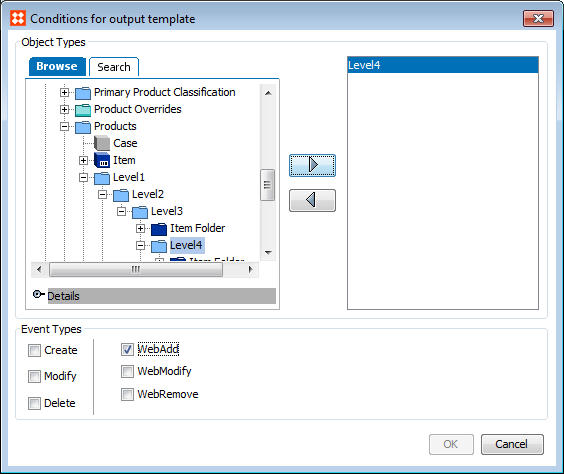
When the trigger you need is not available as a core event, use a derived event, which is an event generated by a JavaScript-based business rule. Another case for derived events is when you want to use different output templates under conditions different from the core conditions. For example, when publishing data to a website (if the website categories are modeled using a classification in STEP) you may want to send files formatted in different ways or include different data when a product is first linked into a category, when a product linked to a category is modified, and when a product is unlinked from a category.
This topic addresses:
A thorough understanding of business rules is need to create successful derived events. For more information, see the Business Rules section of the Business Rules documentation here.
Although core event functionality can be used to publish data to a downstream system when an object is created or updated via an import, or when an object reaches a specific state in a workflow, these situations will not normally trigger any of the core events. Since an event-based OIEP cannot discriminate the republish event from other types of events, it would also be registering events and publishing data, for example, based on an object being approved for the first time.
You may also want to generate derived events on referenced images, referenced products, parent product, or on products that are linked, removed, or modified in a specific classification structure.
When triggering object types are set up on an event-based OIEP, business rules can be applied to generate derived events, based on the original object type triggering. Derived events are triggered based on business rules, and can be set up depending on the need.
For more information about using derived events, see the Event-Based OIEP Example Business Rules for Derived Events section of the Data Exchange documentation here.
Derived event types can be added to an OIEP output template, and from within a business condition to filter objects that trigger the OIEP. For example, consider the following derived event types:
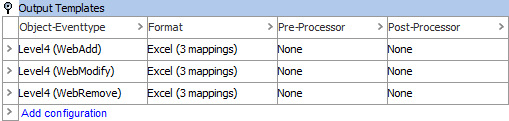
In this example, the format for all output templates is Excel but the mapping differs in each template. It is also possible to specify a different output format for each output template, such as Generic XML, STEPXML, or CSV, depending on the specific requirements.
Before using a derived event, create a derived event type.
2017, Stibo Systems