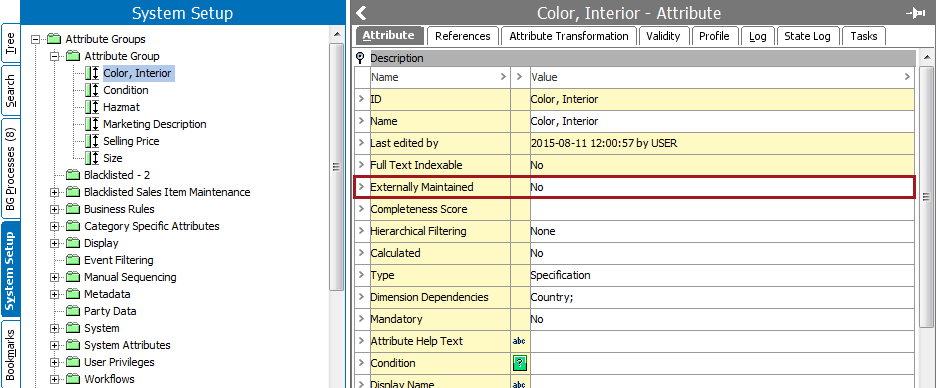
An externally maintained attribute 'lives' outside of STEP because the values are housed in an external system. A typical example is the prices that are maintained in the ERP environment and transferred to STEP for publishing and distribution or addresses maintained in an electronic medical record (EMR).
Externally maintained attributes are not included in revision control. This means that when a value is imported to one of the workspaces, the new value is automatically applied to all other workspaces. For example, if a supplier enters a value in the 'Staging' workspace for an externally maintained attribute, this value is automatically transferred to the other workspaces, e.g., 'Main' and 'Approved'.
If you update an existing internally maintained attribute that has values to be externally maintained, you must select the workspace that contains the values that will be kept. Typically this will be the workspace that contains the most recent updates, e.g., 'Main'.
Note: No revisions are made due to a change on an externally maintained attribute, even if another user modifies it. The data change does generate an event, however, a revision is only generated if some internally maintained attribute is changed.
Externally maintained attributes cannot share LOVs with internally maintained attributes, as values cannot be maintained both internally and externally.
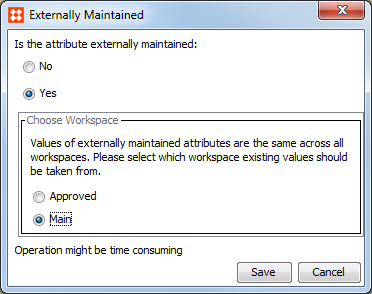
Note: The number of values that already exist for the attribute affects the time required to complete this operation.
2017, Stibo Systems