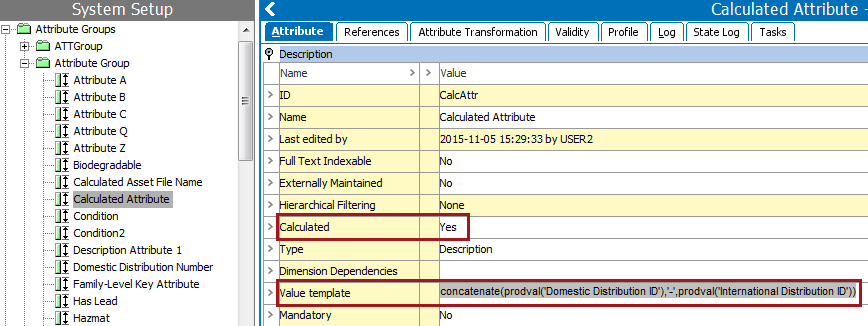
A calculated attribute is an attribute whose value is determined by a value template that includes a formula of functions and arguments and/or static text. A value template can also give access to information from references, compare data between objects, round numbers, modify text, and many other options, which are defined in the Calculated Attribute Functions section of the System Setup / Super User Guide
The foundation for a calculated attribute is a functional programming language very similar to the language used for defining functions in Excel. Calculated attributes are a special type of attributes whose values are not written in the database, but are calculated on the fly, based on other data in the system.
Both description attributes and specification attributes can be set as calculated attributes, and calculated attribute values can be used in Business Rules as any other attribute values.
When in workbench, calculated attributes are created by going to System Setup and clicking on the desired attribute. Then on the Attribute tab, click into the Calculated field, and select 'Yes' or 'No'. In Web UI this can be set on the Attribute Management screen. For information about Web UI, see the Calculated Attributes in Web UI section of the Web User Interfaces documentation
When an attribute is set as calculated, a Value template field displays. Functions added to the value template perform predefined actions on the argument(s) that are supplied. Arguments are placeholders for data (like an attribute ID or text that should be appended to a value).
For example, the following functions and arguments are included in the workbench image below:
Note: The functions ‘prodval’ and ‘value’ act the same in fetching the attribute values in STEP.
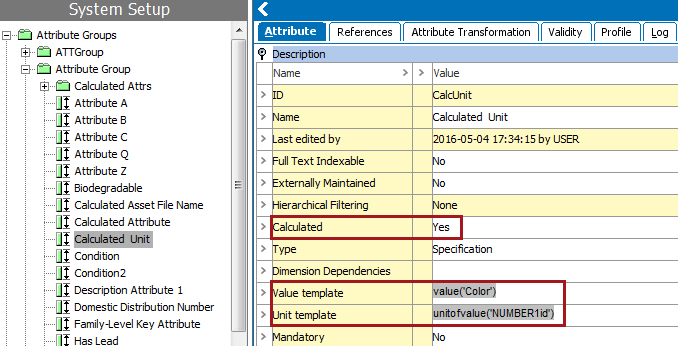
When a calculated attribute uses the validation base type of Embedded Number, Fraction, Integer, Number, or Numeric Text, a Unit template field displays. This field can hold a static Unit ID and/or an expression that evaluates to a Unit ID.
1. None of the attributes used in the calculation can be dimension dependent.
2. There must be no iterations in the calculation that involve any kind of references or child products. Only attribute values that are directly on the selected object (or, if a product, an inherited value from a higher level) are allowed.
3. The calculated attribute cannot make use of an attribute value that is itself a calculated attribute.
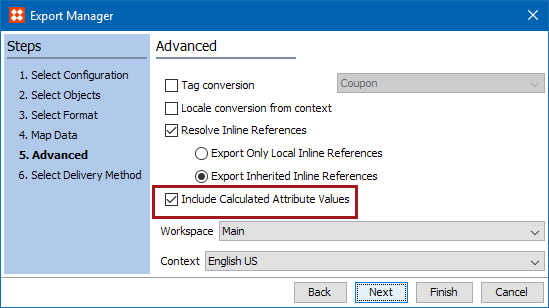
If these criteria are met, then the system will calculate the value once and will export that value for each of the selected contexts. This can result in a reduction of the time to create the exported STEPXML file.
If these criteria are not met, then the calculation will be performed per context, which can increase the time to create the exported STEPXML file.
2017, Stibo Systems