Open topic with navigation
You are here: AutoPage > Printing Pages, Sections or Sub-sections
Printing Pages in AutoPage
Sections and subsections may be printed from the AutoPage Publication Planner tab or from one or more pages from the Page Inspector tab.
- In the Tree, click the relevant publication, section or subsection.
- Do one of the following:
- On the Page Inspector tab, select the pages that you want to print and then click the Print icon
 .
.
-OR-
- On the AutoPage Publication Planner tab, select the sections or subsections that you want to print, right-click, and then choose Print.
The Print dialog box appears.
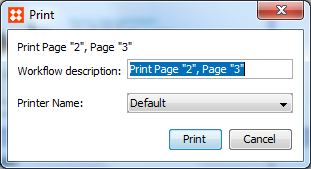
- Click Print.
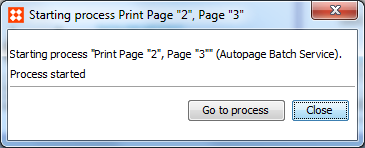
- The Starting process Print Page dialog appears. Click Close or Go to process. Go to process goes to Autopage Batch Service on the BGProcesses tab.
Note: In order to print, a default printer must be installed on the InDesign server. Contact Stibo Systems for assistance if you need help configuring the InDesign server.
2017, Stibo Systems