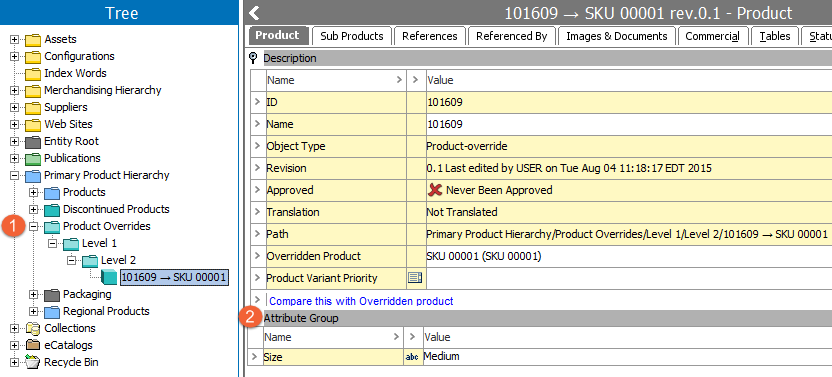
Product-overrides are alternate versions of products and product families that may have differing values, references, links, and structures. Attributes and values applied to the product family are inherited to the product override and can be replaced with local values and references on the product override.
A product override folder can include products from various "standard" (e.g. non-override) product families. Similarly, a product override leaf object can live under a different product folder (override or standard) than the folder in which its corresponding standard object resides.
1. Tree Structure: For clarity, it is recommended to house product overrides in a separate sub-hierarchy from standard products.
2. Override Interface: The product override object makes it possible to override the children, attributes, and references of a product / product family. This is useful in order to publish a limited version of a product family without modifying the object itself.
Example of a Product-Override:
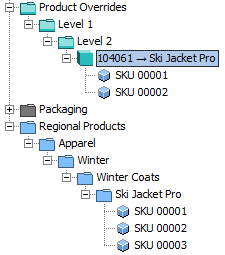
In this example a product family Ski Jacket Pro has three products. A product override 104061 is created and based on the product family Ski Jacket Pro. Attributes, values, and references are inherited from the product family Ski Jacket Pro to the product override folder and can be replaced with local values and references on the product override.
Two products from the product family Ski Jacket Pro are linked into the product override folder (SKU 00001 and SKU 00002). The product override only contains a subset of the products included in the original product family Ski Jacket Pro, as SKU 00003 is not included.
Important: Values and references inherited to a product override will not be inherited to products linked into the product override. These products will have their values inherited from their original structure instead.
Selecting the Product tab or References tab on the product-override will indicate with a yellow icon ( ), if an attribute or reference is inherited from an overridden product. Inherited values and references can be replaced with local versions, assuming the relevant attribute and/or reference is valid on the relevant product override object type.
The product will be converted into a product-override. Values, references, and links will get inherited from the overridden product.
2017, Stibo Systems