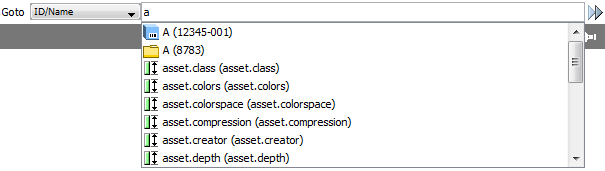
The Goto functionality allows you to locate an object in STEP in a quick and efficient manner. You simply type in the Name or ID of an object in the Goto field, press Enter or click the Goto next object button to the right of the field, and the system will take you to the object without displaying a list of search results. If there are several matches, the Goto function will take you to the first hit it finds and you can then browse through the additional hits using the Goto next object button.
Note: Pressing Ctrl+G will take you to the Goto field.
Once you start typing in the Goto field, the system will suggest objects matching the typed-in text (case insensitive) and display them on a drop-down menu as shown below.
Items can be selected from the menu using either the mouse or the keyboard ARROW UP/DOWN keys. A maximum of 20 items will be displayed.
2017, Stibo Systems