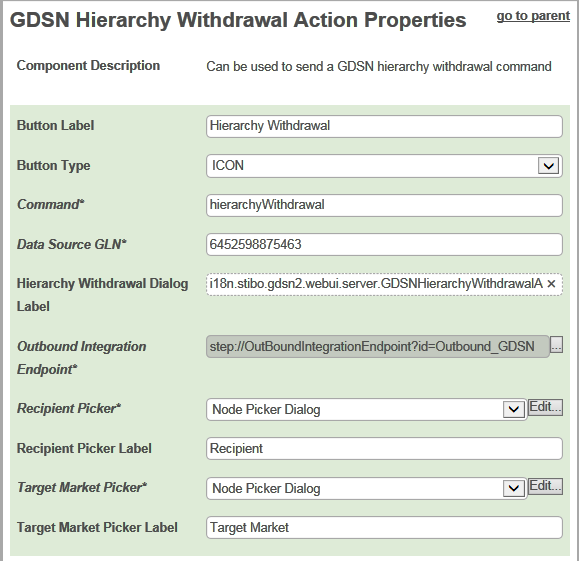
In the Designer, the Web UI component for the Hierarchy Withdrawal button is called GDSN Hierarchy Withdrawal Action. Each parameter is described in the following table.
|
Parameter |
Description |
|---|---|
|
Button Label |
Optional Add a label for the Hierarchy Withdrawal button, displayed when the Button Type is Text or Both |
|
Button Type |
Optional Specify if the button should appear with an icon, text (the button label) or both. |
|
Command |
Mandatory Specify which GDSN command that should be executed when a user clicks the Hierarchy Withdrawal button. In the default GDSN configuration, the command is 'hierarchyWithdrawal'. |
|
Data Source GLN |
Mandatory Enter your Global Location Number (GLN). This is the GLN that the publications are sent from. |
|
Outbound Integration Endpoint |
Mandatory Specify the Outbound Integration Endpoint that should be used to send the command to the data pool. |
|
Hierarchy Withdrawal Dialog Label |
Optional Add the Hierarchy Withdrawal Dialog Label to the dialog that appears when clicking the Hierarchy Withdrawal button. |
|
Recipient Picker
|
Mandatory Configure the pop-up dialog that enables the end user to pick recipients for the hierarchy withdrawal. |
|
Recipient Picker Label |
Mandatory Apply the label of the pop-up dialog used by end users to pick recipients for the hierarchy withdrawal. |
|
Target Market Picker |
Mandatory Configure the pop-up dialog that enables the end user to pick target markets for the hierarchy withdrawal. |
|
Target Market Picker Label |
Mandatory Apply the label of the pop-up dialog used by end users to pick target markets for the hierarchy withdrawal. |
2017, Stibo Systems