Open topic with navigation
Create a GDSN Web UI
Use STEP Workbench to create a Web UI that is based on the 'User Web UI'. The Web UI illustrates how you can create a GDSN Web UI, but it is not production-ready. Additional customization is required to address your company's needs.
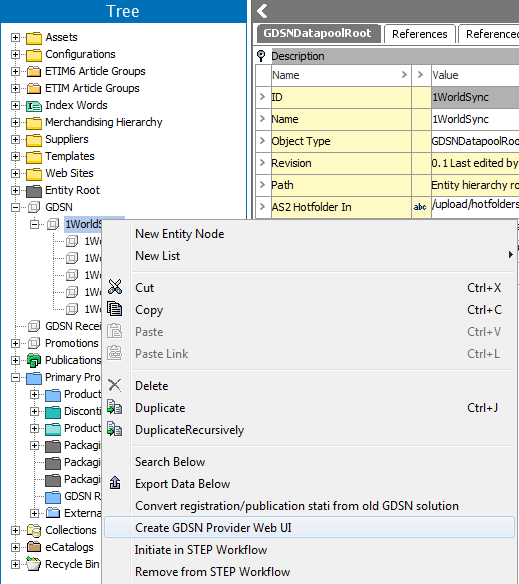
- In the Tree expand GDSN and right-click the relevant data pool entity.
- Click Create GDSN Provider Web UI.
- In the Setup GDSN Publisher Data Model dialog, specify the following:
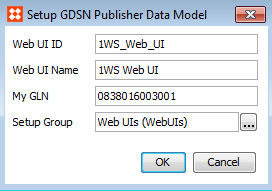
- Web UI ID: The ID of the Web UI. Is also used as part of the URL for the Web UI. The Web UI ID must not contain spaces.
- Web UI Name: The name of the Web UI.
- My GLN: The Global Location Number of your company or the company that is publishing.
- Setup Group: Select the setup group where the Web UI configuration is stored. The setup group field is populated with any setup group that allows Web UIs. If there are no setup groups that allow the creation of a Web UI, a warning is displayed before the dialog is displayed.
2017, Stibo Systems