Open topic with navigation
Configuring a Gateway Integration Endpoint
Once a gateway integration endpoint is created, the configuration settings allow you to identify the server housing the required data.
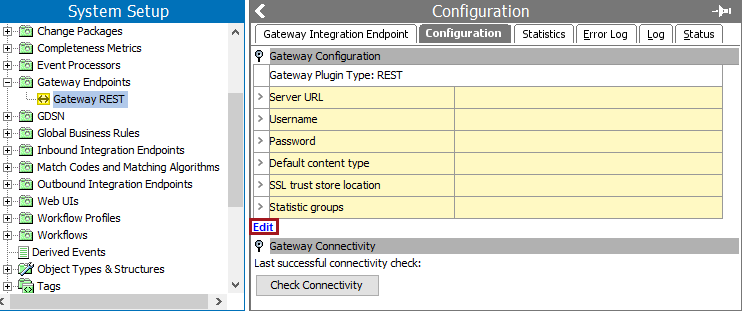
- In System Setup, click the Gateway Endpoints setup group, and select the relevant gateway integration endpoint.
- On the Configuration tab, click the Edit link.
- On the Gateway Integration Endpoint Configuration dialog, use the following parameters to specify which external system the gateway integration endpoint will access.
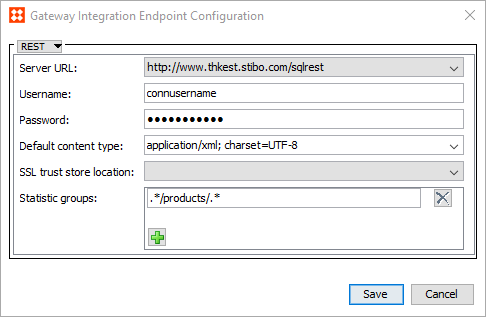
- Server URL - The URL of the server to be accessed. To display a Server URL in the dropdown, first update the 'RESTGateway.ServerURL' property in the sharedconfig.properties file. Contact Stibo Systems technical support for assistance in adding a Server URL to your system.
- Username - Login required to establish the connection.
- Password - Password required to establish the connection.
- Default content type - Data format or content type to be used for the endpoint. Type your own, or select from the dropdown list of the most commonly used options.
- SSL trust store location - The trust store holds certificates that verify that the system can be trusted. To display a trust store in the dropdown, first update the 'RESTGateway.SSLTrustStoreLocation' property in the sharedconfig.properties file. Contact Stibo Systems technical support for assistance in adding a trust store to your system.
If no trust store locations are selected, the gateway connection is not configured to use SSL encryption and the connection will be established using a certificate signed by a recognized CA such as Verisign or Thawte.
- Statistic groups - Optional. Regular expression can be used to group executed REST methods on the endpoint's Statistics tab. The regular expression must match the entire URL, for example, */products/.*. Use the regular expression syntax available in Java in java.util.regex.Pattern class. For more information, see the Gateway Integration Endpoint Statistics section here.
- Click Save to complete the configuration.
- Create a business action to access the gateway endpoint. For details, see Business Action Accesses Gateway Integration Endpoint here.
2017, Stibo Systems