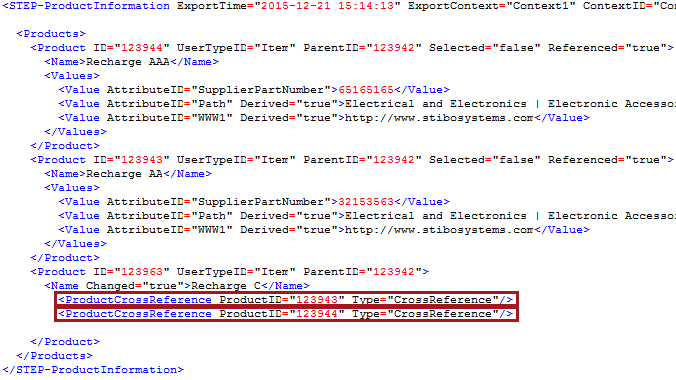
The ID and Type of an object's references can be exported using the Referenced XML attribute.
<Product Referenced="true">
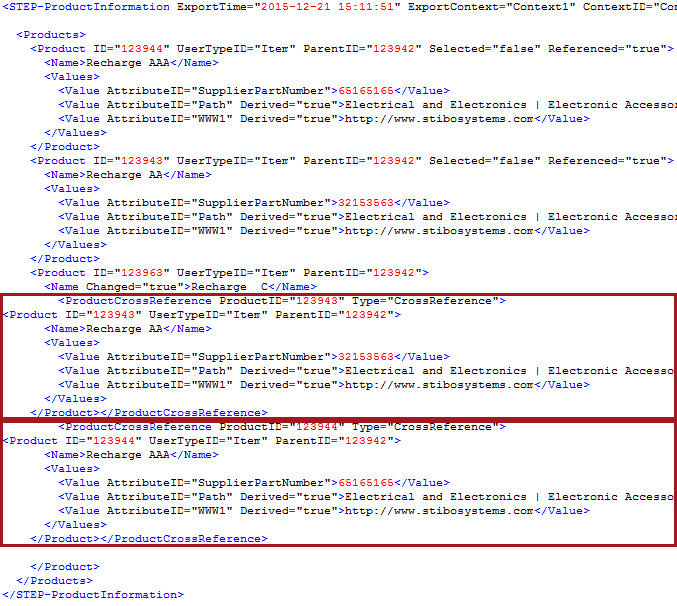
In order to export details about the reference itself, use the Embedded XML attribute.
<Entity Referenced="true" Embedded="true">
Note: Embedded referenced objects cannot be imported. Any changes to the embedded object, like its name, will not update the data in STEP if loaded for import.
When required by a downstream system, the Referenced and Embedded XML attributes are used together to provide additional details about the reference in line with the product, classification, or asset that owns the reference.
For details on tags, elements, and their XML attributes, refer to the available XSD (XML Schema Definition) files in the STEPXML Tags and Examples topic.
For example, if STEP allows a product-to-product cross reference between products A and B, then the data for both products A and B can be delivered via the product reference. The cross referenced product details are exported within the product that references it.
Template
The MetaData tag is used to output attribute values maintained on the product reference itself.
| Referenced Without Embedded | Referenced With Embedded |
|---|---|
<?xml version="1.0" encoding="UTF-8"?> <STEP-ProductInformation ResolveInlineRefs="true"> <Products> <FilterUserType ID="Item"/> <Product IncludeParent="true"> <Name/> <ProductCrossReference Type="CrossReference"> <MetaData/> <Product Referenced="true"> <Name/> <Values/> </Product> </ProductCrossReference> </Product> </Products> </STEP-ProductInformation> |
<?xml version="1.0" encoding="UTF-8"?> <STEP-ProductInformation ResolveInlineRefs="true"> <Products> <FilterUserType ID="Item"/> <Product IncludeParent="true"> <Name/> <ProductCrossReference Type="CrossReference"> <MetaData/> <Product Referenced="true" Embedded="true"> <Name/> <Values/> </Product> </ProductCrossReference> </Product> </Products> </STEP-ProductInformation> |
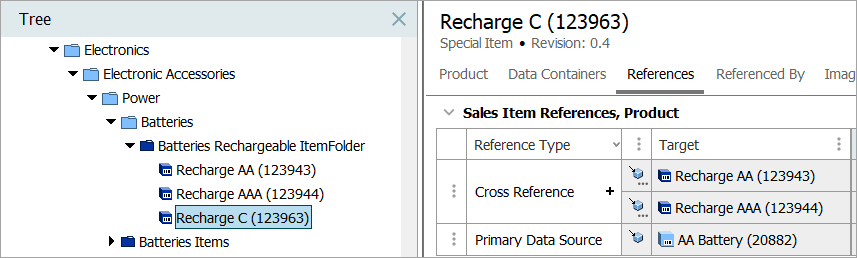
Modified Object
For each template, the same single item (Recharge C) is modified and approved, which triggers the OIEP.
Results
| Referenced Without Embedded |
|---|
|
|
| Referenced With Embedded |
|---|
|
|
As another example, the following Advanced STEPXML template is defined to export a customer entity hierarchy. Each customer has references to contacts, and each contact has one or more references to addresses. All objects are in this example are modeled with entity objects.

The following is a general Advanced STEPXML template that exports all used entity objects below the customer hierarchy.
<?xml version='1.0'?>
<STEP-ProductInformation>
<Entities>
   <Entity>
      <EntityCrossReference Type="Customer to Contact">
         <Entity Referenced="true">
            <Name />
            <EntityCrossReference Type="Contact to Address">
               <Entity Referenced="true">
                  <Name />
               </Entity>
            </EntityCrossReference>
        </Entity>
      </EntityCrossReference>
   </Entity>
</Entities>
</STEP-ProductInformation>
The template exports customer entity objects and their references of the type Customer to Contact and Contact to Address. However, the referenced objects are not exported as embedded in the customer hierarchy. To export the referenced contacts and their address objects embedded in the customer hierarchy, you have to insert <Entity Referenced="true" Embedded="true"> in the advanced template as illustrated in the following.
<?xml version='1.0'?>
<STEP-ProductInformation>
<Entities>
   <Entity>
      <EntityCrossReference Type="Customer to Contact">
         <Entity Referenced="true" Embedded="true">
            <Name />
            <EntityCrossReference Type="Contact to Address">
               <Entity Referenced="true" Embedded="true">
                  <Name />
               </Entity>
            </EntityCrossReference>
         </Entity>
      </EntityCrossReference>
   </Entity>
</Entities>
</STEP-ProductInformation>