When an entity reference type has only entity object types for source and only entity object types for target, the 'Parent/Child relation' parameter is available. This allows an aggregated display of all entity-to-entity reference types in the Tree hierarchy navigator.
Note: If another super type (e.g., products or classifications) is present on the Validity tab of the reference, the parameter is not available.
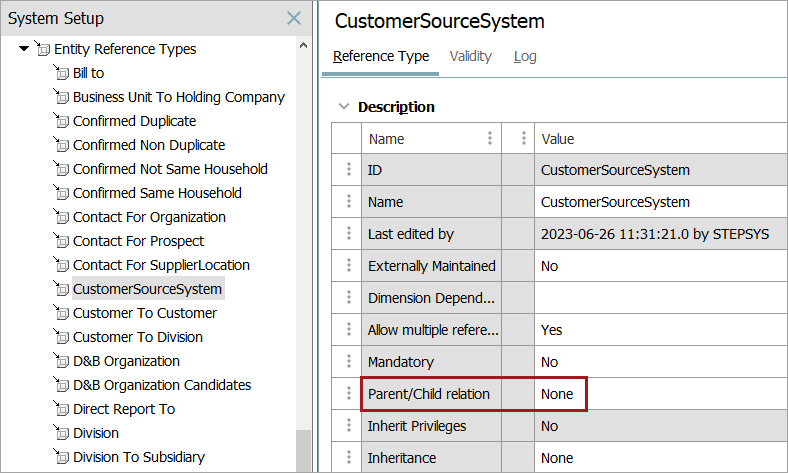
The Parent/Child Relation field includes these options, which are illustrated in the 'Parent/Child Relation Example' section below:
- None means entity-to-entity references are not aggregated.
- Source as Parent, Target as Child means entity-to-entity references are aggregated below the source entity (where references originate).
- Target as Parent, Source as Child means entity-to-entity references are aggregated below the target entity (where references end).
When setting the Parent/Child Relation field, be aware of these items:
- Use different icons for each entity object type to make the hierarchy overview easier to understand. Refer to the Object Type Icons topic.
- Aggregating references enables Copy, Paste, Drag, and Drop between entity hierarchies. STEP will automatically apply the reference at the new position.
- Entity objects types can be set up to be globally revisable or internally revisable. For more information about this functionality, refer to the Revisability on Entity Object Type documentation.
- STEP prevents you from setting the Parent/Child Relation field if the objects that are parent and child of the reference already have a true parent / child relationship via the data model. If either object type appears under the object type References tab > Parents flipper, an error is displayed and a parent/child relation is not allowed.

Entity to Entity Parent/Child Relation Example
Consider an example that includes the following data: a Customers entity hierarchy, an Addresses entity hierarchy, and a 'Send to' reference type which is used to link each customer to its relevant address(es).
The image below shows the following relationships: Customer X has three Addresses, and Customer Y has one Address. Each of the Addresses (target) are referenced from Customer (source) using the 'Send to' reference type.
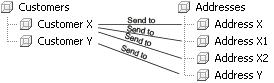
This same data can be displayed differently on the Tree, based on the 'Parent/Child Relation' parameter setting in the 'Send to' reference editor. Customer is the source and Address is the target since a reference is created from a customer to an address.
None
On the Tree, expanding the Customers entity hierarchy displays only customer objects, and expanding the Addresses entity hierarchy displays only address objects, as shown in the image below:
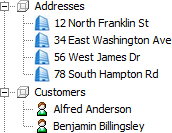
Source as Parent, Target as Child
On the Tree, expanding the Customers entity hierarchy displays all referenced Address entities, as shown in the image below:
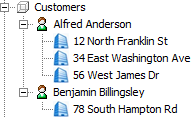
Target as Parent, Source as Child
On the Tree, expanding the Customer entity hierarchy displays all referenced Address entities, as shown in the image below:

When Inherit Privileges is set to ‘Yes’ for entity reference types configured with ‘Target as Parent, Source as Child’ relationships, child entities automatically inherit privileges from their parent entities. This allows privilege rules set at higher levels to apply to all child entity groups beneath them.
This inheritance enables users to apply general privilege rules at the top level and specify only local privilege rules for sub User Groups. It is recommended to apply all general privilege rules as high as possible in the User Groups hierarchy to simplify their management.
Note: The 'Inherit Privileges' setting allows a source entity to receive all privileges from the referenced target entity. This means that in addition to standard inheritance within the entity hierarchy, this setting also allows traversal inheritance across references with 'Inherit Privileges' enabled. As a result, if a node is linked via a reference type that supports privilege inheritance, the source entity will inherit the associated privileges through that reference as well.
This behavior closely resembles how Product Classification Link Types work, as they also allow products to inherit additional privileges as described in the topic Product to Classification Link Types.
For more information, refer to the Privilege Rules topic in the System Setup documentation.
Asset to Entity Reference Example
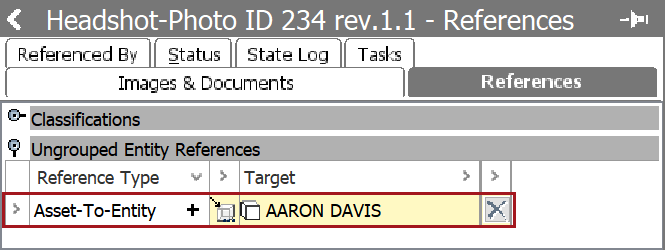
When configured, an asset can reference an entity. A use case for this would be when a customer needs to take a photo identification (Photo ID) of all of their members, and then create a reference from the Photo ID to the member's name. To set up an Asset to Entity reference type, follow the directions below:
-
Create the Asset-to-Entity reference type. For more information on creating a reference type, follow the steps outlined in the Creating a Reference Type topic.
-
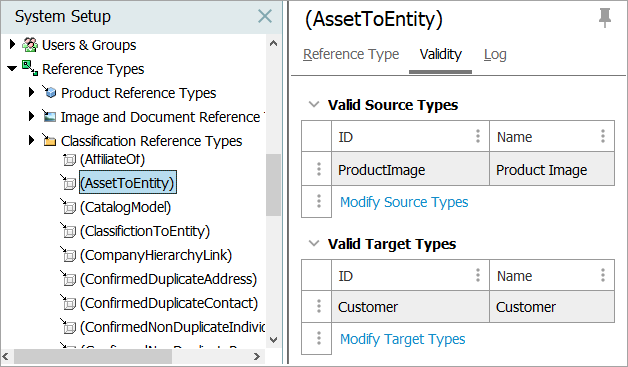
Under the Validity tab, set an asset as the Valid Source Types and set an entity as the Valid Target Types. In this example, Product Image is the source and Customer is the target.
-
Now, when a customer takes a photo ID of one of their members, they can navigate to the Reference tab on the asset, and select the appropriate entity reference. In this example, an image is linked to a member's name.