All data and configuration objects in STEP have an ID. The ID cannot be omitted, it cannot be changed, and since it serves to identify an object, it will always be the same across all contexts and workspaces.
IDs alone, however, are not unique identifiers in STEP because they are not unique across super types or node types. Thus, you cannot have two products with the same ID, even when they are of different object types, but you can have a product, a classification, an asset, an attribute, and an LOV that all have the same ID.
Take care when assigning IDs since they cannot be changed, especially for objects that are likely to have their data and metadata changed routinely. It is also advisable to avoid any spaces in IDs.
It is possible to automatically generate IDs for objects of specific object types and this feature should be used for:
-
Objects that are created often
-
Objects that are created by end users
-
Objects whose names and/or core properties are likely to change over time
-
Objects whose name does not hold much importance in identification
For example, an auto ID Pattern is generally used when products are created automatically, either by import or from an upstream system. This could be because the products originated in a legacy system and were subsequently introduced to STEP. To create the products in STEP, an automatic ID Pattern is recommended.
Defining the Name and ID Pattern
The Name and ID of a node can be autogenerated by entering a template pattern. An object type with a Name Pattern and/or ID Pattern automatically presents to the user the resulting pattern when a new node of that object type is created manually.
-
Static text entered in the object type’s Name Pattern or ID Pattern parameters is displayed in the Name or ID field when a new node is created.
-
Name Patterns and ID Patterns typically consist of both an incremental counter template and static text. Static text may be entered before or after the [id], or both. For example: ATTR_[id], [id]_FAM, and PROD_[id]_LINE.
-
The '[id]' template is an incremental counter that displays the next available number in a sequence. This counter is extremely advantageous when used in an ID Pattern to automatically create an ID when a new node of that object type is created. The '[id]' template increases the likelihood that a unique ID is generated and reduces the chances of a duplicate ID.
-
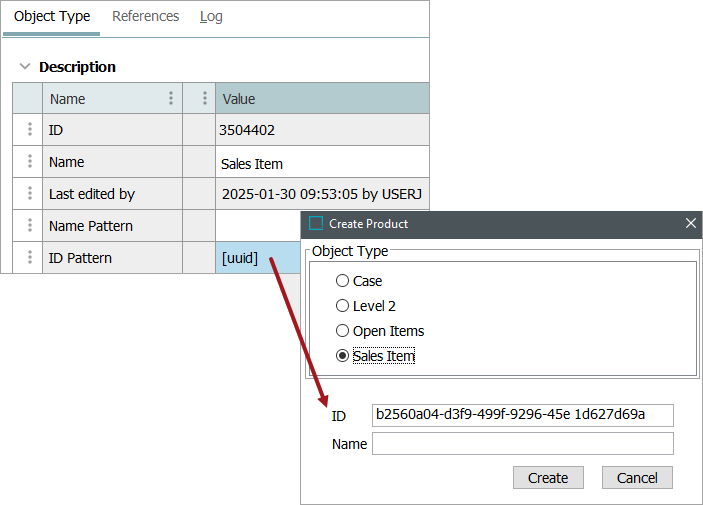
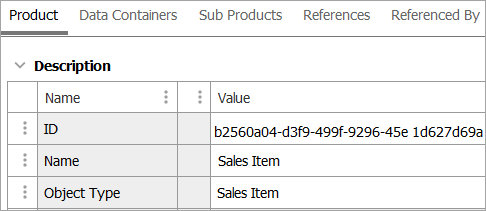
The '[uuid]' template is similar to the '[id]' template functionality except that IDs are autogenerated using a universally unique identifier (UUID) generator.
Note: A UUID is 36 characters long, and a maximum of 40 characters is allowed in a STEP ID. Only four static characters can be added to the UUID. Refer to the example image below.
-
Only standard ASCII printable characters in the range of 32-126 are allowed.
-
ID Patterns are far more commonly used than Name Patterns.
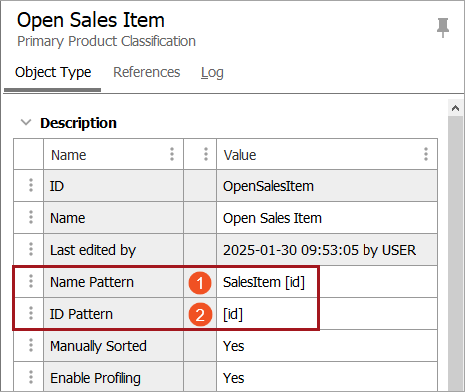
To specify an ID / Name Pattern, select the object type in system setup below the 'Object Types and Structures' node and enter the desired pattern in the field ‘ID Pattern’ or ‘Name Pattern’ parameter. As illustrated below, a new node of the object type 'Product' has a pattern of 'SalesItem [id]' for the Name Pattern parameter and [id] for the ID Pattern field.
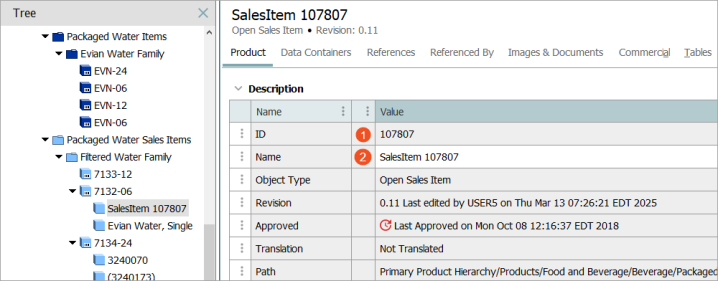
When a new node is created on the Tree for the Open Sales Item object type:
- The Name is 'SalesItem 107807' because in this case, 107807 is the next unique number available to STEP Workbench.
- When both the Name Pattern and ID Pattern are specified, the ID number is the same as that for the Name. The counter does not increment just because the same '[id]' template was used in both pattern fields.
Below is an example using the [uuid] template:
Some important factors to keep in mind when using autogenerated IDs and Names:
-
When an ID Pattern has been specified for an object type, you cannot manually override the ID. However, objects with user-defined IDs can be created via data imports. Generally, this should be avoided since mixing user-defined and autogenerated IDs can lead to errors.
-
When manually creating a node where the object type has an entry for the Name Pattern, the autogenerated Name is presented as a suggestion and can be changed.
-
There is no guarantee that the generated ID is not already used by an existing object. This can happen if IDs are being generated both automatically and manually via an import.