Prior to importing the Unit or Dictionary file into the system, it is essential to establish a relationship (commonly referred to as mapping) between the ECLASS language code and the language dimension points in the system. Familiarity with the ECLASS language codes contained within the ECLASS XML file is essential for this process.
Within the Unit file, the language code will be specified within the 'content_description' tags, as depicted below. The Unit file always comes in English and German language.
<content_description language_code="ENG">eCl@ss 10.1</content_description>
Although the Unit file contains both English and German languages, Unit Groups and Units are exclusively created in English. Consequently, it is recommended to import Units into the Global context. Alternatively, if there is a desire to import Units in German, users should switch the tag as follows:
From:
<content_description language_code="ENG">ECLASS12.0</content_description>
To:
<content_description language_code="DEU">ECLASS12.0</content_description>
The Dictionary file, the language code may vary depending on the specific file being imported.
For the file that is in English, the language code within the 'content_description' tags will be as
<content_description language_code="ENG">eCl@ss 10.1 ADVANCED</content_description>
For French, the language code within the 'content_description' tags will be as
<content_description language_code="FRA">eCl@ss 10.1 ADVANCED</content_description>
For German, the language code within the 'content_description' tags will be as
<content_description language_code="DEU (or GER)">eCl@ss 10.1 ADVANCED</content_description>
Users must be aware of the appropriate language code to be used within the 'content_description' tags based on the language of the Dictionary file they intend to import.
Context (Dimension Point) Identification
Mapping ECLASS Advanced language codes is a straightforward process. As a system administrator, you need to enter the appropriate language code value into the metadata attribute ISO-639-2 (ID = stibo_ISO-639-2) for the desired language dimension point. By following these guidelines, you can effectively identify and import language-specific data into the appropriate contexts.
Example:
In the following example, the language code 'ENG' is applied to the English language dimension. Consequently, language-dependent data will be imported in the English language and associated with the context that holds the English dimension point.
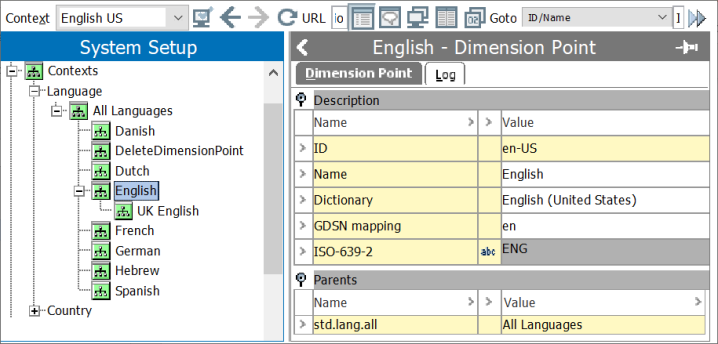
Note: As illustrated in the example picture above, selecting the All Languages option (as it is the parent of all other language dimension points) ensures that language-dependent data are inherited across all dimension points.
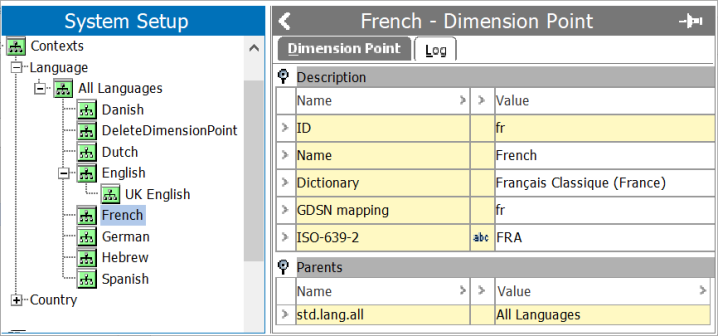
For ECLASS Advanced packages in the French language, the language code 'FRA' should be applied to the French language dimension point. As a result, language-dependent data will now be imported in the French language, associated with the context holding the French dimension point.
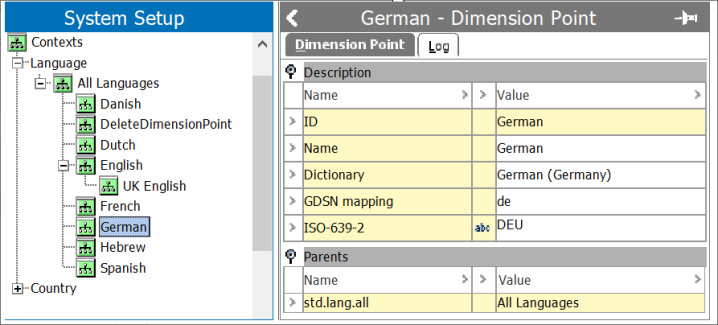
Similarly, for ECLASS Advanced packages in the German language, the language code 'DEU' should be applied to the German language dimension point. Consequently, language-dependent data will be imported in the German language, linked to the context holding the German dimension point.
Potential Scenarios During Dictionary File Import
During the import of ECLASS Dictionary files, certain scenarios may arise due to irregularities in language mapping. We have outlined the following possible situations:
-
Absence of matching language dimension point:
If the system lacks a language dimension point that corresponds to the language code provided in the file, the language-dependent data will be imported into the context specified in the Inbound Integration Endpoint. In this way, data is seamlessly imported even if an exact language match is unavailable.
-
Multiple contexts with the same language dimension point:
In cases where the same language dimension point exists in multiple contexts within the system, the import process identifies the first context containing the relevant language dimension point. For instance, if the 'Eng' language code is found in contexts named 'UK-Eng' and 'US-Eng,' the English dimension point from the 'UK-Eng' context will be selected for the mapping. Ultimately, the data is imported into the English language dimension.
Important Considerations for Language Codes
When dealing with the mapping of language codes, it is essential to consider the following points.
-
Case Insensitivity of Language Codes: Language codes are case insensitive, meaning they can be mapped to the system without concern for the letter case. For example, language codes such as 'Eng,' 'eng,' or 'ENG' will all receive identical treatment.
-
Default Language for Unit Imports: Units are typically imported in the English language. As a result, the import process automatically defaults to the dimension point mapped with the 'ENG' language code. In case the language code is not mapped to any dimension point in the system, the import will default to the context determined in the Inbound Integration Endpoint (IIEP).
-
Multiple Dimension Points with the Same Language Code: If the same language code is mapped to multiple dimension points, the parser will consider the first language dimension point detected by the IIEP during the import.
-
No Language Code Mapping: If the language code is not applied to any of the language dimension points, the import will default to the context determined in the IIEP.
-
Erroneous Language Code Mapping: Mapping an incorrect or erroneous language code will also result in the import defaulting to the context determined in the IIEP.
-
For IIEPs involved in importing Unit and Dictionary files, the ISO-639-2 attribute is defined as the Context Attribute. It is of utmost importance not to remove this attribute once defined. Accidentally removing it will cause the IIEP to fail in determining the language code provided in the file, leading to the default context being considered.
-
After importing a file, to gain insights into the context determined for that import, users can refer to the Execution Report, which provides comprehensive information on the import process.