For simplicity, examples use minimal data. Once an import file is verified for a small dataset, the use case can be expanded to include additional objects using search / replace as necessary within a larger import file.
Important: To ensure you do not remove unintended items, use the ID parameter when available to define the changes.
These examples demonstrate using the ReplacementRules tag via inbound STEPXML to:
- Replace cross references
- Replace data containers
For more information, refer to the ReplacementRules Tag in STEPXML topic.
Replace Cross References
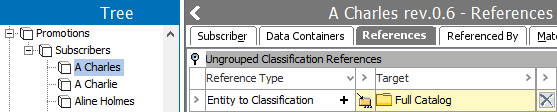
The following entity includes items for the multivalued 'Entity to Classification' reference:
<STEP-ProductInformation ExportTime="2020-07-01 13:10:10" ExportContext="Context1" ContextID="Context1" WorkspaceID="Main" UseContextLocale="false">

  <Entities>
    <Entity ID="A Charles" UserTypeID="Subscriber" ParentID="I-Subscribers">
      <Name>A Charles</Name>
      <ClassificationCrossReference ClassificationID="FullCatalog" Type="EntityToClassification"/>
      <ClassificationCrossReference ClassificationID="MarketingPostcards" Type="EntityToClassification"/>
    </Entity>
  </Entities>
</STEP-ProductInformation>
The subscriber A Charles only wants to receive the Full Catalog so the Marketing Postcards classification should be removed.
- Add the ReplacementRules <ReplaceCrossReferences> tag for the <Entities> super type.
- Remove data from the <Entities> tag until only the required data is left.
<STEP-ProductInformation ExportTime="2020-07-01 11:43:08" ExportContext="Context1" ContextID="Context1" WorkspaceID="Main" UseContextLocale="false">

  <ReplacementRules>
    <Entities>
      <ReplaceCrossReferences ReferenceTypeID="EntityToClassification"/>
    </Entities>
  </ReplacementRules>

  <Entities>
    <Entity ID="A Charles" UserTypeID="Subscriber" ParentID="I-Subscribers">
      <Name>A Charles</Name>
      <ClassificationCrossReference ClassificationID="FullCatalog" Type="EntityToClassification"/>
    </Entity>
  </Entities>
</STEP-ProductInformation>
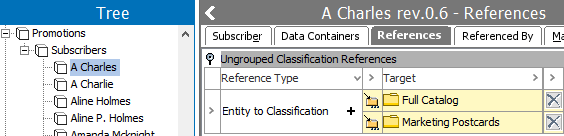
The result of importing the modified file is shown in the entity editor.
Replace Data Containers
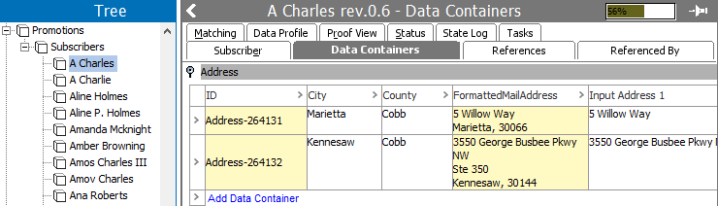
The following entity includes multiple items for the multivalued Address data container:
<STEP-ProductInformation ExportTime="2020-08-17 13:25:25" ExportContext="Context1" ContextID="Context1" WorkspaceID="Main" UseContextLocale="false">

  <Entities>
    <Entity ID="A Charles" UserTypeID="Subscriber" ParentID="I-Subscribers">
      <Name>A Charles</Name>
      <Values>
        <Value AttributeID="S-LastName">Charles</Value>
        <Value AttributeID="S-Country">United States</Value>
        <Value AttributeID="S-ZIP">30075</Value>
        <Value AttributeID="S-Phone">9384369489</Value>
        <Value AttributeID="S-City">Roswell</Value>
        <Value AttributeID="S-FirstNames">Alan</Value>
        <Value AttributeID="S-State">GA</Value>
        <Value AttributeID="S-Email">amet.consectetuer.adipiscing@Aeneaneget.org</Value>
        <Value AttributeID="S-Street">4722 Amber Grove</Value>
      </Values>
      <ClassificationCrossReference ClassificationID="FullCatalog" Type="EntityToClassification"/>
      <AssetCrossReference AssetID="395600" Type="EntityToAsset"/>
      <DataContainers>
        <MultiDataContainer Type="Address">
          <DataContainer ID="Address-264132">
            <Values>
              <Value AttributeID="InputAddress1">3550 George Busbee Pkwy NW</Value>
              <Value AttributeID="InputCounty">Cobb</Value>
              <Value AttributeID="InputAddress2">Ste 350</Value>
              <Value AttributeID="Zip">30144</Value>
              <Value AttributeID="City">Kennesaw</Value>
              <Value AttributeID="FormattedMailAddress" Derived="true">3550 George Busbee Pkwy NW Ste 350 Kennesaw, 30144</Value>
            </Values>
          </DataContainer>
          <DataContainer ID="Address-264131">
            <Values>
              <Value AttributeID="InputAddress1">5 Willow Way</Value>
              <Value AttributeID="InputCounty">Cobb</Value>
              <Value AttributeID="Zip">30066</Value>
              <Value AttributeID="City">Marietta</Value>
              <Value AttributeID="FormattedMailAddress" Derived="true">5 Willow Way Marietta, 30066</Value>
            </Values>
          </DataContainer>
        </MultiDataContainer>
      </DataContainers>
    </Entity>
  </Entities>
</STEP-ProductInformation>
The subscriber entity has new addresses that should replace both of the current addresses.
- Add the ReplacementRules <ReplaceDataContainers> tag for the <Entities> super type.
- Remove entity tags not being modified.
- Remove ID from the <DataContainer> tag to create new data containers.
- Remove the <FormattedMailAddress> calculated attribute that combines values from the attributes.
- Add the new address information.
<STEP-ProductInformation ExportTime="2020-08-17 13:25:25" ExportContext="Context1" ContextID="Context1" WorkspaceID="Main" UseContextLocale="false">

<ReplacementRules>
    <Entities>
      <ReplaceDataContainers DataContainerTypeID="Address"/>
    </Entities>
  </ReplacementRules>

  <Entities>
    <Entity ID="A Charles" UserTypeID="Subscriber" ParentID="I-Subscribers">
        <DataContainers>
        <MultiDataContainer Type="Address">
          <DataContainer>
            <Values>
              <Value AttributeID="InputAddress1">88 Turner Road</Value>
              <Value AttributeID="InputCounty">Cherokee</Value>
              <Value AttributeID="InputAddress2">Ste 200</Value>
              <Value AttributeID="Zip">30189</Value>
              <Value AttributeID="City">Woodstock</Value>
            </Values>
          </DataContainer>
          <DataContainer>
            <Values>
              <Value AttributeID="InputAddress1">3409 Fountain Court</Value>
              <Value AttributeID="InputCounty">Cherokee</Value>
              <Value AttributeID="Zip">30188</Value>
              <Value AttributeID="City">Woodstock</Value>
            </Values>
          </DataContainer>
        </MultiDataContainer>
      </DataContainers>
    </Entity>
  </Entities>
</STEP-ProductInformation>
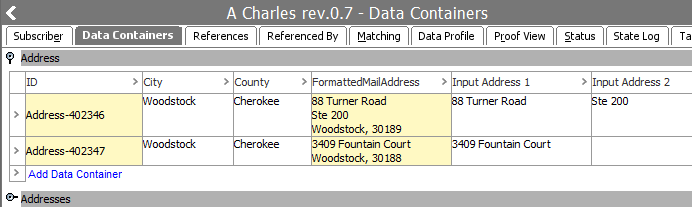
The result of importing the modified file is shown in the 'Subscriber' entity editor.