A unit conversion provides a way to 'translate' one unit to another. Standard units are defined with standard conversions.
Unit conversions can be created and deleted as necessary. Each maintenance option is defined below.
Creating a Unit Conversion
- Go to System Setup, click the Units node and expand the relevant unit group.
- Click a unit to display the units editor as shown below.
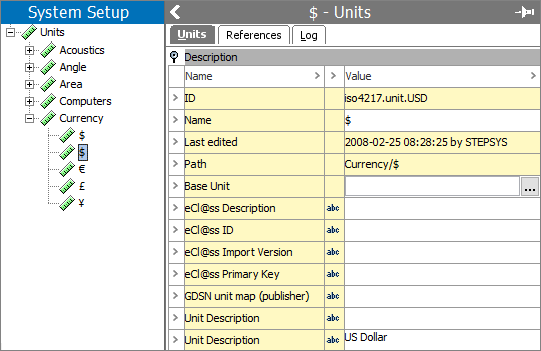
- On the Units tab in the Base Unit parameter, click the ellipsis button (
 ), to display the Edit Conversion Rule dialog.
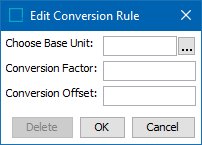
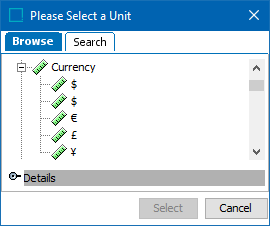
- For the Choose Base Unit parameter, click the ellipsis button (), to display the Please Select a Unit dialog. Use the Browse or Search tabs to find and select the relevant unit, and then click the Select button.
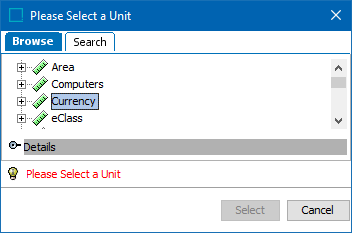
If a unit group is selected, a waring is displayed to select a unit (as shown below).
- In the Conversion Factor parameter, type the factor.
- In the Conversion Offset parameter, type the offset.
For more information, see the Conversion Factor and Conversion Offset section of the Units topic here.
- Click the OK button on the Edit Conversion Rule dialog to create the conversion rule between the two units displayed in the Base Unit field.
Note: There can only be one Base Unit for each group. If one unit uses another unit as Base, it cannot be used as Base itself.
Deleting a Unit Conversion
- Go to System Setup and click the Units node, expand the relevant unit group and click the relevant Base Unit where the conversion rule is to be removed.
- On the Units tab of the units editor, click the ellipsis button () on the Base Unit parameter to display the Edit Conversion Rule dialog.
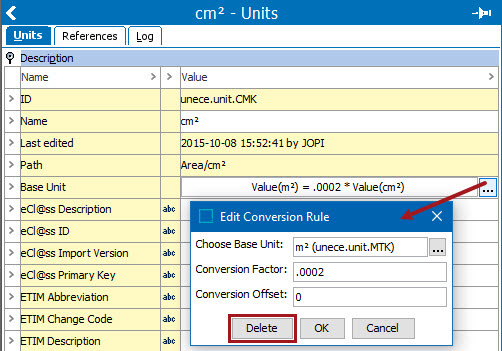
- Click the Delete button. The conversion rule is removed.