A List of Values (LOVs) is a defined set of values that can be selected for an attribute with the validation base type of LOV. LOVs are maintained on the System Setup tab under List of Values/ LOVs. As described below, an LOV is only used after it has been selected on an attribute.
- LOV attributes reference a separate 'List of Values' (LOV) object that holds a list of possible values to choose from.
- LOVs come in two variants; one that allows users to add new values when populating attributes that use the LOV (a medium domain LOV), and one that does not allow a user to add new values (a hard domain LOV).
- LOVs are sometimes referred to as 'Domains.'
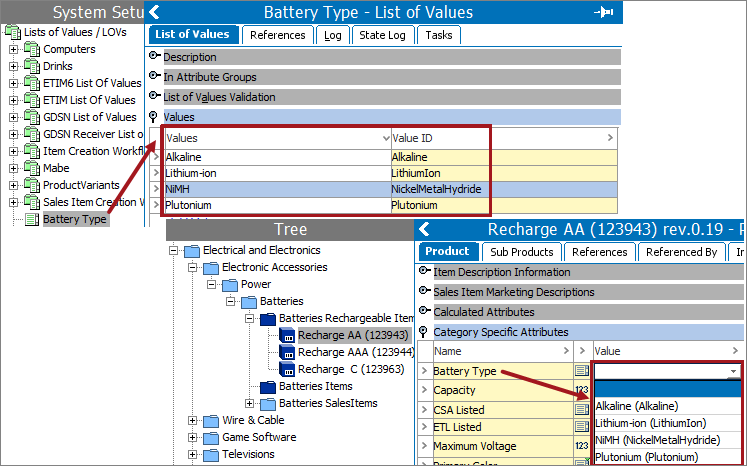
- The values that exist on an LOV are available for selection on an attribute via a dropdown, as shown below.
Ideally, each LOV value is unique. Unique values prevent duplicate data and the confusion about the "correct" selection. For example:
- Battery Size—AA, AAA, D, C, 9V
- Material—Brick, Steel, Wood, Plastic, Granite
- Country Code—001, 007, 045, 086, 506, 044
LOV Features
- LOV objects have a Validation Base Type setting of their own, and an list of values must be selected.
- A single LOV can be used by multiple attributes. For example, a single list of colors could hold all possible colors for your products.
- When used for multiple attributes, a filter can be applied so only a subset of the values is selectable for the attribute. For example, a user would be limited to only the colors that are valid for a specific product, and not the entire list of colors.
- If the attribute is a specification attribute it is possible to filter legal values on the links from the instantiated hierarchy so only specific values are legal for specific branches. For example, the colors available in the clothing line of products may not be the same as those in the tools line.
Values by Reference
Values in the LOV are assigned to an attribute 'by reference.' This means that if the values in the LOV are edited, then the changes are immediately reflected in the attributes associated with the LOV.
Revision Control
Revision control of the LOV is determined by the Externally Maintained status of the attribute using the LOV.
- Externally Maintained = No on an attribute using the LOV means that the attribute and the LOV are under revision control.
- Externally Maintained = Yes on an attribute using the LOV means that the attribute and the LOV are not under revision control.
Validation Base Type
The validation base type for an existing LOV can be changed. When merging multiple LOVs into one LOV, all LOVs being merged must first share the same validation base type.
Working with Large LOVs
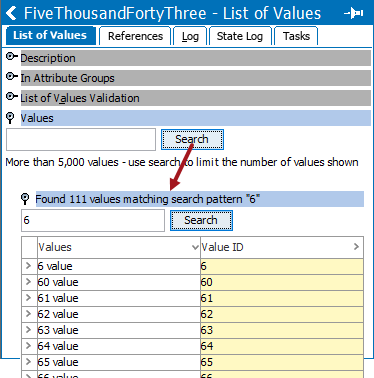
When an LOV has over 5000 values, the full list of values cannot be instantly viewed as it would be for a smaller list of values. To find a specific LOV value, type a few characters to search for a partial or complete match.
In System Setup, on the List of Values editor tab, open the Values flipper. Enter characters in the text box and click Search to display the results. The flipper label changes to show the values that match the search, and the values are displayed below the search field.
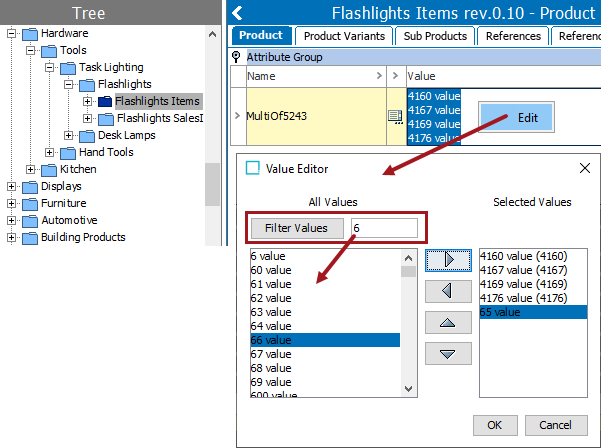
In Tree, when editing an attribute that uses a large list of values, click into the value field, right-click to display and click the Edit option (or click Alt+F2). On the Value Editor dialog:
- Enter a character in the text box to limit the listed available values. Click the Filter Values button to update the available values list.
- Double click a value in the left column to move it to the Selected Values list, or select multiple values and click the right arrow button (
 ).
). - Double click a value in the Selected Values column to return it to the available values list and remove it from the attribute. You can also select an item in the Selected Values list and click the left arrow to remove an item from the list (
 ).
). - Use the up (
 ) and down (
 ) arrow buttons to change the order of the highlighted value in the Selected Values list.
 - Click OK to update the values in the product editor.
The values shown in the Selected Values list will be displayed in the attribute editor.