Full text indexable is a way of indexing the values of an Attribute with validation base type 'text' in words. This will enable you to search for words within 'text' values.
Without the full text indexable option you can still search for values. This option is only needed if you want to search for objects based on a word or set of words in a sentence in an attribute value.
Important: Changing the Full Text Indexable parameter is time consuming, and is based on the values present for that attribute. Making an attribute full text indexable may create performance issues. Only apply this option to attributes if absolutely necessary, and all other options have been explored.
It is recommended to only set Full Text Indexable parameter to 'Yes" on an attribute if full text searches on values of the attribute are absolutely necessary.
Important: Enabling the Full Text Indexable parameter can have a negative system-wide impact on performance because it is time-intensive to read, write, and search for such values.
To modify the setting:
- In System Setup, expand Attribute Groups, expand the relevant Group, and then select the Attribute to be set as full text indexable.
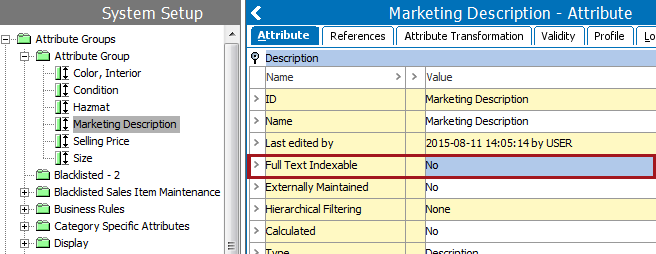
- Click the Attribute tab.
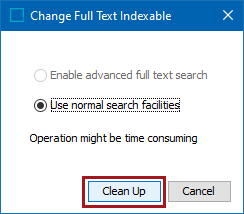
- Under Description, double-click the Full text indexable field. The Change Full Text Indexable dialog box appears.
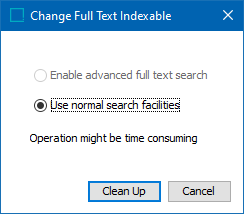
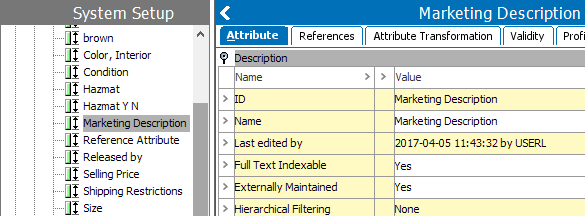
- Click Enable advanced full text search and then Save to display Full Text Indexable = Yes.
Important: If the Enable advanced full text search option is disabled, you must contact Stibo Systems' Technical Support via the customer portal (Jira) to enable the full text index functionality. This is not standard functionality, so the Technical Support team will go over your options for running a SQL script (either by Stibo Systems or by the customer), which will activate 'Enable advanced full text search' option. In the background these attribute values will be indexed in value7 of the database, helping users to search by the respective attribute values. See the 'Important' message at the beginning of this topic for potential issues you may encounter upon enabling, and why it is recommended that you explore other options prior to enabling.
To remove the Full text Indexable = 'Yes' setting, select the field and choose 'Use normal search facilities' and click the 'Save' button. If this operation fails, choose it again, and click the 'Clean Up' button.