Action Sets are used to define the actions or privileges a user or group of users are permitted to perform in STEP. Actions are grouped into Action Sets and made available for User Groups under the Users & Groups setup area. For more information, see the Users and Groups section of Users and Groups documentation
Action Sets are maintained in System Setup > Action Sets.
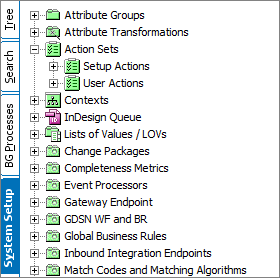
Whereas an Action represents a single operation (such as create product, move product, delete product, or view product), an Action Set is a group of actions that contains the set of operations that are necessary to perform one or more tasks.
An example Action Set could be:
|
Action Set |
Operations |
|---|---|
|
Maintain Products
|
|
There are two types of Action Sets:
- Setup Actions: Actions related to system configuration or system setup. Setup Actions generally define actions that can be performed in the System Setup tab. Many of these actions are considered administrator functions, but some of them may be required for non-administrator users, depending upon what functionality is required for their user roles. Create a Setup Action Set for each role and add the minimum actions that they need for that role.
- User Actions: Actions related to data maintenance. User Actions generally define actions for end users working in the STEP Tree hierarchy and/or Web UI. Nearly all User Actions will fall into a 'general function' category:
- View
- Create
- Modify
- Approve
- Delete
- Classify
Depending upon the user role you are trying to create, it may be necessary to create a combination of Action Set types to facilitate the functions of that role. That is, you may need to create both a 'User Actions' action set and a 'Setup Actions' action set so the user has access to all of the functionality required to perform their specified tasks.
Recommendations for Action Sets
- Design for change. Requirements will change over time.
- Define Action Sets based on roles and general functions.
- Each role should have its own Action Set. This makes it easy to add or remove an action for a role without affecting other roles.