This is one of the data gathering methodologies and recommendations for functional performance improvement. The full list is defined in the Functional Performance Recommendations topic here.
Matching and Linking functionality relies on three underlying components:
- Match Codes: define a string of attributes to compare, such as name, address, birth date, and email for customer data; or GTIN, EAN, part number, and SAP entity for product data.
- Matching Algorithm: evaluates match codes for potential duplicates and displays a percentage to indicate if they are the same record (via auto threshold) or likely the same record (requiring clerical review). The matching algorithm also defines how the duplicates are handled, such as merge or generate a golden record. Survivorship rules of the matching algorithm determine which attributes are copied to the golden record (name, attributes, references).
- Event Processor: triggers events which can be acted upon by the matching and linking business rules or matching and linking outbound integration endpoint.
Match codes limit the number of comparisons that the matching algorithm must make, and an event processor launches the associated business rule or OIEP. The system load of matching and linking can have a negative effect on the performance of STEP, especially if there are a lot of supplier items imported, if the matching and linking process is complex, or if the approval of the golden record is part of the process. For more information, see the Matching, Linking, and Merging documentation here.
While the matching and linking and golden record functionalities are designed and based on business requirements, use the following recommendations when a matching and linking process performs poorly.
Optimize Match Codes and Matching Algorithm
For details on match codes and matching algorithms, see the Match Codes section within the Matching, Linking, and Merging documentation here.
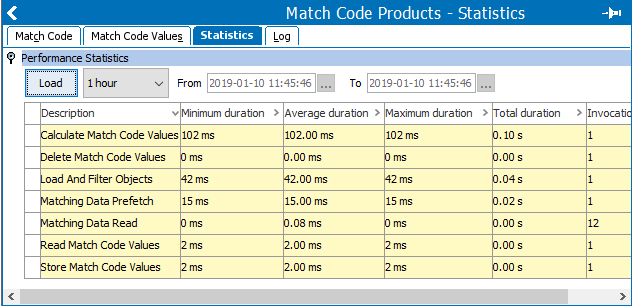
- Evaluate the performance of match code generation via the 'Maintain Match Code Values' option by reviewing the Match Code object's Statistics tab 'Performance Statistics' flipper details. Modify the items reported to have poor performance.
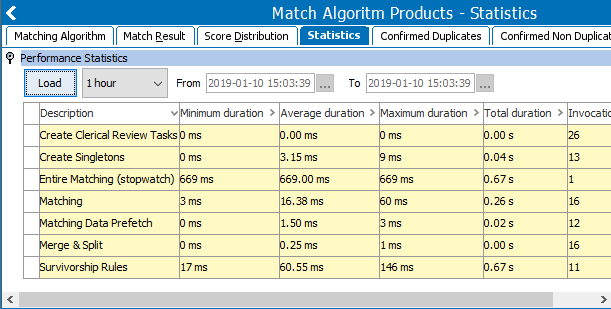
- Evaluate the performance of the matching algorithm execution via the 'Generate Events for Matching' option by reviewing the Matching Algorithm object's Statistics tab 'Performance Statistics' flipper details. Modify the items reported to have poor performance.
Statistics on Match Codes Generation
The performance of the generation of the Match Codes can be measured in STEP. The Match Code Statistics tab allows you to verify the Match Codes are performing well and identify performance problems.
 Te
Te
For detailed information on the 'Maintain Match Code Values' option and the 'Match Code Values' tab, start by going to the Match Codes section within the Matching, Linking, and Merging documentation here.
Statistics on Running the Matching Algorithm
The performance of the running of the Matching Algorithm can be measured in STEP. The Matching Algorithm Statistics tab allows you to verify that Matching Algorithm generation is performing well and identify performance problems.
Limit Attributes Promoted to Golden Records
Attributes can be promoted to golden records via the 'Trusted Source Value' survivorship rule. When the attributes belong to an attribute group with thousands of attributes (or more), such as an ETIM attribute group, the golden record process can degrade performance significantly. To avoid this performance issue, limit the number of attributes in the attribute group that is subject for promotion.
In most cases, this can be achieved by defining an attribute group that includes a limited set of attributes.
If the number of attributes in the attribute group cannot be limited (such as ETIM attribute groups), use a business action during the survivorship rules, instead of using the 'Trusted Source' option.
Approve Golden Records Outside of Matching and Linking
Golden records can be approved within the matching and linking process, separate from the process, or not approved at all.
When approving the golden record is required, for recommended performance, use an event processor trigger to run a bulk update after the matching and linking process is complete.
Avoid Multi-Context Survivorship Rules
STEP allows multi-context survivorship rules for context specific names, context specific attribute values, context specific image references, and context specific web-hierarchy links.
However, when a multi-context survivorship rule is executed and the global value is not available, the matching and linking process continues through all contexts to find an attribute value in a local context. Ultimately, the local value is copied to the golden record in that local context. This process negatively effects performance.
In legacy STEP versions, the multi-context survivorship rules (available via a custom extension) are called 'Merging Contexts' as shown below.
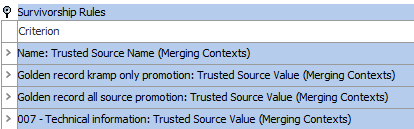
Now multi-context survivorship rules are standard and are called 'Multi Context' as shown below.

If multiple languages are defined, then a multi-context survivorship rule for a language-dependent name, attribute values, primary image references, or web-hierarchy links attempts to promote the correct value of the supplier record in the right language of golden record.
By default the 'Allow values from …' checkbox is selected, and allows sub-dimension point to be updated from less trusted sources.
The following examples illustrates this effect:
Assume the name is language dependent and the trusted sources are 'SLRV' and 'CNET,' in that order.
- The SLRV source (silver record) only has a name for 'All Language' context.
- The CNET source has a name for 'English' context (which is a sub-dimension point to 'All Languages').
The English name will only be allowed to be promoted to the golden record if the checkbox is checked.