This is one of the data gathering methodologies and recommendations for base setup improvement. The full list is defined in the Base Setup Recommendations topic here.
Note: These recommendations are valid for systems without In-Memory. The performance costs are different with In-Memory. For more information, see the In-Memory Database Component for STEP section of the Resource Materials in online help here.
Calculated attributes are a special type of attributes whose values are not written in the database, but are calculated on the fly. Calculated values are dynamic based on the context, version, product selected in the GUI or included in the export. Calculated values are generated when clicking on the object in GUI or when exported and are not stored in the database. The foundation for a calculated attribute is a functional programming language very similar to the language used for defining functions in Excel.
Note: Change Flags for events require that data is present in the database. Since calculated attribute values are not stored, no change flags are generated. For more information, see the Limitations and Exceptions section of the Core Events topic in the System Setup / Super User Guide documentation here.
For assistance in determining if a calculated attribute is the most efficient way to meet your requirements, see the Calculated Attribute Considerations and Limitations topic in the Calculated Attributes section of the System Setup / Super User Guide documentation here.
The value of a calculated attribute is determined by a value template which can be written in the Function Editor. Many functions can include an argument, which specifies the STEP data to be accessed. Functions can access information from references, compare data between objects, round numbers, modify text, and many other options. For a step-by-step guide to creating a calculated attribute, see the Creating a Calculated Attribute topic in the Calculated Attributes section of the System Setup / Super User Guide documentation
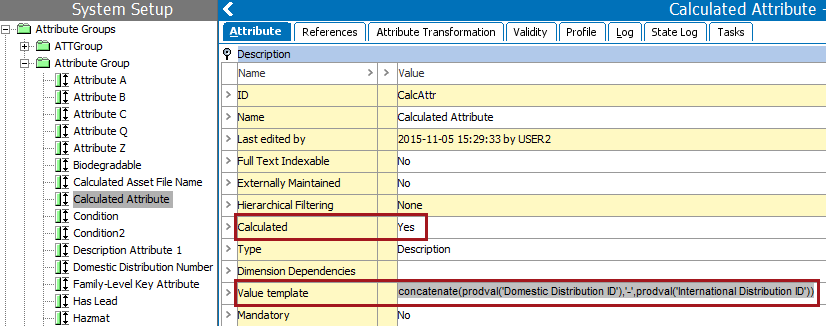
As an example, the following functions and arguments are included in the workbench image below:
- The 'concatenate' function takes a comma-delimited list of arguments. In this example, the three (3) arguments are: prodval('Domestic Distribution ID'), '-', and prodval('International Distribution ID').
- The 'prodval' function takes an argument of an attribute ID and retrieves the value of the attribute identified. In this example, the two (2) attribute IDs are: 'Domestic Distribution ID' and 'International Distribution ID'.
- Assuming that the 'Domestic Distribution ID' value is 1234 and the 'International Distribution ID' value is 5678, the result of this 'Value template' would be 1234-5678.
For additional use cases for calculated attributes, see the Calculated Attribute Use Cases topic here.
In Web UI, calculated attributes can be identified and their values can be overridden on the Attribute Management screen as described in the Calculated Attributes in Web UI section of the Web User Interfaces documentation
Considerations and Limitations
Generally, business actions are preferred to calculated attributes with the understanding that the value is not always up-to-date, typically immediately following approval.
While calculated attributes provide a lot of flexibility, they also have a direct impact on downstream deliveries. Additionally, calculated attributes can degrade performance as defined below.
-
For cross-context exports, STEP attempts optimizations to avoid repetitive calculations per context, but the following limitations exist:
Attributes used in the calculated attribute must not be dimension dependent. The cross-context exporter does not impact performance significantly when extracting non-calculated attributes in many contexts compared to a single context. However, the time it takes to extract calculated attribute values grows in a nearly linear way with the number of contexts. STEP cannot automatically detect if the formula that expresses the calculation is dimension dependent or not. This means that introducing many calculated attributes for new contexts to a downstream delivery can significantly degrade performance.
Iterations in a calculation must not include references or child objects. Only attribute values directly on the selected object or inherited values for a product are allowed. Locality refers to the distance between the values required by a calculation and the calculated attribute. Calculated attributes that access only values on the local object can be very efficient, but calculated attributes that navigate to other objects (via references and/or hierarchy links) are more expensive in terms of performance. Therefore, calculated attributes that navigate to other objects should be carried out in a controlled and limited manner.
Calculated attributes must not rely on the value from another calculated attribute. Chained calculated attributes depend on other calculated attributes and can make performance unpredictable.
-
Calculated attributes that cross transitive closures can potentially grow very large cause performance to degrade. For example, a calculated attribute that involves all children of a large (and growing) entity or product hierarchy.
-
Calculated attributes are calculated each time they are viewed.
-
Complex calculated attributes increase the load time of an object (product or entity) in the Web UI and workbench.
Recommendations
Review calculated attributes by exporting all attributes as Excel or CSV and filter on 'Attribute Calculated'. Add the identified calculated attributes to a collection and export the collection as STEPXML to evaluate the value templates for the following elements.
-
Identify the products and entities that take a long time to load. In workbench, from the View menu, click Disable calculated values and verify if there is a measurable difference between viewing these objects without the calculated attribute values. Significant differences in load time indicate further analysis is needed as outlined in the following items. See the View Menu topic in the Getting Started / User Guide documentation here.
-
Check the log files for SEVERE errors of 'DAPTreeWalker.' This indicates that a calculated attribute value template uses the function 'stepurl' to call a reference instead of a node. Correct the calculated attribute value template to resolve this error. For more information, see the Logs topic in the Administration Portal documentation here.
-
If the calculated attribute is included in cross-context exports, consider performing the calculation on approval via a business action, and then copy the result to a non-calculated attribute.
-
Avoid calculated attributes that navigate to other objects via references and/or hierarchy links across children. Replace the calculates attribute with a business action.
-
Avoid calculated attributes across transitive closures that potentially grow very large.
-
Avoid having chained calculated attributes and use business actions for better performance.
-
Consider In-Memory to optimize the performance of reading data on complex data models via calculated attributes which navigate references. For more information, see the In-Memory Database Component for STEP section of the Resource Materials section of online help here.