Dun & Bradstreet (D&B) is sunsetting the legacy Direct 2.0 API. As such the new Direct+ connector replaces the existing Direct 2.0 connector.
Note: The legacy Direct 2.0 connector is not compatible with release 10.2 and onwards. For customers using the D&B Direct 2.0 integration in release 10.1 or earlier, a mandatory migration to D&B Direct+ is required when upgrading to release 10.2 or beyond.
Upgrading to the new Direct+ connector requires some manual steps even after running easy setup, as described below. This is because easy setup will not alter existing configurations. Since the D&B data model in some areas has changed from Direct 2.0 to Direct+, the corresponding STEP data model also needs to be changed. In some cases, the data structures have changed from multivalued to single valued. Other examples would be field names that have simply changed. The new STEP data structure is easily created by running easy setup, but after that a migration of data is needed. Stibo Systems has a prepared script to help with this. See the process below.
Alternatively, a complete enrichment operation can be performed on all entities that have a selected D&B Organization candidate. After the data migration, the old, outdated data containers and attributes must be manually deleted. A STEPXML import file is available that will list these.
Important: The changes in the STEP data model could lead to adjustments in downstream systems. This should be analyzed carefully before proceeding with the upgrade.
Prerequisites
To use this functionality, the following needs to be in place:
- The Dun & Bradstreet Direct+ Enrichment Service commercial license, which enables access to a system license (DnBIntegration) and the dnb-integration add-on component. As an existing customer already licensed to use the D&B integration with Direct V2.0, this license should already be added to your system at the time of upgrade. Please contact your Stibo System representative with questions.
- A new D&B Consumer Key and Consumer Secret for Direct+ from your Stibo Systems representative. A Direct V2.0 license key and password will not work with Direct+. The key and secret are used in the 'DnBDirectPlus.Credentials' property that must be added to the sharedconfig.properties file. An example follows, and the actual credentials go in the properties where indicated:
DnBDirectPlus.Credentials.1=DnBCustomerDirectPlus,[Consumer Key],[Consumer Secret]
Migrating the Connector
The migration steps for Direct 2.0 to Direct+ are as follows:
- Disable the event processors ‘D&B Match Processor’ and ‘D&B Detailed Company Profile Processor.’
- Perform the steps in the D&B Integration Configuration and Easy Setup topic
- D&B License Key configuration
- Configure Gateway Integration
- Run D&B Easy Setup
This applies the default STEP data model for the new Direct+ API and creates a new D&B REST Gateway.
- Asynchronous Processing
Even though your system may already be set up for asynchronous processing using workflows and event processors (from Direct V2.0 implementation), when configuring the 'Easy setup of D&B Integration' dialog, enable the checkbox for the ‘Setup D&B for asynchronous processing,’ option and configure the sub-parameters. This ensures that new business actions will be applied that are needed for the D&B Direct+ integration.
Existing configurations, business rules, workflows and event processors are not changed.
- Synchronous Processing
Consider if business actions for synchronous processing should be applied. If so, enable the checkbox for ‘Setup D&B for synchronous processing’ in the dialog. See the D&B Integration Configuration and Easy Setup topic for instructions on setting up D&B for synchronous processing here.
- Check the D&B REST Gateway connectivity.
- Adjust configuration on the D&B setup.
- Change the event processor DnBMatchingProcessor (Async Matching)
- Set business action to be executed = ‘D&B Match Request Async Wrapper (DnBMatchRequestAsyncWrapper)’
- Set ‘Collate nodes’ = Yes
- Change the event processor DnBCompanyProfileProcessor (Async Enriching)
- Name = ‘D&B Enrich Processor’
- Set business action to be executed = ‘D&B Enrich Request Async Wrapper (DnBEnrichRequestAsyncWrapper)’
- Set ‘Collate nodes’ = Yes
- Change workflow DnBCompanyProfile (Async Enriching)
- Name = D&B Enrich
- Change business action DnBRepublishProfilingAction (Async Enriching).
- Name = D&B Republish Enrich Request
- Change business condition DnBCPInitCondition (Async Enriching)
- Name = D&B Initiate Enrichment
- Set configurations for DnBMatchOpConfig (Async Matching)
- Name = ‘D&B Match Config Async (Identity Resolution)’
- Integration Status Attribute = ‘D&B Matching Integration Status (DnBMatchingIntegrationStatus)’
- Integration Error Code Attribute = ‘D&B Matching Integration Error Code (DnBMatchingIntegrationErrorCode)’
- Integration Error Description Attribute = ‘D&B Matching Integration Error Description (DnBMatchingIntegrationErrorDescription)’
- Candidate Selected Business Action = D&B Match Select Candidate Async (DnBSelectCandidateActionAsync)
- No Candidate Selected Business Action = D&B Match Select Candidate Async (DnBSelectCandidateActionAsync)
- Configuration for DnBMatchOpConfigSync (Sync Matching)
- This is a new configuration. Check settings
- Set configurations for DnBCompanyProfileOpConfig (Sync+Async Enriching)
- Name = ‘D&B Enrich Config (CMPELF)’
- Integration Status Attribute = ‘D&B Enrichment Integration Status (DnBEnrichmentIntegrationStatus)’
- Integration Error Code Attribute = ‘D&B Enrichment Integration Error Code (DnBEnrichmentIntegrationErrorCode)’
- Integration Error Description Attribute = ‘D&B Enrichment Integration Error Description (DnBEnrichmentIntegrationErrorDesc)’
- Integration JSON Response Data Attribute = ‘D&B JSON Company Profile Data (DnBJSONCompanyProfileData)’
Note: The CMPELF is the default D&B enrichment product. Integrating with other products requires you to create that configuration. See the D&B Direct+ API Products topic for information on other Dun & Bradstreet Products and links to Operation Configurations information here.
- Delete deprecated business actions.
- D&B Detailed Company Profile Request (DnBCompanyProfileAction)
- D&B Match Request (DnBMatchAction)
- D&B Match Select Candidate (DnBSelectCandidateAction)
- Prepare for migration.
- Make sure D&B JSON Match Data (DnBJSONMatchData) is valid on the Customer organization. After the migration,you will remove validity from the D&B Organization (in step 7).
- Migrate the D&B data. See the substeps / information below:
- Apply migration scripts provided by Stibo Systems as a new 'Execute JavaScript' business action named 'D&B Direct 2.0 to Direct+ Data Migration'. (To receive these scripts, send an email request to
- Add binds:
- node <Binds to> Current Object
- manager <Binds to> STEP Manager
- log <Binds to> Logger
- Execute script ‘D&B Direct 2.0 to Direct+ Data Migration’ as a bulk operation on all ‘D&B Enrichment Records.
- See the migration tables listed below for the exact data migration performed:
- Migration Table 1: Outdated Direct V2.0 Attributes (here)
- Migration Table 2: Outdated Direct V2.0 Data Containers (here)
- Migration Table 4: Direct V2.0 Data Containers Kept for Direct+ (here)
- Check the STEP log output and manually fix any data problems.
- Be aware that several existing data containers are migrated from multivalued to single valued, and a manual validation is needed whenever the old data container has two or more entries.
- Be aware that not all the data is migrated.
- Clean up outdated D&B data model using the information below:
- Import StepXML ‘D&B Direct V2.0 Data Model Cleanup Attribute Groups’.
Important: Some data is not migrated and not mapped by default in Direct+. See the migration tables linked below for the exact description of the outdated Direct V2.0 model going into these attribute groups. Manually delete the attributes, data containers, and LOVs in the attribute group.
-
Go through the Attributes and Data Containers in the newly imported group and manually delete or remove validity according to the ‘Cleanup attribute group’ column in these tables:
- Migration Table 1: Outdated Direct V2.0 Attributes (here)
- Migration Table 2: Outdated Direct V2.0 Data Containers (here)
- Migration Table 3: Outdated Direct V2.0 Attributes on Outdated Data Containers (here)
- Migration Table 4: Direct V2.0 Data Containers Kept for Direct+ (here)
- Migration Table 5: Outdated Direct V2.0 LOVs (here)
- Select candidate screen for async processing.
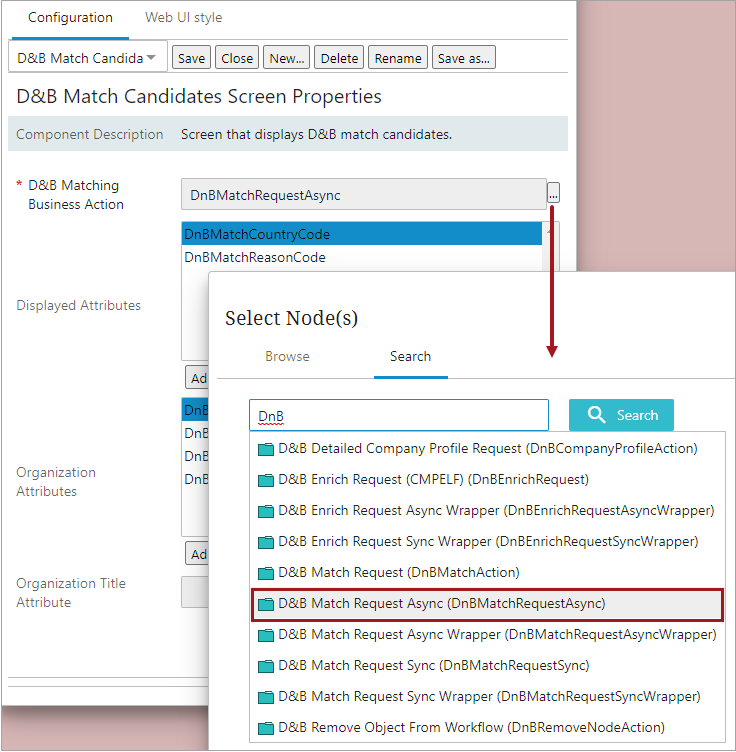
- In Web UI designer, go to the Select Candidate Screen (for async processing), and set ‘D&B Matching Business Action’ to ‘D&B Match Request Async (DnBMatchRequestAsync)’
- Configure for synchronous processing (optional).
- See the D&B Integration Configuration and Easy Setup topic in the Data Integration section for instructions on setting up D&B for asynchronous processing here.
- Enable the event processors ‘D&B Match Processor’ and ‘D&B Detailed Company Profile Processor.’
For more information on the Dun & Bradstreet Direct+ Enrichment Service functionality, see the Dun & Bradstreet Integration topic in the Data Integration section of the documentation here.