Summary
The following enhancements have been made to Stibo Systems' Multidomain MDM analytics offerings:
- The Embedded Analytics Platform solution can be configured to include fly-out panels so that content and analytics can be seen within the same screen, helping businesses make better decisions.
- The Audit Message Framework supports JDBC feeds to external Cassandra databases, eliminating the need for additional third-party software.
Details
New flyout panel for Embedded Analytics Platform
Buyers, merchants, and product managers in businesses continuously need to monitor the performance of their product ranges in the market — what sells, what does not sell, and why. The new Embedded Analytics Platform (EAP) flyout panel, a key component to bring together transparent master data and item performance analytics, will deliver the ability for these critical user roles to perform their daily analytical tasks. By presenting analytics information in context with the content being analyzed, the new EAP flyout panel provides users a seamless, contextual interface to help in their decision-making processes.
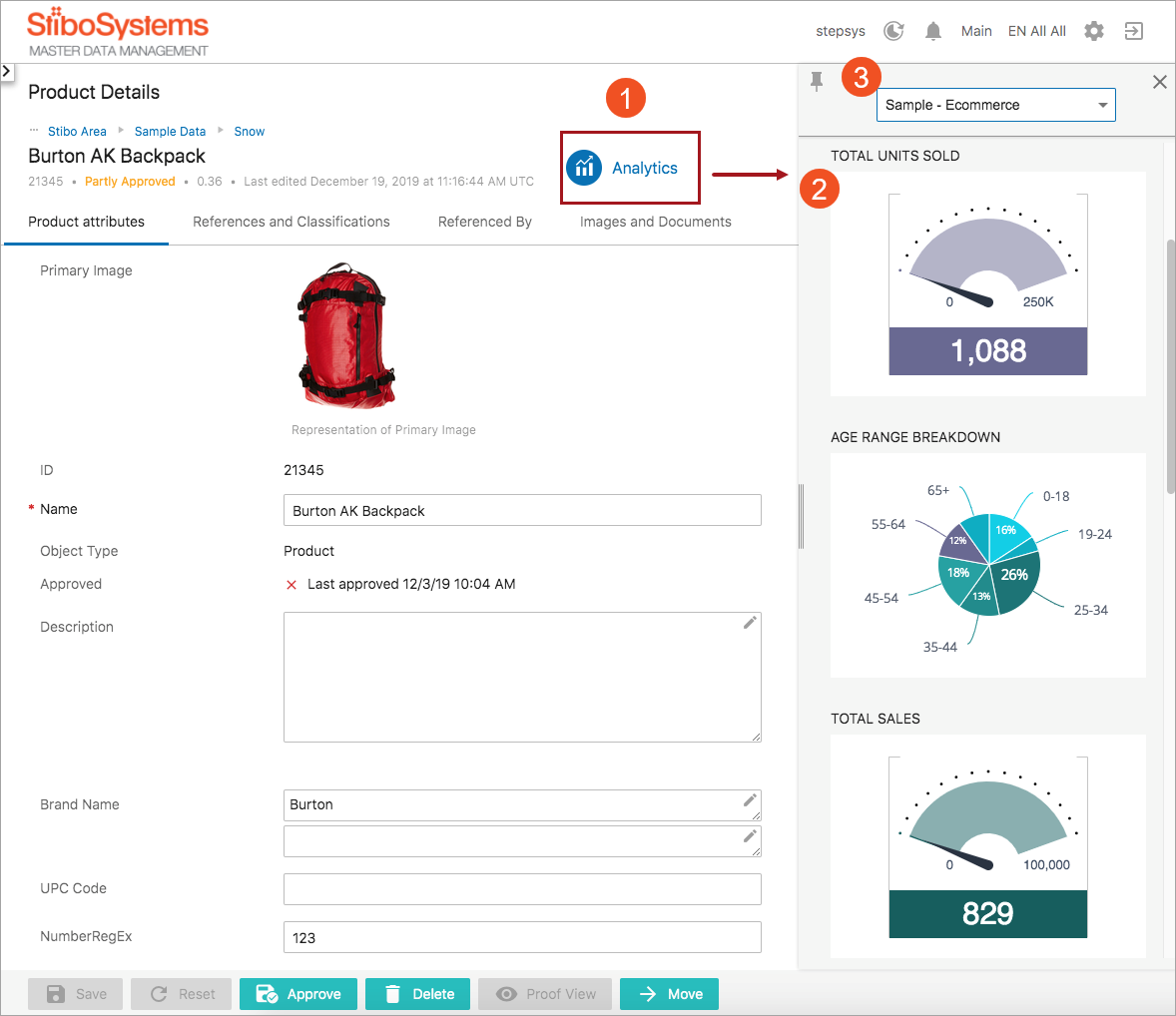
The flyout panel displays widgets from an EAP dashboard that can be expanded / resized and is scrollable, and users can toggle between multiple dashboards, based on setup and user permissions. The flyout panel can be added to either a Node Details screen, or in support of a new use case (i.e., allowing analytics from a selection of items in a list), the panel can also be added to a Node List component.
The below screenshot shows the Analytics button that is used to access the flyout panel via a Node Details screen (labeled '1'), a sample EAP flyout panel (2), and the dropdown list that allows users to select different panel dashboards (3).
The Embedded Analytics Platform functionality is enabled via the X.EmbeddedAnalyticsPlatform.Standard license and embedded-analytics-platform and audit-messaging components. Instructions for installing components can be found in the SPOT Program topic in the System Administration documentation here. Contact your account manager or partner manager to begin the process of enabling a license or licenses for your system.
For more information, see the Embedded Analytics Platform Flyout Panel topic in the Embedded Analytics Platform section of the Analytics documentation here.
Cassandra support added to Audit Message Framework
The Audit Message Framework (AMF) now supports the delivery of audit messages from STEP to external Cassandra databases, further expanding the ability of the AMF to deliver preconfigured database schema configurations to users out of the box. Previously, the AMF only supported message delivery to external JDBC-compliant databases.
Cassandra support has been added through the introduction of the Audit Message Receiver Cassandra Delivery Plugin, which works in the same manner as the Audit Message Receiver JDBC Delivery Plugin except that it writes messages to a Cassandra database instead of a JDBC-compliant database. This new plug-in allows users to persist information to a local or remote Cassandra database without the need for additional third-party software.
Audit Message Framework enablement is done via the X.AuditMessaging license and the audit-messaging component. See the EAP info above for instructions on installing components and enabling licenses.
For more information, see the Audit Message Framework section of the Analytics documentation here.