On a matching algorithm, the following rules are available for promoting data container values to a golden record.
Data Containers with Inconsistent Keys
Consider the following principles when configuring survivorship rules to account for data containers with inconsistent keys:
- Data containers with inconsistent keys do not survive a merge using standard survivorship rules, even if the key is incomplete or duplicated.
- When updating a target with a duplicate key, the data container with the lowest internal STEP ID survives.
- Survivorship rules cannot write an incomplete key.
- Survivorship rules cannot add a data container instance with a duplicated key.
For more information on data container keys, see the Data Container Keys topic in the System Setup / Super User Guide documentation here.
Data Container: Most Recent
Valid for strategies: merge or link
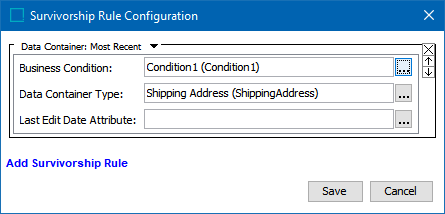
Specifies that the most recent data container instances and their attribute values are promoted to the golden records. The analysis is performed in the single context / workspace selected in the algorithm, and that data is promoted across all contexts / qualifiers.
-
Business Condition - If no Data Container Key is configured, click the ellipsis button (
 ) and select a business condition that is valid for the golden record object type.
 -
If the source record should always overwrite the golden record, the condition must return true.
-
Otherwise, this condition must be a JavaScript rule that uses the 'Pairs of Attributes' bind to compare data container instances on source records with data container instances on golden records when survivorship rules are applied. For more information and an example of the bind, see the Pair of Attribute Values Bind topic in the Resource Materials documentation here.
-
Note: There is no need to configure a business condition if the data container type being merged has a configured Data Container Key. For more information on data container keys, see the Data Container Keys topic in the System Setup / Super User Guide documentation here.
-
Data Container Type - Click the ellipsis button (
) and select the relevant data container type. -
Last Edit Date Attribute - When no attribute is selected, the most recent date is the STEP object revision timestamp when the given element of the survivorship rule entered STEP.
Optionally, click the ellipsis button (
) and select the attribute that holds the value to be used as the last edit date when determining the most recent source record to promote to the golden record. -
When the selected attribute is valid for this object, timestamp is taken from the object.
-
When the selected attribute is not valid for the object, the value is taken from the given element of the survivorship rule, for example, a data container object or a reference object.
-
Note: Survivorship rules consider Last Edit Date attributes on the entities before considering Last Edit Date on the attributes within a data container. Additionally, for multi-value data container types, the newest date from all data containers of the specified type are considered.
Data Container: Trusted Source
Valid for strategies: merge or link
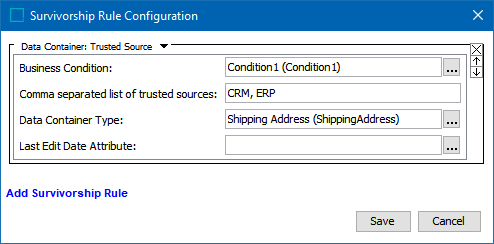
Specifies data container instances and their attribute values that originate from the specified trusted source(s) are promoted to the golden records. The analysis is performed in the single context / workspace selected in the algorithm, and that data is promoted across all contexts / qualifiers.
-
Business Condition - If no Data Container Key is configured, click the ellipsis button (
) and select a business condition that is valid for the golden record object type. -
If the source record should always overwrite the golden record, the condition must return true.
-
Otherwise, this condition must be a JavaScript rule that uses the 'Pairs of Attributes' bind to compare data container instances on source records with data container instances on golden records when survivorship rules are applied. For more information and an example of the bind, see the Pair of Attribute Values Bind topic in the Resource Materials documentation here.
-
Note: There is no need to configure a business condition if the data container type being merged has a configured Data Container Key. For more information on data container keys, see the Data Container Keys topic in the System Setup / Super User Guide documentation here.
-
Comma separated list of trusted sources - Enter a comma-separated list of the Source System ID for all trusted sources, starting with the most trusted source, then the next-most, and so on. Content is taken from the first trusted source with data. If content does not exist for any of the trusted sources, nothing is promoted to the golden record. For information on the Source System ID Attribute setting, see the Configuring Match and Merge topic here.
-
Data Container Type - Click the ellipsis button (
) and select the relevant data container type. -
Last Edit Date Attribute - When no attribute is selected, the most recent date is the STEP object revision timestamp when the given element of the survivorship rule entered STEP.
Optionally, click the ellipsis button (
) and select the attribute that holds the value to be used as the last edit date when determining the most recent source record to promote to the golden record. -
When the selected attribute is valid for this object, timestamp is taken from the object.
-
When the selected attribute is not valid for the object, the value is taken from the given element of the survivorship rule, for example, a data container object or a reference object.
-
Note: Survivorship rules consider Last Edit Date attributes on the entities before considering Last Edit Date on the attributes within a data container. Additionally, for multi-value data container types, the newest date from all data containers of the specified type are considered.