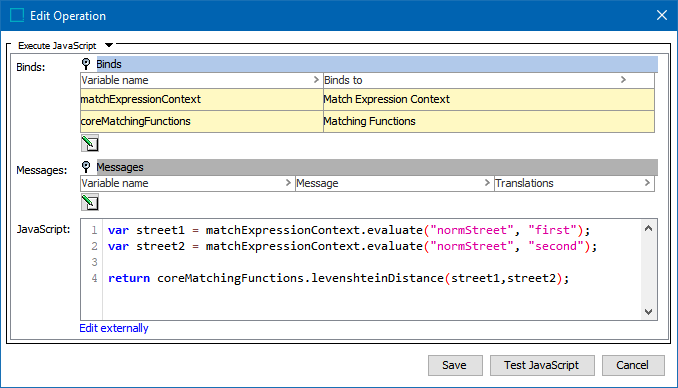
Many cases require expanding on the existing normalizers or matchers with functionality specific to the dataset and sources at hand. Match criteria can be expanded using JavaScript business functions and JavaScript functions support this implementation.
Below are example normalizers and matchers implemented in JavaScript to showcase some of the available tools. These functions can be used for both pure JavaScript matching algorithms and JavaScript in decision tables.
Important: The below functions are examples and likely cannot be used in their current form for your business case. Test thoroughly with your own data before implementing in your production STEP system.
normalizeValue
The normalizeValue function uses JavaScript and regular expressions to make a text lowercase and leave only letters and digits characters.
function normalizeValue(value) {
if(value) {
var normVal = value + "";
normVal = normVal.toLowerCase();
normVal = normVal.replace(/[^\w]|_/g, "");
return normVal;
}
else {
return "";
}
} normalizeStreet
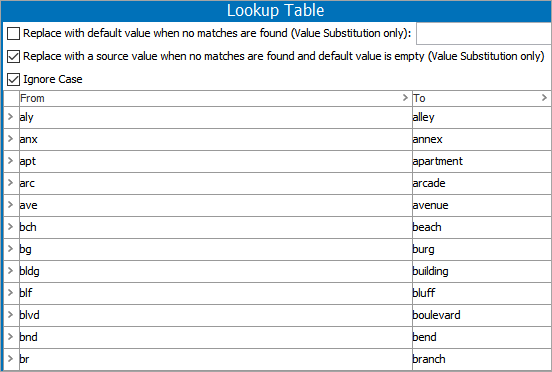
This example demonstrates how to access lookup tables. For more information on lookup tables, see the Transformation Lookup Tables topic in Resource Materials documentation here.
The normalizeStreet function applies basic normalization to 'Street' values and uses a transformation lookup table with ID 'AddressAbbreviations' to replace common abbreviations like 'rd,' 'ave,' and 'ap' with their full-word counterpart.
function normalizeStreet(input, lookupTableHome) {
var output = "";
if(input) {
input = input + "";
input = input.toLowerCase();
input = input.replace(/[\.\,#]|_/g, "");
var inArr = input.split(" ");
var outArr = [];
for(var i = 0; i < inArr.length; i++) {
outArr.push(lookupTableHome.getLookupTableValue("AddressAbbreviations", inArr[i]));
}
for(var j = 0; j < outArr.length; j++) {
output += outArr[j];
if(j != outArr.length - 1) {
output += " ";
}
}
}
return output;
} The logic reads:
- Convert input to JavaScript string,
- Convert to lowercase,
- Remove all instances of (.), (,), and (#) (more characters may be removed, but be careful removing dashes if used in street number ranges),
- Split the string by space characters and loop through the array of words applying the lookup table,
- Piece together the string again and return it.
Core Matching Functions
The example below uses the built-in levenshteinDistance function to get the edit distance between normalized street values. 'Matching Functions' is bound to 'coreMatchingFunctions.'
var street1 = mec.evaluate("normStreet", "first");
var street2 = mec.evaluate("normStreet", "second");
return coreMatchingFunctions.levenshteinDistance(street1, street2);