With the Product Override search criteria you can locate and identify any product overrides present in your system. You can search for all overrides in STEP or you can narrow your search to overrides of a specific product. If more concise results are required, you can specify sub-products.
- Click on the Search tab and click the Search dropdown.
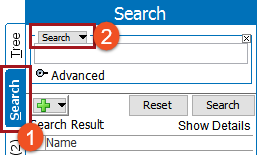
- Select Product Override Search from the dropdown.

- In the Overridden Product group, select a radio button :
- Find All - Searches for all product overrides.
- Find by Overridden Product - Searches for the specified product, as shown in this image. In the text box, either type the product's name, or click the ellipsis button (
 ) to browse or search for a product.
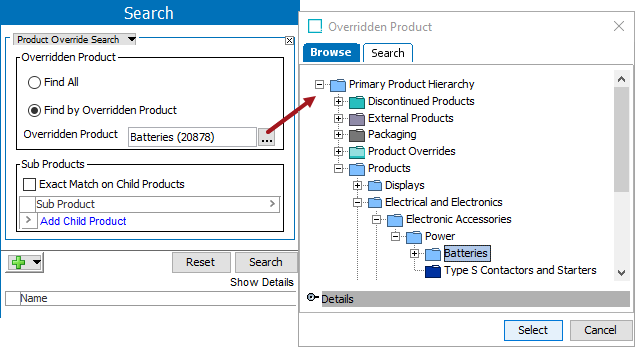
- In the Sub Products group, set the following options as needed:
- Exact Match on Child Products - When checked, search results must have every sub-product specified.
- Add Child Product - Click the link to select sub products that will narrow the search further by requiring search results to have exactly the specified sub-products linked to them.
Click the arrow button ( ) on one or a group of rows to display the following menu and perform the action:
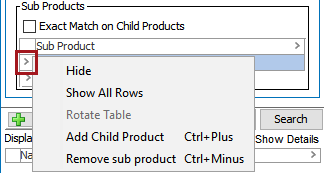
- Hide - Hides an added child product from list.
- Show All Rows - Show all hidden child products.
- Add Child Product - Does the same operation as the ‘Add Child Product' link as stated above.
- Remove sub product - Removes the selected child product.
- If needed, click the green plus button (
 ) to add additional search criteria.
 - Click on Search to run the search and view results.
This image shows products with the specified child product, but others child products could exist as well.

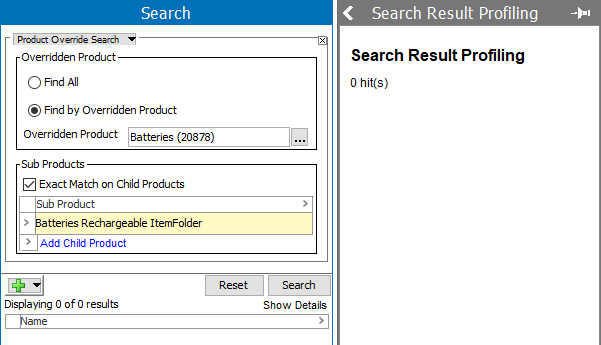
This image shows there are no overridden products with only this exact sub product.
This image shows overrides regardless of sub products.
