The Approver determines whether assets, references between products and assets, and whether new asset folders should be automatically approved by the Asset Importer. By default, 'Standard Asset Approver' is the only configuration option available for the Approver.
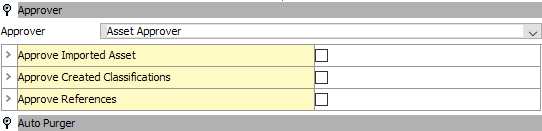
- Approve Imported Asset
- If the 'Approve Imported Asset' parameter checkbox is selected, the asset will be approved upon import.
As the parental classification is already approved (or 'Approve Created Classifications' box is checked), the asset will be approved.
If the parental Classification has never been approved, the asset will not be approved. An error will be logged with an explanation as to why the asset could not be approved.
- If the 'Approve Imported Asset' checkbox is left unchecked, the asset will not be approved upon import. This option is typically used when the asset is initiated into a workflow upon import.
- Approve Created Classifications
- If the 'Approved Create Classifications' checkbox is checked, the classification in which the asset is placed will be approved upon creation. Additionally, if imported assets are to be approved, this should be checked.
- If the box is left unchecked, the classification in which the asset is placed will not be approved upon import. Assets will not be approved as part of the import if this is unchecked.
- Approve References
- Check the 'Approve References' parameter checkbox if the imported asset has a product-to-asset reference(s) to be created, and references should be approved upon import.
Newly created assets must be approved upon import for this configuration to take effect. Additionally, this acts as a partial approval for the products being linked.
Note: The referred product must have been approved at some point in the past, otherwise the reference cannot be approved.
- If the referred product has never been approved, the reference will not be approved either. An error will be logged with an explanation as to why the reference could not be approved.
Trying to re-import an existing asset with the same reference and same product will succeed. However the reference will not be approved. This limitation is due to the fact that the reference is not recreated and users are only allowed to approve links that they created themselves. In this case, STEP cannot differentiate between a link that was created by the Asset Importer previously and a link which was created by the user manually.
- If the Approve References checkbox is left unchecked the product to asset references will not be approved upon import. This option is typically used when the asset is initiated into a workflow upon import.
Note: The approving STEP user should be the same user who is performing the import via Web UI, or the user that has been authenticated through Web API. If importing via integration endpoint, the executing user specified by the IIEP will be used.