A business action is used to communicate with the MLAC prediction service and to get predictions for a single product.
For general information about business actions and functions, see the Business Rules documentation here.
Important: The example scripts should not be used as-is without thorough testing, including updating the script to match object and link types that exist on your system. JavaScript variable names are case-sensitive.
Prerequisites
This business rule requires the gateway integration endpoint created in the Gateway IEP Configuration for MLAC topic here.
Configure the Business Action
Use the following steps to create a basic MLAC business action:
-
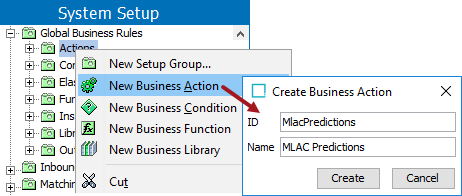
On System Setup, select the Global Business Rules node where the MLAC business rule will be saved. Right-click the node and select the New Business Action option.
On the Create Business Action dialog, add an ID and a Name and click the Create button.
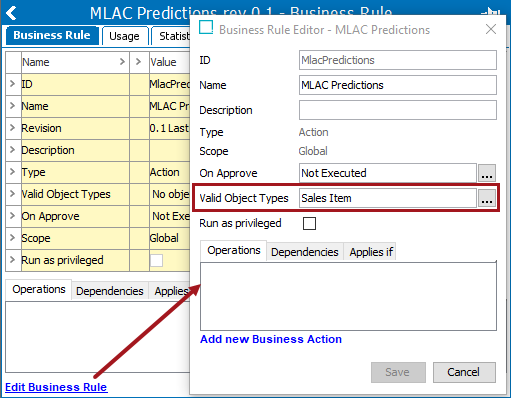
- On the business rule editor, click the Edit Business Rule link dialog to display the Business Rule Editor dialog.
- For the Valid Object Types parameter, add the product object type for which predictions are to be generated.
- Click the Add new Business Action link to add an operation, and click the operation's edit button (
 ).
).
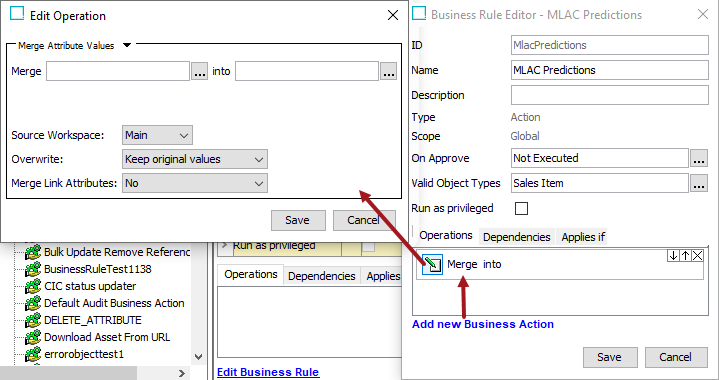
- On the Edit Operation dialog:
- Select the Execute JavaScript operation from the dropdown.
- Click the edit button () under the Binds flipper.
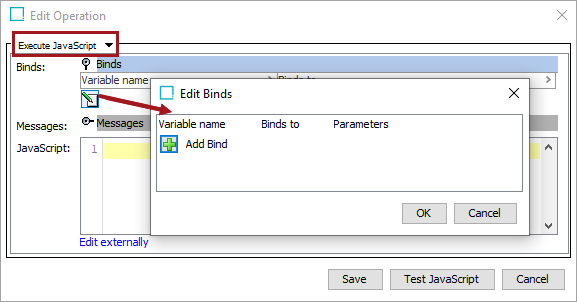
- On the Edit Binds dialog:
- Click the Add Bind button.
- For 'Variable name' type gateway.
- For 'Binds to' select the Configuration option, and select the Gateway Integration Endpoint option.
- For 'Parameters' select the MLAC gateway IEP previously created.
- Click the Add Bind button again.
- For 'Variable name' type product.
- For 'Binds to' select Current Object.
- Click the OK button.
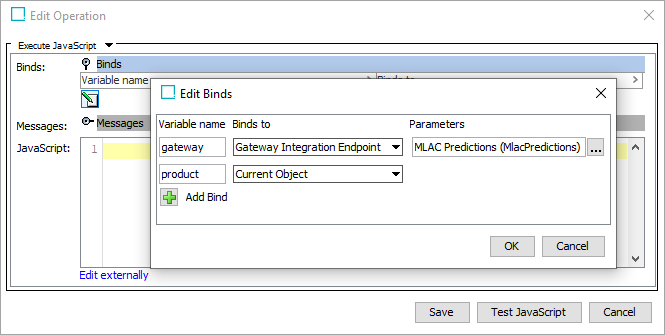
- On the Edit Operation dialog, click the Save button.
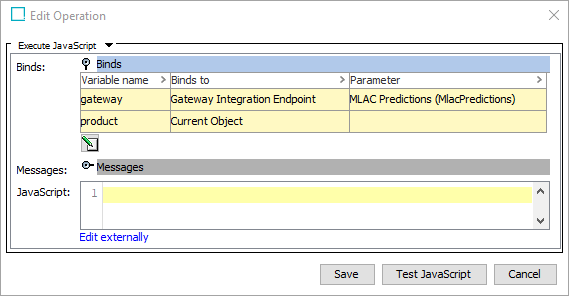
- On the Business Rule Editor dialog, click the Save button to complete the business rule creation.
- On System Setup, select the Global Business Rules node where the MLAC token function will be saved. Right-click the node and select the New Business Action option. On the Create Business Action dialog, add an ID and a Name and click the Create button.
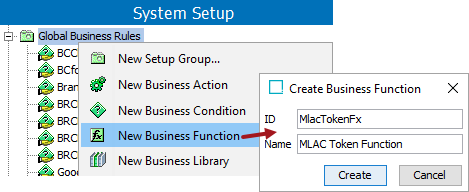
- In the business function editor, click the Edit Business Function link. Click the edit button () for the JavaScript function.
- In the JavaScript parameter:
- Add the getToken function shown below for obtaining a token from the token endpoint.
Important: Replace the username ("myusername") and password ("mypassword") with your credentials.
- Click the Save buttons to close both dialogs and complete this function.
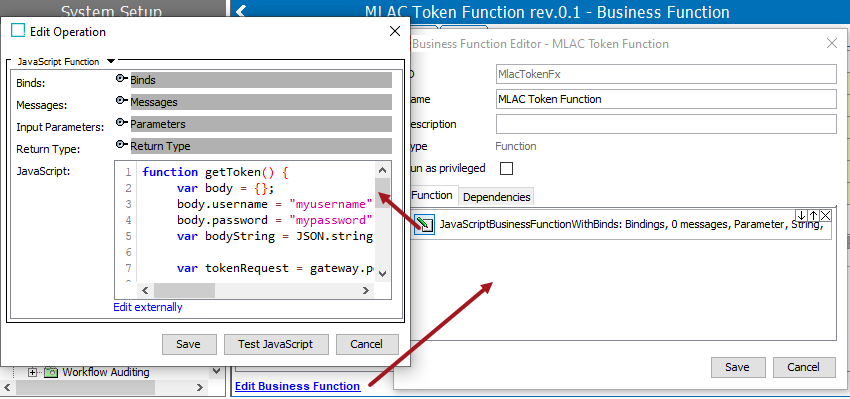
For example:
function getToken() {
	var body = {};
	body.username = "myusername";
	body.password = "mypassword";
	var bodyString = JSON.stringify(body);

	var tokenRequest = gateway.post().pathElements("token").acceptContentType("text/plain").body(bodyString);

	var tokenResponse;
	try {
		tokenResponse = tokenRequest.invoke();
	} catch(e) {
		if (e.javaException instanceof com.stibo.gateway.rest.RESTGatewayException) {
			throw "Error getting token: " + e.javaException.getMessage();
		} else {
			throw(e);
		}
	}
	return tokenResponse;
}
- Create a getProductJsObject function that produces the JSON body for the request to be sent to the prediction service. This function uses the same relevant attributes that are also used when uploading data for already classified products.
Important: When creating a JavaScript object, the string values retrieved from STEP should be concatenated with an empty string to produce JavaScript strings.
For example:
function getProductJsObject(prod) {
	var id = prod.getID();
	var vendor = prod.getValue("Vendor").getSimpleValue();
	var description = prod.getValue("ConsumerShortDescription").getSimpleValue();

	var jsObject = {};
	jsObject.id = "" + id;
	if (description) {
		jsObject.description = "" + description;
	}
 	if (vendor) {
		jsObject.sourceId = "" + vendor;
	}
	return jsObject;
}

function createBody() {
	var prodJsObject = getProductJsObject(product);
	var prodsArray = [];
	prodsArray.push(prodJsObject);
	var bodyJsObject = {};
	bodyJsObject.products = prodsArray;
	return JSON.stringify(bodyJsObject);
}
- Create a getPredictionsString function that composes the prediction request, sends it, and returns the result.
Important: Hierarchy IDs must match IDs used when uploading hierarchies.
For example:
function getPredictionsString(tokenResponse, body) {
	var queryParams = new java.util.HashMap();
	queryParams.put("hierarchyIds", "primaryHierarchy");
	queryParams.put("maxSuggestionsPerHierarchy", "2");

	var request = gateway
		.post()
		.pathElements("predict")
		.header("Authorization", tokenResponse)
		.pathQuery(queryParams)
		.body(body);


	var response;
	try {
		response = request.invoke();
	} catch(e) {
		if (e.javaException instanceof com.stibo.gateway.rest.RESTGatewayException) {
			throw "Error getting prediction: " + e.javaException.getMessage();
		} else {
			throw(e);
		}
	}
	return response;
}
- Create an optional getResponseJsObject function for converting the Java String prediction response to a JavaScript object. This function is not required if, for example, the prediction response is written as an attribute value.
For example:
function getResponseJsObject(responseString) {
	var jsResponseString = "" + responseString;
	return JSON.parse(jsResponseString);
}
- Add code to call the functions.
For example:
var tokenResponse = getToken();

var body = createBody();

var responseString = getPredictionsString(tokenResponse, body);
- Create a script to handle the response. For example, classify the product, create a workflow task, or write the prediction results to a value.
Below is a full example script.
function getToken() {
	var body = {};
	body.username = "myusername";
	body.password = "mypassword";
	var bodyString = JSON.stringify(body);

	var tokenRequest = gateway.post().pathElements("token").acceptContentType("text/plain").body(bodyString);

	var tokenResponse;
	try {
		tokenResponse = tokenRequest.invoke();
	} catch(e) {
		if (e.javaException instanceof com.stibo.gateway.rest.RESTGatewayException) {
			throw "Error getting token: " + e.javaException.getMessage();
		} else {
			throw(e);
		}
	}
	return tokenResponse;
}

function getProductJsObject(prod) {
	var id = prod.getID();
	var vendor = prod.getValue("Vendor").getSimpleValue();
	var description = prod.getValue("ConsumerShortDescription").getSimpleValue();

	var jsObject = {};
	jsObject.id = "" + id;
	if (description) {
		jsObject.description = "" + description;
	}
 	if (vendor) {
		jsObject.sourceId = "" + vendor;
	}
	return jsObject;
}

function createBody() {
	var prodJsObject = getProductJsObject(product);
	var prodsArray = [];
	prodsArray.push(prodJsObject);
	var bodyJsObject = {};
	bodyJsObject.products = prodsArray;
	return JSON.stringify(bodyJsObject);
}

function getPredictionsString(tokenResponse, body) {
	var queryParams = new java.util.HashMap();
	queryParams.put("hierarchyIds", "primaryHierarchy");
	queryParams.put("maxSuggestionsPerHierarchy", "2");

	var request = gateway
		.post()
		.pathElements("predict")
		.header("Authorization", tokenResponse)
		.pathQuery(queryParams)
		.body(body);


	var response;
	try {
		response = request.invoke();
	} catch(e) {
		if (e.javaException instanceof com.stibo.gateway.rest.RESTGatewayException) {
			throw "Error getting prediction: " + e.javaException.getMessage();
		} else {
			throw(e);
		}
	}
	return response;
}

function getResponseJsObject(responseString) {
	var jsResponseString = "" + responseString;
	return JSON.parse(jsResponseString);
}

var tokenResponse = getToken();

var body = createBody();

var responseString = getPredictionsString(tokenResponse, body);