To use the Loqate and CASS integrations, the Address Component Model must first be configured in STEP Workbench.
This topic provides an overview of the Address Component Model, including full descriptions of all of the Loqate address attribute fields it contains. For instructions on how to configure the component model, see the following topics in this documentation section:
- Easy Setup of Address Component Model (here)
- Manual Setup of Address Component Model (here) (recommended for modifications after initial setup)
Once the component model has been configured, the system will be ready to standardize addresses using the Loqate solution.
The Address Component Model determines the input and output fields for the information that is sent to Loqate from STEP and returned from Loqate to STEP.
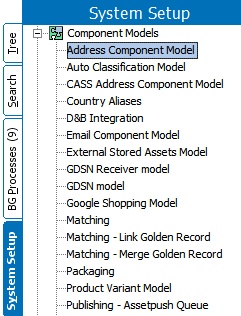
The Address Component Model is found under Component Models on the System Setup tab. If the Address Component Model is not present, contact your Stibo Systems account manager.
Prerequisites
Configuring the Address Component Model requires users to be familiar with the System Setup tab in STEP Workbench and how to configure within this area (e.g., creation and maintenance of object types, attributes, and references). Users must also have the privileges required to carry out these tasks. Additionally, the following condition must be met:
- Users must be connected to a Loqate installation, either through the Loqate Cloud API or the Loqate Local API. For more information, see the Loqate Integration topic in the Data Integration documentation here.
Loqate Address Fields
The following table lists the fields contained in the Address Component Model, along with a description of each field, the corresponding Loqate field, whether the field is available for both the Loqate Cloud service and the Loqate Local installation. Users will typically not use all address fields.
Loqate fields are mapped to STEP attributes, either manually or though easy setup of the component model. The component model contains four types of fields and are identified in the table below:
- Object types – The address object types used to represent addresses
- Regular address attributes – The input fields that are used as input when making a request to Loqate. These are the non-standardized, original address attributes.
- Standardized address attributes – The output fields that store the data returned from Loqate. These are the standardized and validated versions of the address fields from Loqate.
- Data quality attributes – The fields that store information about the validity and precision of the standardized address attributes.
Loqate responses do not overwrite the input fields, which remain as-is after standardized address data is returned. Loqate responses are kept separately in the standardized fields. For more thorough descriptions of these fields, refer to the Loqate website.
|
Address Component Model Field |
Description |
Local Loqate Field Mapping |
|---|---|---|
|
Address Object Types and/or Address Data Container Types |
||
|
Address |
The address object types used to represent addresses; can be either entities or data containers |
N/A |
|
Regular Address Attributes (INPUT fields) |
||
|
Country ISO Code |
The ISO 3166 2-character country code |
Not mapped to Loqate |
|
Input Address 1 |
Input address line field, for one part of an address, e.g., street number and name |
Address1 [in] |
|
Input Address 2 |
Input address line field, for one part of an address, e.g., city, state abbreviation, postcode |
Address2 [in] |
|
Input Address 3 |
Input address line field, for one part of an address, e.g., country |
Address3 [in] |
|
Input Address 4 |
Input address line field, for one part of the full address Typically used if optional information is put into one of the other input Address1 - 3 fields |
Address4 [in] |
|
Input Address Line |
Single line input field for an entire address |
Address [in] |
|
Input Building |
Input field for name identifying an individual location, e.g., a building |
Building [in] |
|
Input City |
Input field for name of a large population center, e.g., city or municipality |
Locality [in] |
|
Input Country |
Input field for country name or code |
Country [in] |
|
Input County |
Input field for small geographic unit within a country, e.g., county. |
SubAdministrativeArea [in] |
|
Input Dependent Locality |
Input field for a small geographic unit within a city, e.g., neighborhood |
DependentLocality [in] |
|
Input Dependent Street |
Input field for street information that depends on an adjoining road |
DependentThoroughfare [in] |
|
Input Organization |
Input field for business name associated with location |
Organization [in] |
|
Input PostBox |
Input field for post box for a location |
PostBox [in] |
|
Input State |
Input field for name of a geographic unit within a country, e.g., state or province |
AdministrativeArea [in] |
|
Input Street |
Input field for street information, e.g., street name and number |
Thoroughfare [in] |
|
Input Street Name |
Input field for street name |
ThoroughfareName [in] |
|
Input Street Number |
Input field for street number identifying an individual location |
Premise [in] |
|
Input Subbuilding |
Input field for secondary identifier of an individual location, e.g., flat or suite |
SubBuilding [in] |
|
Input Zip |
Input field for complete postal code |
PostalCode [in] |
|
Latitude |
The address latitude |
Not mapped to Loqate |
|
Longitude |
The address longitude |
Not mapped to Loqate |
|
Standardized Address Attributes (OUTPUT Fields) |
||
|
Geocode Latitude |
Output field containing the address latitude |
Latitude [out] |
|
Geocode Longitude |
Output field containing the address longitude |
Longitude [out] |
|
Standardized Building |
Output field for name identifying an individual location, e.g., a building |
Building [out] |
|
Standardized City |
Output field for a large population center name, e.g., city or municipality |
Locality [out] |
|
Standardized City Extra |
Output field for supplemental information related to city |
LocalityExtra [out] |
|
Standardized Country |
Output field containing country name or code |
CountryName [out] |
|
Standardized Country ISO Code |
Output field containing the ISO 3166 2-character country code |
ISO3166-2 [out] |
|
Standardized Country ISO 3 Character Code |
Output field containing the ISO 3166 3-character country code |
ISO3166-3 [out] |
|
Standardized County |
Output field for small geographic unit within a country, e.g., county |
SubAdministrativeArea [out] |
|
Standardized Department |
Output field for department name associated with an organization |
Department [out] |
|
Standardized Dependent Street |
Output field for street information that depends on adjoining road |
DependentThoroughfare [out] |
|
Standardized Double Dependent Locality |
Output field for small population center within a city, e.g., village. |
DoubleDependentLocality [out] |
|
Standardized Formatted Address |
Output field for the address formatted for mailing usage, formatted using CRLF (“\n”) as the line break |
Address [out] |
|
Standardized Neighbourhood |
Output field for population center within a city, e.g., neighborhood |
DependentLocality [out] |
|
Standardized Organization |
Output field for business name associated with location |
Organization [out] |
|
Standardized PostBox |
Output field for post box for a location |
PostBox [out] |
|
Standardized Region |
Output field for the largest geographic unit within a country |
SuperAdministrativeArea [out] |
|
Standardized State |
Output field for a geographic unit within a country, e.g., state or province |
AdministrativeArea [out] |
|
Standardized Street |
Output field for street name |
DeliveryAddress [out] |
|
Standardized Street Name |
Output field for street name |
ThoroughfareName [out] |
|
Standardized Street Number |
Output field for street number |
PremiseNumber [out] |
|
Standardized Street Type |
Output field for street type, e.g., Rd for road and St for street |
ThoroughfareType [out] |
|
Standardized SubBuilding |
Output field for secondary identifier for an individual location, e.g., flat or suite |
SubBuilding [out] |
|
Standardized Zip |
Output field for complete postal code |
PostalCode [out] |
|
Quality Measures |
||
|
Geocode Accuracy |
Output field for Geocode Accuracy. This field indicates the precision level of the geocode that has been assigned to an address by Loqate. |
GeoAccuracy [out] |
|
Geocode Distance |
Output field for the Geocode Distance. This field indicates the uncertainty in the physical location of the address. |
GeoDistance [out] |
|
Quality |
Quality attribute for address. Validation base type is text; attribute is a calculated attribute based on other quality fields. For example, the calculation could be a combination of the values of Quality Index and Quality Verification Code. Users are responsible for writing this formula. |
Not mapped from Loqate |
|
Quality Index |
Output field for the address quality index, which is used to indicate the quality of an address. |
Address Quality Index (AQI) response from Loqate |
|
Quality Verification Code |
Output field for the Address Verification Code. This is used to indicate the level of verification of an address. |
Address Verification Code (AVC) response from Loqate |
|
Validation Hash |
Hash value for the address validation integration. Contains a hash value of all input fields. This makes it possible to determine if the address has changed since the last validation Field is updated whenever the standardized address attributes are updated by the Loqate integration. Field is calculated by STEP and is not mapped to Loqate. |
Not mapped from Loqate |
|
Validation Integration Status |
Contains the latest status of the address validation integration. Field is updated whenever the standardized address attributes are updated by the Loqate integration. Indicates if the last address validation was completed or resulted in an error. Valid values are: <empty> and Failed. This field makes it possible to search for accounts and addresses where an error has occurred during the address validation. |
Not mapped from Loqate |
|
Validation Response |
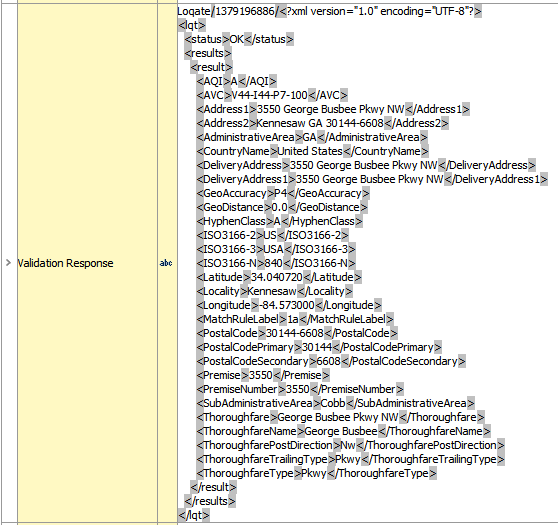
Output field for the cached validation response. This field contains the full response from Loqate. Validation base type is text; maximum length must be at least 1000.
|
Contains the full response from Loqate |
|
Validation Time |
Date and time stamp of the most recent successful address validation. Validation base type is 'ISO Date and Time.' Field is updated whenever the standardized address attributes are updated by the Loqate integration. |
Not mapped from Loqate |