Asynchronous translations can be initiated via a business rule which can be triggered in different ways, for example, from within a STEP workflow.
This section assumes that users are familiar with business rules. Most of the information about setting up and managing business rules can be found in the Business Rules section of the online help here. However, this topic addresses the one business action that is required to initiate an asynchronous translation in a workflow.
Use the following steps to configure a business action that will start a translation job for asynchronous translation.
Prerequisites
- The 'Translation Completed Business Action' and 'Translation Failure Business Action' can be created prior to being selected for the Start Translation Business Action. These actions can move the translation job through the workflow.
- The Start Translation Business Action only displays if the functionality for asynchronous translations has been activated on your system. See your Stibo Systems account representative about adding the functionality, if desired.
Configuration
- Create a business action in System Setup, then right-click and select Edit Business Rule.
- In the Business Rule Editor, give the rule an ID and Name, then click Add new Business Action to open the Edit Operation dialog.
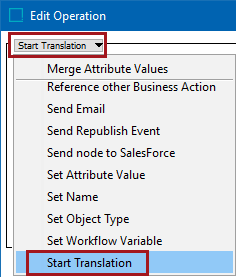
- In the Edit Operation dialog, select the Start Translation business operation, as shown in the image below.
- Supply the Start Translation operation parameters shown below as required:
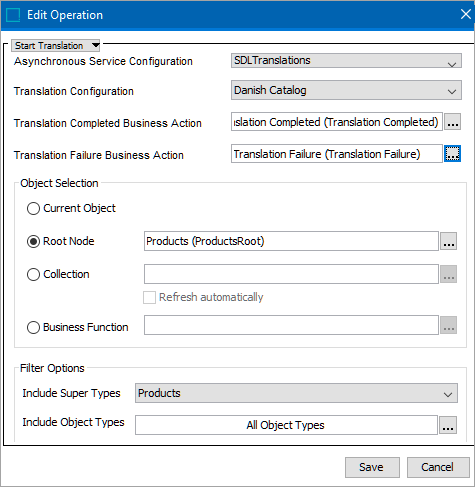
- For Asynchronous Service Configuration - Use this dropdown to select the Service Configuration you want to initiate.
- For Translation Configuration - Select the Translation Configuration to which the business rule applies. There can be many Translation Configurations for the same Service Configuration but the business action must be configured to use just one translation configuration.
- For Translation Completed Business Action - Select the business action that must be executed once a translation job is completed. If the translation was initiated in a STEP workflow task, you can use the Trigger STEP Workflow Event business action to move the workflow task to the next state.
- For Translation Failure Business Action - Select a business action that will be executed when a translation job fails.
- For Object Selection Options - Choose one of the following options:
- Current Object - For accessing the STEP object that the business rule is being evaluated or executed against.
- Root Node - For selecting objects directly from the Tree. These can include products, assets, classifications, attributes, and LOVs. Click the ellipsis button (
 ) to either browse the Tree or search for a specific root node.
Important: If a user selects LOVs or Attributes / Attribute Groups from the list of available nodes, the Filter Options (detailed below) will be inactive.
- Collection - For selecting a manually selected grouping of various object types (which can, potentially, be from multiple super types) grouped in a collection. In the Collection field, click the ellipsis button () and either browse to or search for the collection to be translated. If the collection is based on a search and you want to ensure that new or amended values in the collection are captured prior to exporting for translation, click the box beside Refresh Automatically. Choosing this option activates the selections in the Filter Options section of the dialog. See the 'Filter Options' subsection below for more details.
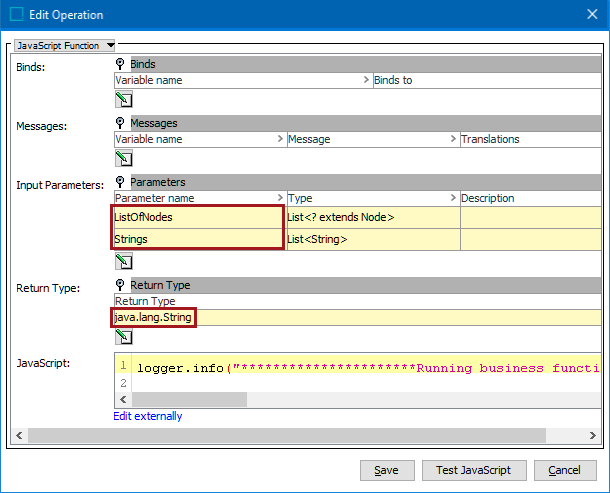
- Business Function - For creating output from STEP to send to the translation service. Click the ellipsis button () to browse to or search for the relevant business function. For more detailed information about how to use business functions, see the Business Functions section of the Business Rules documentation here.
As shown in the following image, to use the Business Function feature for asynchronous translations, two input parameter types are required: List<? extends Node> and List<String>. The Return Type java.lang.String must also be used.
- For Filter Options - set the parameters as required:
- Include Super Types - From the dropdown list, select which super types should be translated. This field is only activated if Root Node, Collection, or Business Function was chosen for Object Selection. The super type options are Products (default), Classifications, Assets, or All.
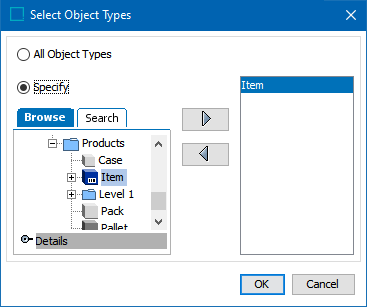
- Include Object Types - Click the ellipsis button () to display the Select Object Types dialog and select the object types to be included in the translation export. This field is only activated if Root Node, Collection, or Business Function was chosen for Object Selection.
In the dialog, click the Specify radio button to enable the Browse and Search tabs for the Tree window. Select the relevant object type(s), then click the right-facing arrow ( ) to add the object type(s) to the filter. To remove an object type from the filter, select it and click the left-facing arrow (
 ).
).
Click OK to close the dialog.
- Click the Save button to close the Edit Operation dialog and add the operation to the business rule.
Note: Exported translation files can contain either data objects (products, classifications, assets, etc.) or system setup objects (attributes, LOV, etc.); they cannot contain a combination of the two.
Running the Start Translation Business Rule
After setup of the business action is complete, testing or running the business rule starts a background process that is displayed on the BG Processes tab under the Async Job Runner node. The job displays a status of 'suspended' until the translation job is complete.