The STEPXML Configuration Export format plugin is a utility feature for easily creating a cross-context STEPXML file that contains the full STEP configuration (minus user objects) and the data nodes that are required for being able to import the configuration on to an empty STEP system.
Format Availability
STEPXML Configuration Export is available for selection in:
- Export Manager - see Creating a Data Export here
- OIEP - see Creating an Outbound Integration Endpoint here
Mapping
Since STEPXML is the native format for STEP, mapping data is not required and the Map Data step / Mapping tab is disabled. Additional configuration not related to mapping should be completed as desired.
Outbound Data
Behind the scenes, the plugin makes use of the STEPXML output template (included later into this topic).
The template allows the following configuration objects to be exported:
-
All contexts, dimensions, and dimension points
-
All object types
-
All edge, classification product links and reference types
-
All units
-
All lists of values and list of values groups
-
All attributes and attribute groups
-
All data container types
-
All attribute transformations and attribute transformation groups
-
All keys
-
All derived event types
-
All collections (definitions) and collection groups
-
All setup groups
-
All setup entities
-
All business rules and business libraries
-
All workflows, status flags, and workflow profiles
-
All match codes and matching algorithms
-
All action sets
-
All user groups
-
All tag groups and tags
-
All import configurations
-
All export configurations
-
All translation configurations
-
All bulk update configurations
-
All transformation lookup tables
-
All image conversion configurations
-
All asset push and non-asset push event queues
-
All eCatalogs
-
All Web UI configurations
-
All integration endpoints
-
All event processors
-
All table types, table type groups, table rules, and table colors
-
All component models
-
Global settings and system setup
-
Selected products, classifications, and entities (name only) and their ancestors up to and including the supertype specific roots
-
Selected assets, and if using the domain exporter, their “parent” classifications including ancestors up to and including the classification hierarchy root
The template could be used with the Advanced STEPXML format plugin, which would allow for the same configuration objects to be exported. What the STEPXML Configuration Export adds is the ability to get data node dependencies included in the exported file. Dependencies that are not present in the target system or included in the STEPXML file will cause errors when importing the file.
Specifically, the plugin will add the following objects to the selection passed to the exporter:
-
All classifications, entities, products, and assets referenced from user group privilege rules
-
All classifications referenced from supplier user groups
-
All products and entities referenced from match codes
-
For the following configurations types that live in the Tree, their parent classifications:
-
Export configurations
-
Import configurations
-
Bulk update configurations
-
Transformation lookup tables
-
Image conversion configurations
-
Translation configurations
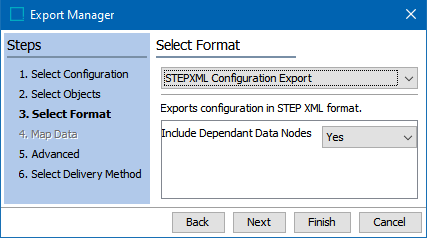
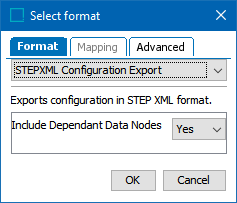
Note: Whether or not to have these data node dependents included is determined via the 'Include Dependent Data Nodes' parameter for the 'Select Format' step when using the Export Manager or configuring an Outbound Integration Endpoint (OIEP).
Export Manager example:
OIEP example:
The plugin will produce a cross-context STEPXML file containing data from all system contexts.
Output Template
<?xml version="1.0" encoding="utf-8"?>
<STEP-ProductInformation>
  <TagGroupList/>
  <TagList/>
  <ContextList/>
  <GlobalSettings/>
  <UserTypes ExportSize="All"/>
  <SystemSetup ExportSize="All"/>
  <Keys/>
  <DerivedEventTypes/>
  <EdgeTypes/>
  <CrossReferenceTypes ExportSize="All"/>
  <DimensionList/>
  <UnitList ExportSize="All"/>
  <CollectionList ExportSize="All"/>
  <ListOfValuesGroupList/>
  <ListsOfValues ExportSize="All"/>
  <AttributeGroupList ExportSize="All"/>
  <AttributeList ExportSize="All"/>
  <AttributeTransformationGroups/>
  <SetupGroups ExportSize="All"/>
  <SetupEntities ExportSize="All"/>
  <BusinessLibraries ExportSize="All"/>
  <BusinessRules ExportSize="All"/>
  <STEPWorkflows ExportSize="All"/>
  <STEPWorkflowProfiles ExportSize="All"/>
  <MatchCodes/>
  <MatchingAlgorithms ExportSize="All"/>
  <Classifications ExportSize="Selected">
    <Classification IncludeParent="true">
      <Name/>
    </Classification>
  </Classifications>
  <Assets ExportSize="Selected" DontFollowClassificationToAssetReference="true">
    <Asset IncludeParentClassifications="true">
      <Name/>
      <ClassificationReference/>
    </Asset>
  </Assets>
  <Entities ExportSize="Selected">
    <Entity IncludeParent="true">
      <Name/>
    </Entity>
  </Entities>
  <DataContainerTypes ExportSize="All"/>
  <Products ExportSize="Selected" DontFollowClassificationToProductReference="true">
    <Product IncludeParent="true">
      <Name/>
    </Product>
  </Products>
  <ActionSetList/>
  <UserGroupList ExportSize="All"/>
  <ImportConfigurations ExportSize="All"/>
  <ExportConfigurations ExportSize="All"/>
  <TranslationConfigurations ExportSize="All"/>
  <BulkUpdateConfigurations ExportSize="All"/>
  <TransformationLookupTableConfigurations ExportSize="All"/>
  <ImageConversionConfigurations ExportSize="All"/>
  <AssetPushEventQueues ExportSize="All"/>
  <ECatalogs/>
  <PortalConfigurations ExportSize="All"/>
  <EventQueues/>
  <IntegrationEndpoints ExportSize="All"/>
  <EventProcessors ExportSize="All"/>
  <StatusFlags ExportSize="All"/>
  <TableColors ExportSize="All"/>
  <TableRules ExportSize="All"/>
  <TableTypeGroupList ExportSize="All"/>
  <TableTypeDefinitions ExportSize="All"/>
  <ComponentModels/>
</STEP-ProductInformation>