ETIM IXF is the ETIM XML format and includes multiple languages (English, German, Dutch, and a number of other European languages). The import converter creates a new attribute for each classification the feature is linked into. Each of the attributes (for the same ETIM feature) uses the same LOV but with an individual LOV filter for the valid values. STEP supports ETIM version 6, 7 and 8; STEP also supports the dynamic, or pre-release versions in between major releases. For more information about ETIM functionality in STEP, see ETIM Format here.
For ETIM IXF imports, deprecation is supported for classifications, features (i.e., attributes), classification-feature links, and LOV filtering. This means that when a new ETIM version is installed (in the ETIM IXF format):
- Any deprecated classifications will not be imported.
- Any deprecated links between classifications and features (i.e., attributes) will not be imported.
- Any deprecated values within an LOV will not be included in the LOV, via LOV filtering.
Existing ETIM taxonomy data on the system will never be removed via ETIM imports. If the ETIM Change Code in an ETIM import file is updated in any way for an existing ETIM data element on the system, the ETIM importer will update the ETIM Change Code metadata for those data elements.
Format Availability
ETIM IXF format is available for selection in:
- IIEP - see Creating an Inbound Integration Endpoint (here)
- Import Manager - see Creating a Data Import (here)
Mapping
This format does not require a data map.
Inbound Data
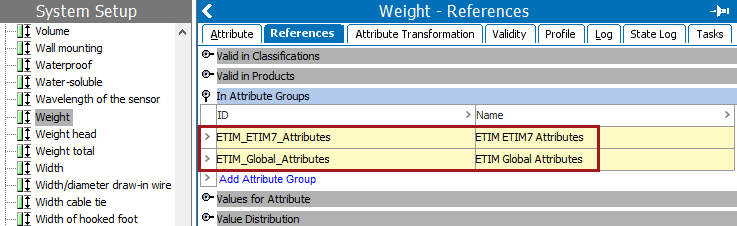
Importing ETIM data results in the creation of version-specific attribute groups, but the ETIM specification attributes created are not version specific. When the same specification attribute is required for multiple ETIM versions, it is linked to each applicable version-specific attribute group.
In the example below, the 'Weight' specification attribute is needed for both ETIM5 and ETIM7 data. The single attribute with the name 'Weight' is added to two attribute groups and is displayed on the References tab of the attribute under the 'In Attribute Groups' flipper.
Inbound Parameters
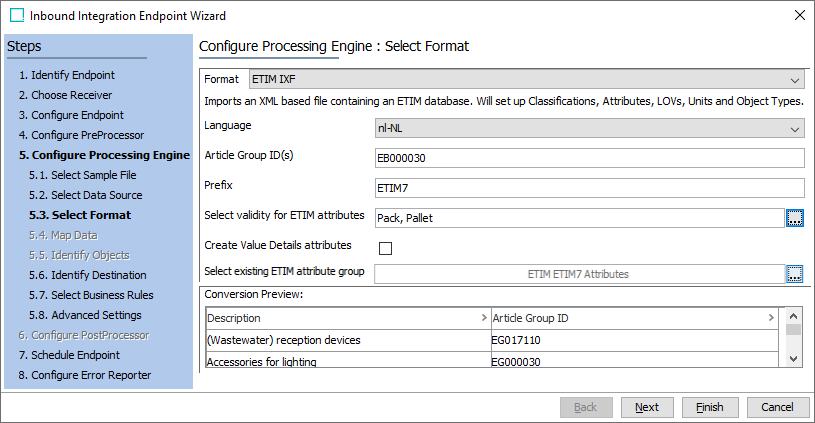
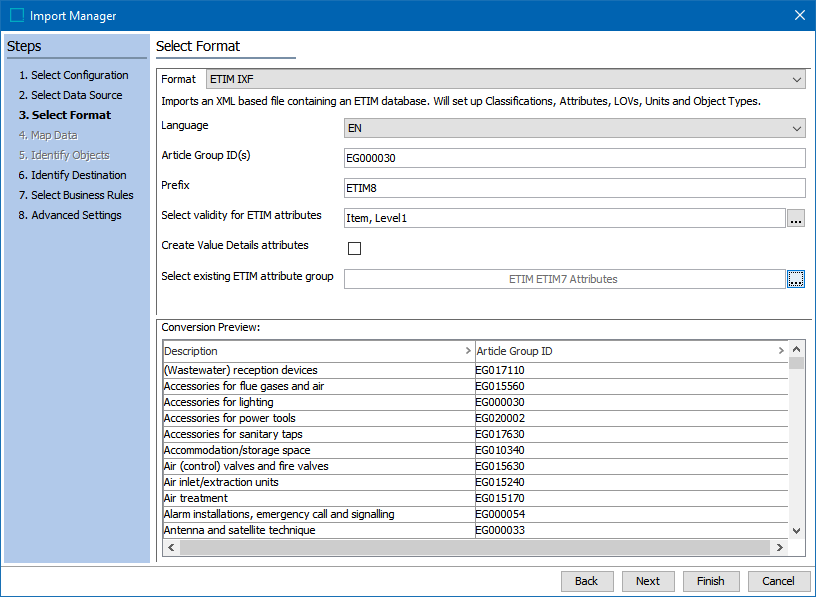
- Language allows selection of a single ISO Language Code to import. Multiple languages must be imported separately. In the Advanced Settings step you will select a context for the import.
- Article Group ID(s) allows the user to list one or more classifications as follows:
- A single Article Group ID to import one classification.
- A comma-separated list of Article Group IDs to import several classifications.
- Blank to import the full ETIM classification system.
- Prefix allows the user to manage the taxonomies of the ETIM structures within STEP by prepending text for the prefix parameter value. By default, this will be read from the file being imported into STEP but it can be changed depending on how it should be displayed in STEP, e.g., if it is an ETIM version 6 file it will read ETIM6, and if it is ETIM version 7 it will read ETIM7. However, if the file is an ETIM pre-release file, sometimes known as a dynamic file, it will load with the ETIM version number followed by a '-D.' So an ETIM version 6 dynamic file will automatically be populated as ETIM6-D.
Note: This ETIM-D version number should only be changed if a user wants to see multiple taxonomies for each dynamic version of the ETIM 6 imports. Otherwise each dynamic ETIM file will continue to load into the ETIM6-D file structure.
- Select validity for ETIM attributes allows the user to select the object types that are valid for the ETIM attributes. Click the ellipsis button (
 ) to display a list of object types that can be checked for validity in both the Import Manager and IIEP.
 - Create Value Details attributes, when checked, a new attribute group with the name 'ETIM Value Details Attributes' is created. The attributes created in this group are written with the ID composed of the prefix 'ETIM_', the ETIM attribute ID, and the text '_FVD' (which indicates FValue Details), 'ETIM _EF007220_FVD.' These attributes (or the group) will be made valid on the object types selected in the previous parameter Set validity for ETIM attributes, and then mapped to the 'Value Details' target. When exporting this data, using the 'ETIM FVALUE Details' aspect, allows the value from these attributes to be output in the FVALUE_DETAILS tag.
-
- Conversion Preview displays article groups that were read from the ETIM import file in the selected language.
Note: This should complete the ETIM IXF configuration. If changes need to be made to the configuration, see the ETIM Configuration section of the ETIM Format documentation here.
Import Manager
IIEP