In the final step, select one or more of the available options.
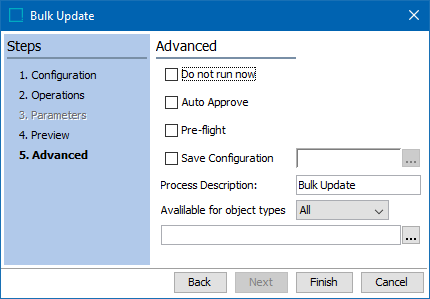
- Set the following parameters as necessary:
- Do not run now runs the bulk update later, and not immediately when the wizard is finished. This allows a user to save the configuration. When check, the Auto Approve and Pre-flight parameters are disabled.
- Auto Approve approves the updated objects once the update succeeds. The objects are displayed in the approved workspace.
- Pre-flight performs a test run of the update. When the user clicks 'Finish', the test runs in a background process. Selected operations are applied and then rolled back. An execution report and an impact report is generated. Temporary collections are created for the objects where the operations were successfully applied, and for the ones were errors were generated. The availability of this option depends on the user's system setup.
Important: There is no 'undo functionality for bulk updates. It is recommended to run a Pre-flight and/or to apply operations to a small set of objects before updating a large number of objects.
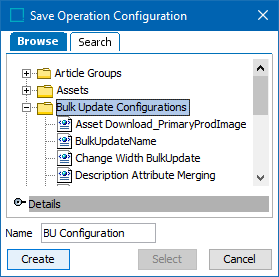
- Save configuration defines a location and name for the saved configuration so that it can be used again. Click the ellipsis button (
 ) to display the 'Save Operation Configuration' dialog. To name a new configuration, select a folder and type a name in the Name parameter, and click Create. To overwrite an existing configuration, select the configuration and click Select.
- Process Description displays the name for the background process.
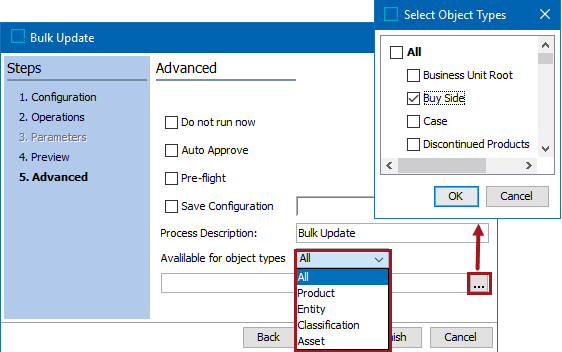
- Available for object types limits the object types and nodes affected by the bulk update operations. First select an object type from the dropdown, then click the ellipsis button () to select the nodes to update.
- Click Finish to complete the bulk update configuration and start the operation(s) in a background process.
- Monitor the bulk update as defined in the Monitoring Bulk Updates topic