Unique Keys
When a STEP ID is not available (such as with imported data) or when it is not an ideal unique identifier (i.e., external systems need to update data in STEP), Keys can be implemented. A key is a unique database entity composed of (transformed) object data, and represents a specific object in the STEP system. Because no two objects can have the same key, they provide an alternative method for identifying objects. The terms 'key' and 'unique key' are used interchangeably and both indicate an identifier that cannot be duplicated.
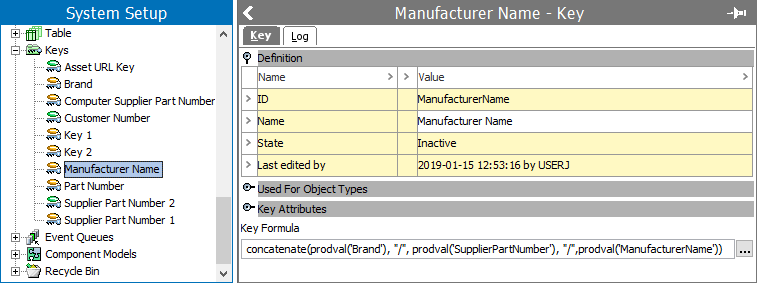
The idea behind the STEP Key concept is that an external system can identify an object in STEP, not via its ID or URL, but by using one or more attribute values. Thus, a Key in STEP can be a string representation of an object that is unique for a specific key definition.
Keys are especially useful when STEPXML is delivered to websites or ERP systems that do not have the STEP ID of the exported products and need a specific, unique ID. For more information on exporting STEPXML, see the STEPXML Format section of the Data Exchange documentation here.
Defining Keys
Each key has a formula that defines what object data is used and how it is combined and transformed.
A key definition has an ID, a state, and specifies the following:
- One or more object types that the key applies to (product, entity, classification and asset object types only).
- One or more attributes whose values are used in constructing keys for instances of the selected object type(s).
- A STEP function used for generating / calculating the key.
Key Attribute Considerations
As there needs to be no more than one calculated key (string) per object covered by the key definition, a number of restrictions apply to the attributes used for calculating the keys.
Because a key must be the same in all contexts and workspaces, the selected attributes must comply with the following:
- must be valid for the selected object types.
- must be externally maintained (values should be the same across all workspaces).
- must be single valued, and when specification attributes are used, the values must be local.
- must not be dimension dependent (values should be the same across all contexts).
- must not be calculated, as the update of a single value in STEP could lead to the system potentially having to re-calculate millions of keys.
- length must not exceed 1,000 characters.
- if a validation base type list of values (LOV) is used, then the LOV must not be dimension dependent and the length must not exceed 1,000 characters.
Once an attribute is used in a key definition, the properties will be locked and cannot be changed as long as the key definition exists. To unlock the attribute, the key must be deactivated.
For more information on deactivating keys, see the Activating and Deactivating Keys section of the System Setup / Super User Guide documentation here.
Key Example
See below for examples of key formulas and their resulting values.
In this example, two product object types have the following attributes values:
Product A:
- Manufacturer Part Number (MPN): 100-440-0.750-3434-A
- Universal Product Code (UPC): 155488876964
- Brand: Acme Ltd.
Product B:
- Manufacturer Part Number (MPN): TSR-1002
- Universal Product Code (UPC): 887554522477
- Brand: Ajax
Key Formula Example
concatenate(prodval('Universal Product Code (UPC)'), lower(left(prodval('Brand'), 4)), substitute(prodval('Manufacturer Part Number (MPN)'),'-',''))
In this example, the values for the Manufacturer Part Number, Universal Product Code, and Brand of the product are concatenated to form a key. The generated keys would be as follows:
155488876964acme10044007503434A (Product A)
887554522477ajaxTSR1002 (Product B)
Key Formula Example
concatenate(upper(left(prodval('Brand'),3)),'-', prodval('Universal Product Code (UPC)'), '-', upper(substitute(prodval('Manufacturer Part Number (MPN)'), '-','')))
Again, the values for the Manufacturer Part Number, Universal Product Code, and Brand of the product are concatenated to form a key. This time, however, the brand names are abbreviated and appear at the start of the formula, and the other two values are separated by a hyphen. The generated keys would be as follows:
ACM-155488876964-10044007503434A (Product A)
AJA-887554522477-TSR1002 (Product B)
Important Notes
- If values for attributes used in the key definition are missing on objects, those objects are ignored and no key is generated for them.
- Attributes used in keys must have values assigned to the objects which should be identified via a key. Inherited values cannot be used. That is, if you have an attribute value entered at the parent level of a product, that inherited value cannot be used to create a key for a child product. The attribute value must be assigned to the child product directly.
- For example, if you have data for books and you determine that the books could be uniquely identified with one attribute, ISBN, then you could have a calculation for this particular attribute value.