Recycle Bin for System Setup
The deletion concept in STEP is quite similar to what you know from Windows and Mac OS. Thus, if you delete the objects in System Setup, they will be moved to the Recycle Bin in the System Setup tab. However, not all objects will display in the Recycle Bin.
Below are the objects that will display in the recycle bin when deleted from System Setup:
- Business Rules (Business Condition and Business Action)
- Business Rule Libraries
- Integration Endpoints
- Workflows
Note: The Recycle Bin in System Setup is different from the one in Tree tab. For more information about the Recycle Bin for the Tree tab, see the Recycle Bin for Tree topic
The Recycle Bin for System Setup can be found in the System Setup tab. Right-clicking on the Recycle Bin will display a menu, as shown below.
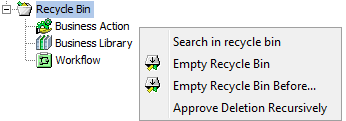
- Search in recycle bin: Allows the search for deleted objects in the recycle bin.
Note: Items / objects in the Recycle Bin are not searched when doing STEP searches nor when using the workbench Goto functionality.
- Empty Recycle Bin: When selected, the contents of the Recycle Bin are permanently deleted.
- Empty Recycle Bin Before...: When selected, the contents of the Recycle Bin before a specified date are permanently deleted.
- Approve Deletion Recursively: Only works for the Recycle Bin in the Tree tab, as objects in System Setup cannot be approved.
Note: Items in the Tree Recycle Bin are subject to approval, which will be flagged with 'In Use' and 'Not In Use' indicators. The System Setup Recycle Bin will only show the 'Not In Use' indicator. For more information, see the In Use and Not In Use Objects section in the Approval of Objects topic of the Getting Started / User Guide documentation here.
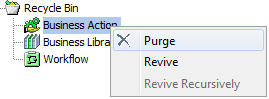
Deleted business rules, workflows, and integration endpoints can be seen in the Recycle Bin and can be revived from that location. Similarly they can be purged.