Business Module Manager
A business module is a functional configuration which handles use cases based on common practices observed in the industry. The Business Module Manager allows an administrator to install a pre-configured data model for a business purpose, such as the 'sell side' of the product enrichment process, or the 'buy side' for the vendor data onboarding process. Business module installation can include the creation of product objects types, classification objects, lists of values types, etc.
The 'Business Module Manager' option displays on the File menu for all users. The install functionality is available for users who are assigned the 'Install Business Modules' setup action privilege. For more information, see the Setup Actions topic here.
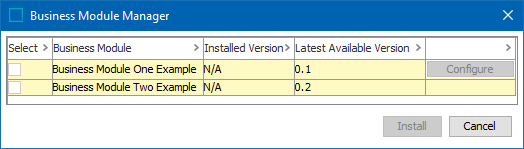
When a business module is activated by Stibo Systems, it displays in the Business Module Manager dialog. The dialog includes:
- Select - checkbox to indicate a module should be installed.
- Business Module - names of the activated modules. Hovering over the business module name displays a tooltip with a description of the module.
- Installed Version - the version of the module currently on your system.
- Latest Available Version - the current available activated version.
- Configuration - when additional parameters required to install the module, the 'Configure' button is enabled.
Installing a Business Module
- Activate the 'Install' button by meeting the requirements for the selected modules, as follows:
- If multiple modules are selected for install, safeguards ensure any required order is followed.
- If the 'Configure' button is enabled, click to display an additional dialog with required parameters.
- Click the Install button to start the installation background process.
- Review the BG Processes progress under the 'Install Business Modules' node.
If an error occurs during install, the BGP Execution Report shows the problem and actions are rolled back. The Installed Version column is not modified.
Available Business Modules
- PIM for Retail: see the Solution Enablement documentation here.