Custom Validation Error Messages
You can write your own error messaging for attribute validation errors. Creating clear error messaging provides a way for data stewards and various managers (e.g., brand, product, channel) to understand their errors and correct them immediately.
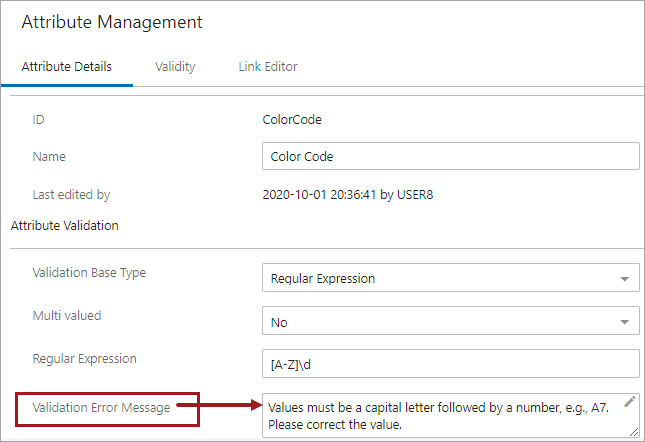
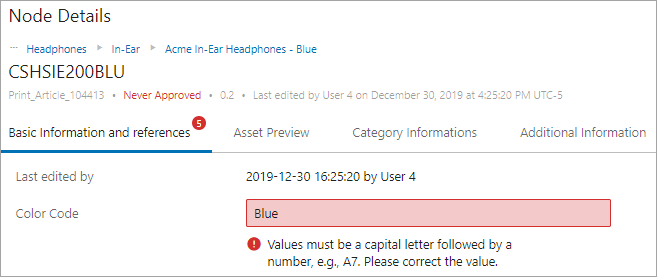
For example, writing a custom message for a Regular Expression (RegEx) validation that says 'Values must be a capital letter followed by a number, e.g., A7.,' is clear and concise compared to a system-generated message that says '[Blue] does not fit the regular expression "[A-Z]\d".'
Note: User-defined messages are optional. If a custom error message is not supplied, the existing system messages will still be shown. These error messages will display if there are errors when validating attributes in Web UI (shown above), workbench, Smartsheets, and upon import.
An attribute named 'Validation Error Message' exists on your system upon installation and is housed within your systems' Metadata attribute group in System Setup and is added to all attributes by default.
- If an attribute with the same ID (ValidationErrorMessage) already exists on a system before upgrading to 10.1 (and higher) versions, the existing attribute will not be changed nor will further configuration take place.
- If a Metadata attribute group already exists within another group,it will appear in that group even if within another higher-level group.
- If the Validation Error Message attribute is ever removed, it can be added back and set up as a metadata attribute again by following the directions that are found in the Attribute Metadata on Attributes topic here.
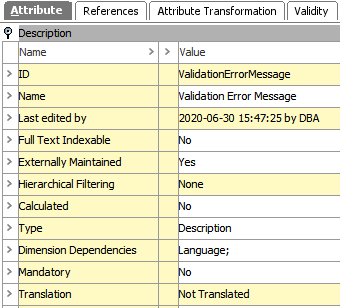
Setting Up a Custom Validation Error Message
Define your custom error message within the metadata attribute field for the designated attribute.
- If using workbench, use the Attribute Editor.
- If using Web UI, define the message within the Attribute Management screen for the specific attribute (shown below). Save changes.
Using the Custom Validation Error Message
When you enter an attribute value and click out of the value field, if the attribute validation fails, then the custom error will display. Continuing with the example from above, see the error for an invalid Color Code below.
Considerations and Limitations
- As described above in the 'Setting Up the Validation Error Message' section, the validation errors are context specific and have nothing to do with locale.
- User-defined error messages are not present in the Map Data step of the Import Manager. Validation is done upon import and reported in the execution report.
- An execution report will always present the validation error messages from an XML-pointed import context and in cases where importing multi-context values.