Validity on Description Attributes
Setting validity for a description attribute identifies when it will display for the selected object types, as defined in the following table.
|
Object Type |
Description |
|---|---|
|
Product |
The attribute will be valid for the selected product object types and will display in the Description flipper. Note: By default, the attribute is set to be valid for all product object types. |
|
Classification |
The attribute will be valid for the selected classification object types and will display in the Description flipper. |
|
Asset |
The attribute will be valid for the selected asset object types (Images & Documents) and will display in the Description flipper. |
|
Entity |
The attribute will be valid for the selected entity object types and will display in the Description flipper. |
|
Publication |
The attribute will be valid for the selected publication object types and will display in the Description flipper. |
|
Attribute Link Types |
The attribute will be valid for attribute link types and will display in the Product Attribute Link Type or the Classification Attribute Link Type in the 'Attributes' flipper. |
|
Reference Types |
The attribute will be valid for the selected link types and will display in the reference editors in product, classification, and/or asset editors. |
|
Version Types / E-catalog types |
The attribute will be valid for the publication version objects / e-catalog objects based on the selection. |
Note: The STEPXML format identifies selected Validity object types within the UserTypeLink tag using the UserTypeID element.
- In System Setup, expand Attribute Groups, expand the relevant group, and then select the relevant description attribute.
The Attribute editor appears.
- Click the Validity tab.
The available object types appears.
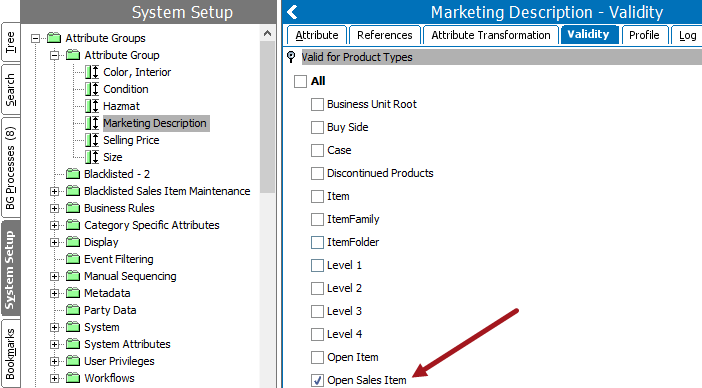
- Use the checkboxes to select the object types for which the attribute should be valid.
- Selecting a product, classification, entity, or asset object type displays the attribute in the Description flipper of all selected object types.
- Selecting a link type displays the attribute on product, classification, and/or asset references.
- Selecting a product / classification attribute link type makes the attribute visible on the Linked Attributes flippers of product / classification Reference tabs or on the attribute object’s Reference tab. For more on how to link description attributes to reference types and links, see the Metadata Attributes on Reference and Link Types documentation here.
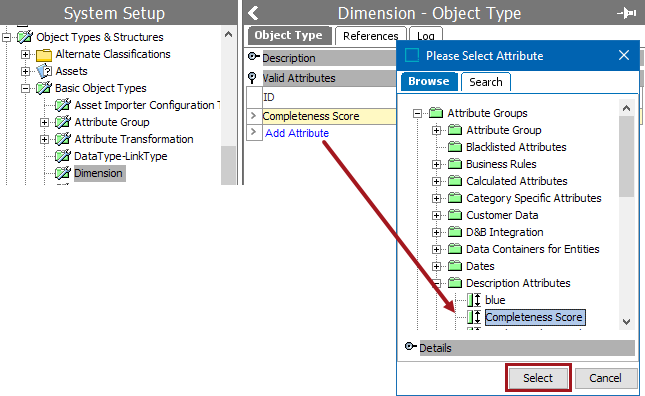
- If needed, add the description attribute on any object type (attribute, attribute groups, users, user groups, etc.).
- As shown below, in System Setup > Object Type and Structures > select the desired object type > add the desired description attribute.
For more on description attributes and how to link them, see the Description Attributes topic in the System Setup / Super User documentation here.