Server Log File Settings
This is one of the technical infrastructure data gathering methodologies and performance recommendations for server machines. The full list is defined in the Server Environment Recommendations topic here.
STEP uses a powerful logging subsystem tool to provide troubleshooting information if the system is not working as expected. For more information, see the Logs topic in the Administration Portal documentation here.
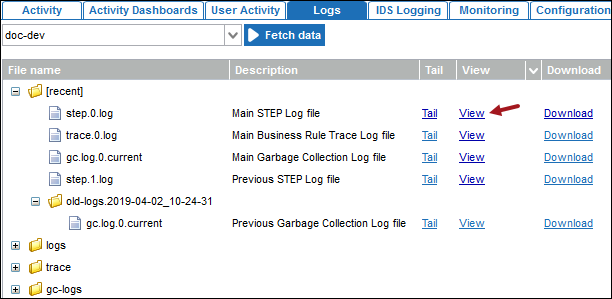
View Main STEP Log File
From the Start Page, click the STEP System Administration button and supply the login credentials. On the Logs tab, click the Fetch data button to load the logs. On the Main STEP Log file row, click the View link.
Logging Levels
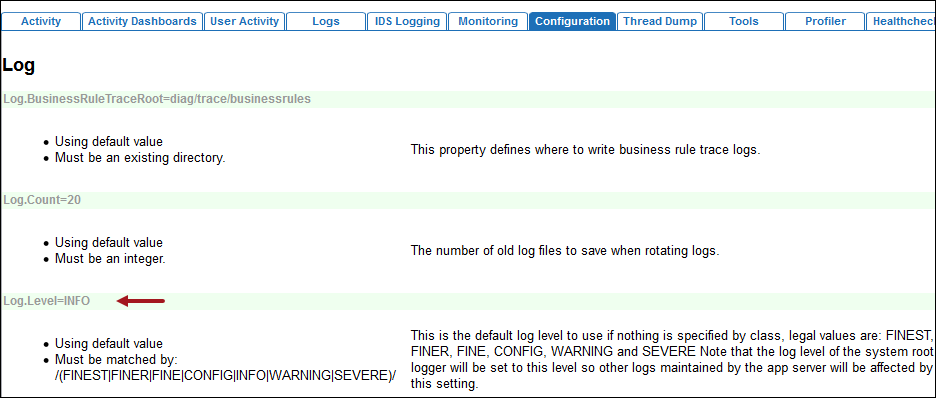
The Log.Level configuration property in the sharedconfig.properties file controls the level of detail generated in the logs. A high level log contains only the most important messages while a low level provides more detail. Each level implicitly logs all other levels above that level as well.
To determine the current level being logged, from the Start Page, click the STEP System Administration button and supply the login credentials. On the Configuration tab, search for Log.Level.
Important: Log level detail FINE, FINER, and FINEST can create a large number of log entries in a short period of time. Typically these levels are not used for the whole system.
The available logging levels are:
- SEVERE: Errors where the program is unable to recover and continue in a normal manner, such as a workflow looking for a property that does not exist.
- WARNING: Conditions which are possible errors or where the program is able to recover and continue in a normal manner.
- INFO: Messages indicating normal progress of the program, the default setting. These entries can be of interest to the end user.
- CONFIG: Messages not generally of interest to the end user, but often useful for diagnosing issues on a running system.
- FINE: Messages of interest to most developers.
- FINER: Messages of interest to only a few developers.
- FINEST: Messages of interest to only a very few developers. This can be extremely verbose.
Recommendation
The log file settings typically differ per environment, as follows:
- On development (STEP DEV) and test (STEP TEST) environments, set the log to FINE to trace errors. This log level assists in identifying potential issues during development and testing. If there is an error and the current level log file setting does not provide enough detail, set the log to FINER or FINEST.
- On a QA environment (STEP QA), set the log to INFO or WARNING.
- On a production environment (STEP PROD), the log level is typically set to log SEVERE issues during normal operation. This avoids the risk of clogging the production system with large log files.
Package-Specific Logging
Set a logging level for a package to allow a more granular log for a specific area. In the sharedconfig.properties file, add the name of the package to the end Log.Level property.
For example, the setting Log.Level.com.stibo.centralhotfolder=FINE will set the level of everything under com.stibo.centralhotfolder to FINE.
Stack Trace Information
In the event of an error, the log will commonly have a stack trace of some sort. While the stack trace data is mostly of interest to developers, it is a good indicator of the most interesting log messages. The following is an example log entry with a stack trace. Real log entries and stack traces will look somewhat different and will not have identifying information trimmed out as is in this illustration.
Feb 18, 2009 6:28:33 PM com.stibo.servicemanager.beans.CentralHotFolder doRun
SEVERE: Unable to handle [trimmed] exception message Couldn't rename [trimmed] to [trimmed]
java.lang.RuntimeException: Couldn't rename [trimmed] to [trimmed]
at com.stibo.customer.[trimmed].moveFile([trimmed].java:143)
at com.stibo.customer.[trimmed].handleFile([trimmed].java:76)
at com.stibo.servicemanager.beans.CentralHotFolder.doRun(CentralHotFolder.java:277)
at com.stibo.servicemanager.beans.CentralHotFolder$4$1.run(CentralHotFolder.java:211)
...
- The first line shows the date and time as well as what part of the program the message was logged from, namely the doRun method in com.stibo.servicemanager.beans.CentralHotFolder.
- The next line gives the error message where the cause was one file not being able to be renamed and the error happened in a specific customer hotfolder.