Optimistic Locking Recommendations
This is one of the data gathering methodologies and recommendations for functional performance improvement. The full list is defined in the Functional Performance Recommendations topic here.
STEP runs with optimistic locking policy. Optimistic locking errors can be caused by long transactions (for example, imports, exports, asset push, business rules, etc.). The longer a transaction takes, the higher the probability of introducing an optimistic locking failure when an additional long transaction runs.
A transaction is put on hold when optimistic locking occurs, and after some time, an attempt is made to process the transaction again. Optimistic locking errors degrade the performance of imports, exports, asset push, business rules, etc., and degrade the performance of the system.
Analyze Optimistic Locking Failures
Use the STEP Admin Portal to analyze optimistic locking errors.
- From the Start Page, click the STEP System Administration button and supply the login credentials.
- On the Logs tab, click the Fetch data button to load the data.
- Select the Main STEP Log File and click either the View link or the Download link to review the log.
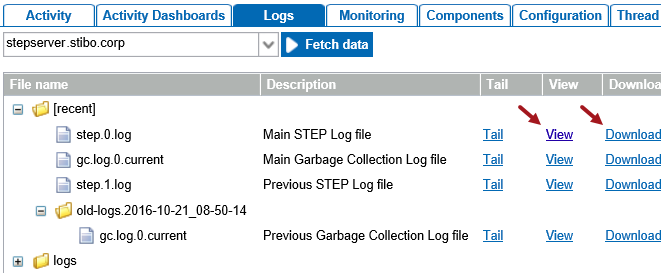
- Search the log for the instance of 'optimistic locking' text.

- Determine the cause of the optimistic locking error.
Examples
Optimistic locking errors are caused by long transactions and may be an import, export, business rule, asset push, etc. The following examples illustrate how to identify what caused the optimistic locking errors.
- Warning for optimistic locking caused by Asset Push
2017/10/25-16:34:07 9e8e com.stibo.services.assetpush.beans.AbstractServiceBean wrapUnexpectedException
WARNING Caught unexpected: kodo.util.OptimisticVerificationException: Optimistic locking errors were
detected when flushing to the data store. This indicates that some objects were concurrently modified
in another transaction. Failed objects: [AssetPO@7caa505: 3615004291612_1, AssetPO@526cb477:
3615004302998_3, AssetPO@3c0fccc3: 3615004302998_pantone, AssetPO@3bd3211d: 3615004291612_3,
AssetPO@696359ef: 3615004302998_1, AssetPO@5e9b87b8: 3615004291612_pantone, AssetPO@1cb0217c:
3615004302998_2, AssetPO@3e49203e: 3615004291612_2] [java.util.ArrayList]
- Severe optimistic locking error caused by a Web UI transaction in Web UI 'C4userportal'
2017/10/17-12:34:59 795|L3022356|PRT|C4userportal com.stibo.portal.engine.server.util.ExceptionConverter
convertExceptionSerializeAndLocalize SEVERE Type: Error no esperado, Message: Optimistic locking errors
were detected when flushing to the data store. This indicates that some objects were concurrently
modified in another transaction. Failed objects: [ProductPO@21d744cc: C4A-305195, Value7PO@5b8b4f21,
valno: 231765818, qualifier: -5, rev: 0, Value7PO@344dc391, valno: 231765817, qualifier: -5, rev: 0,
Value7PO@3f2b8947, valno: 231765815, qualifier: -5, rev: 0, Value7PO@5478ad23, valno: 231765816,
qualifier: -5, rev: 0, com.stibo.core.persistence.NodeStatePO@36bc02a7] [java.util.ArrayList]
- Warning for optimistic locking caused by business condition transaction in state 'ModeCommerce' in Web UI 'C4userprotal'
2017/10/23-09:52:10 6d7b|R3404828|PRT|c4userportal com.stibo.core.domain.impl.state.scxmlimpl.StateFlowImpl
evaluateConditionNoThrow WARNING Business Condition failed for item "C4A-1957171" in state
"ModeCommerce" : Wrapped kodo.util.OptimisticVerificationException: Optimistic locking errors were
detected when flushing to the data store. This indicates that some objects were concurrently modified
in another transaction. Failed objects: [ProductPO@3c0b71a7: C4V-1957172, ProductPO@2f9030b2:
C4V-1038657, ProductProductReferencePO@284a0999, edgeid: 23130110, rev: 0] [java.util.ArrayList]
(Script#305) in Script at line number 25 at column number 0
'Reference Target Lock Policy' Parameter
Setting the 'Reference Target Lock Policy' parameter for the asset, entity, classification, and product object types manages how objects should be locked while they are being referenced. When a reference between two objects is being created, the target object is locked to ensure that it is not being deleted while the reference is being created. This means that only one process or user can edit it at a time.
In most of these cases, deletion of the object is not a deletion from the database, but the deletion that occurs due to revision control when an insert of a new history entry occurs. This can be a major issue when running parallel imports where the first import locks the object type being referenced, and the second import eventually stops running because it cannot access the locked object. Although STEP continues to retry the import, this can cause inbound feeds to be negatively affected.
The default setting for this property is 'Strict.' When long-running transactions cannot be simplified easily, consider setting the 'Reference Target Lock Policy' parameter to 'Relaxed' on the object types to which the long transaction applies.
Important: The 'Relaxed' setting should NOT be used on an object type for objects that are often deleted as this can result in poor performance, and risks locks and deadlocks.
The 'Relaxed' setting on the property puts a less restrictive lock on the reference target objects being edited so that they can be updated concurrently by more than one process and/or user, with a full lock being employed only in the case that a deletion is attempted. This setting, when used with object types that are frequently referenced but rarely deleted, will improve the performance and stability of parallel inbound imports, bulk updates, and users concurrently creating references to the same objects.
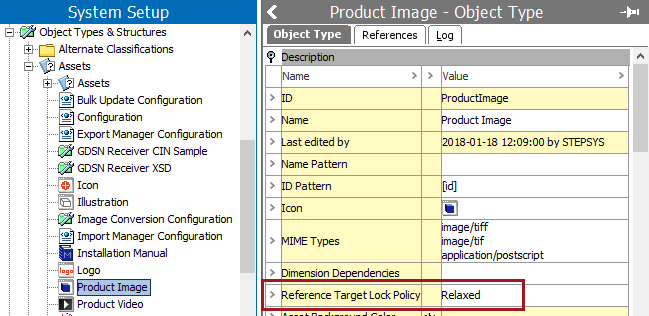
For example, the following image shows the 'Reference Target Lock Policy' for object type Product Image (ProductImage) since the many of the optimistic locking errors in the asset push apply to this object type.
Recommendations
- Optimize large transactions - keep transactions small to limit the probability of introducing an optimistic locking failure by optimizing the business rules and functions used at e.g., imports, exports, bulk updates.
- Set reference target policy - set the parameter to 'Relaxed' when all of these points are true:
- optimistic locking failures occur frequently in the log file
- transactions cannot be optimized
- the object types that are frequently referenced are rarely deleted