GDSN Receiver Solution Enablement
The GDSN Receiver can interact with any GDSN datapool which is capable of sending and receiving XML files in the standard GS1 XSD schema machine - to - machine. The GDSN Receiver Solution acts as a repository to store all received products and full GS1 attribution. The system provides the framework for automating CIC responses and framework for transforming the GS1 data model to meet the needs of PMDM and other downstream systems.
The GDSN Receiver Solution:
- is a solution which runs in a separate STEP instance.
- stores full attribution received from GDSN.
- allows specified attributions to flow to PMDM, with the ability to expand attribute sets as requirements change.
- allows full attribute mapping for inbound CINs.
- incorporates Web UI for managing GDSN admin tasks.
- allows built-in workflows to manage messaging, MDM data flow, and Hierarchy Withdrawals.
- includes completeness rules that can be maintained in Web UI.
- contains GPC validations that can be maintained in Web UI.
- is a framework for transforming GDSN data model to match downstream systems, automating the CIC response, and adding more complex rules.
- contains transformation tables for Attribute IDs, LOVs, object types, reference types, and unit descriptors.
- includes a XSLT post-processor.
Configuring the GDSN Receiver
Easy setup
The GDSN easy setup requires GTIN-14 based values for the GTIN attribute.
Context languages
Context languages must be configured to include all languages that are intended to be captured from incoming GDSN data. Any GDSN data received in a language that is not configured will be skipped during CIN import.
In this example, the user has created six different contexts, one of which (ID=Context1) is the master context.
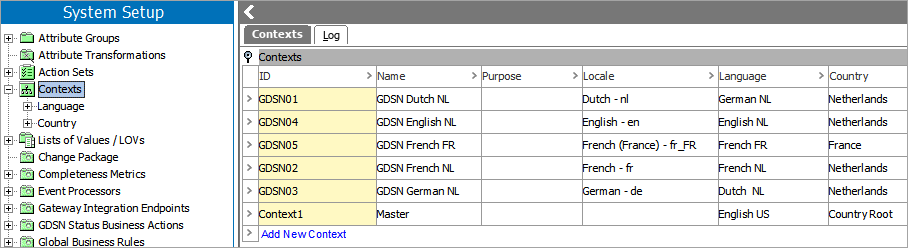
Note: When creating contexts, If more than four contexts are required, it is recommended to continue using the ID format GDSN01, GDSN02, etc., as shown in the image above.
For more information on creating and maintaining contexts, see the Contexts topic in the Dimensions and Contexts documentation here.
Target Markets
Context countries must be configured to include any Target Markets used in current or future subscriptions. The ‘Target Market Code’ must be set to the three digit numeric country code as defined by ISO 3166. For the current list of numeric country codes, see the ISO Online Browsing Platform (OBP)

Add contexts and language codes to the Target Markets. Note that it is possible for multiple language codes to apply to a single context.

Language codes are defined by ISO 639-2. For the current list of language codes, see the Library of Congress language code standards
Global Location Number (GLN)
The GLN must be added to the GDSN Receiver GLN object. This GLN will be used for sending and receiving GDSN messages and must match the GLN that providers will use for publications.

GDSN Datapool Receiver Root
There are several values that need to be input into the GDSN Datapool Receiver Root tab during configuration.

- Datapool GLN: The GLN of the datapool the user is subscribed to.
- Define AS2 Hotfolder In – The folder the IIEP will monitor for incoming GDSN messages from the datapool.
- Define AS2 Hotfolder Out – The folder the OIEP will place the outbound GDSN messages that will be sent to the datapool.
- Define Datapool Username – User name if required by the datapool. If no user name is is provided, this can be left blank.
- GLN – User's Global Location Number.
Note: Event processors and endpoints must be enabled and scheduled before processing any inbound or outbound GDSN messages. For more information on endpoints, see the Data Exchange topic here. For more information on event processors, see the Event Processors topic here.
Providers can be added to the system manually in the WebUI or imported into STEP Workbench. If migrating many existing providers, it is recommended to use an import. Following is an example of a STEPXML import:
<STEP-ProductInformation ContextID="GDSN01" WorkspaceID="Main" UseContextLocale="false">
<Entities>
<Entity ID="1234567890123" UserTypeID="GDSNProviderGLN" ParentID="DatapoolBMS_01ProviderGLNs">
<Name>My Provider</Name>
<Values>
<Value AttributeID="GLNIdentifier">1234567890123</Value>
<Value AttributeID="InformationProviderName_GDS">My Provider</Value>
</Values>
</Entity>
</Entities>
</STEP-ProductInformation>
Workflows
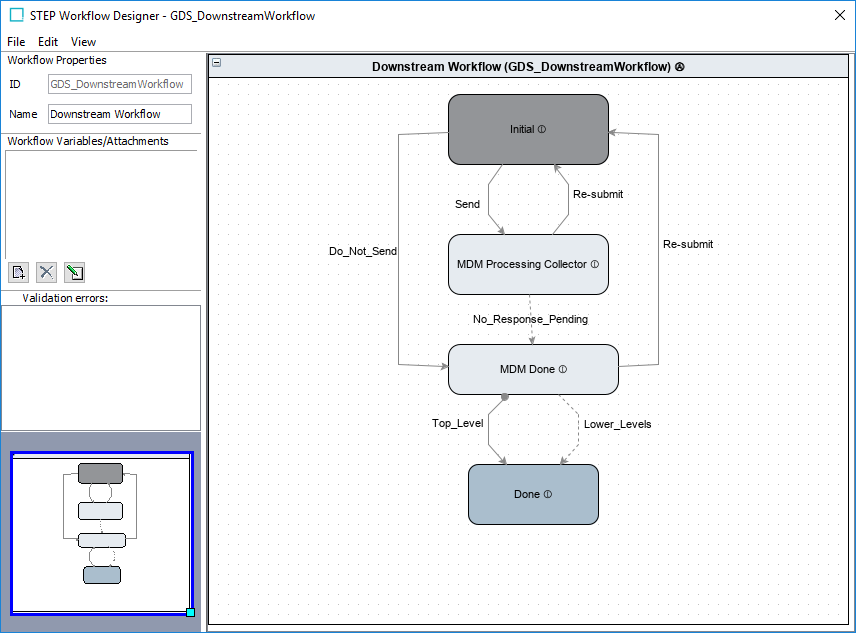
Downstream Workflow
The downstream workflow is configured to:
- determine which products will be sent downstream via the GDS_GDSNToMDMOutbound endpoint.
- wait for a response from the downstream system for all necessary levels of the hierarchy.
- trigger a CIC message back to the provider based on customizable logic.
To add logic for restricting certain products from being sent downstream, the function sendItemToMDMOutbound within library GDS_CustomerAutomatedValidationLibrary can be edited.
Note: Default logic always returns ‘True’ result (all products will be sent).
Message Response Workflow
For messages sent to a GDSN datapool, a response back is expected confirming it has been received. To ensure there is no loss of connectivity between the systems, the Message Response Workflow is used to track messages that have not received a response. The escalation timer on the Message Response Pending state defaults to one hour. The timer and notification can be customized based on needs.

Hierarchy Withdrawal Workflow
Providers can send a CatalogueItemHierarchicalWithdrawal message to delete a publication, sometimes only temporarily while making necessary changes to the hierarchy. To prevent the temporary withdrawals from getting sent downstream unnecessarily, the Hierarchy Withdrawal Workflow exists to track how long the products have been withdrawn and prevent submission through the Downstream Workflow. By default, the escalation timer is set to 48 hours. This can be adjusted as needed.

For more information on workflows, see the Getting Started with STEP Workflows topic in the Workflows documentation here.
CIC handling
In GDSN, the CIC message is used to communicate the internal status of a product hierarchy back to the provider. Possible CIC statuses include Received, Reject, Review, and Synchronize:
- Received: Notifies the provider that the product has been received.
- Reject: Indicates that the recipient is not interested in the product. All synchronization is terminated.
- Review: Sends a request for the revision of the product to the provider because the data cannot be synchronized.
- Synchronize: Notifies the provider that the received data has been synchronized with the recipient's system.
To facilitate this process, the Downstream Workflow will automatically trigger a ‘Received’ CIC message if it is the first time receiving the product hierarchy. If a CIC status already exists, no ‘Received’ CIC message will be sent.
Products sent downstream will remain in the workflow pending an API call from the downstream system including a command from the CIC status list (Received, Reject, Review, Synchronize).
If the Review CIC status message is returned, the necessary instructions needed for any needed corrections should also be included for the provider.
The MDMtoGDSN function can be updated for customized logic. The default logic is:
- Reject will immediately find all hierarchies the product belongs to and trigger a Reject CIC for each hierarchy.
- Review will trigger a Review CIC once entire hierarchy has gotten an MDM response and none of the responses contain Reject.
- Synchronize will trigger a Synchronize CIC once entire hierarchy has gotten an MDM response and none of the responses contain Reject or Review CIC statuses.