Regular Expression Examples
A regular expression can be used in several places throughout STEP. The examples below are some of the common uses and are divided into the following areas:
- Asset importer
- Attribute transformations
- Import transformations
- Search
- Table Transformations
- Validation base type
Asset Importer
The following examples involve requirements for file name matching as used in Asset Importer.
For more information on asset importer, see the Asset Importer section of the Digital Assets documentation here.
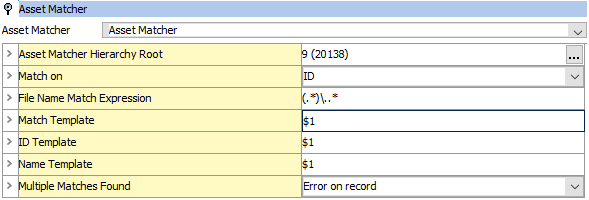
Match a file name and save the part before the extension
- Expression: (.*)\..*
- Value: 'abc123.pdf'
- Result: $1 = 'abc123'
Match the last folder in a path
- Expression: .*/(.*)
- Value: '/net/share/imageupload/product_images'
- Result: $1 = 'product_images'
- Notes
- To understand why it doesn’t yield $1 = 'share/imageload/product_images', it is necessary to understand that by default, the repetition modifiers are ‘greedy’ and try to match as far as they can while still resulting in an overall match. There are modifiers to make the match 'lazy,' but that is beyond the scope of this primer.
- The initial '.*' will match all the path separators ( / ) except the last one that has to be saved to be matched by the literal '/' in the expression.
Attribute Transformations
The following examples involve requirements for attribute values that should be modified when mounted in STEP’n’design.
For more information on attribute transformations, see the Attribute Transformations documentation here.
Transform attribute value based on the value
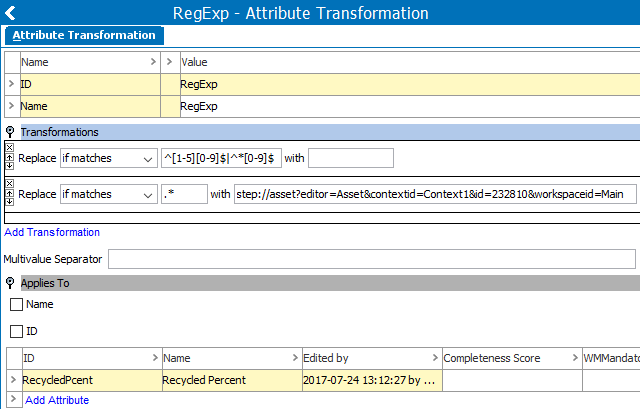
Consider the requirement that objects containing greater than 60% recycled material get an icon informing the customer that recycled materials were used. Using an Attribute Transformation (created in System Setup), it is possible to use a regular expression along with the transformation 'Replace substrings of the value using regular expressions' to modify the value of the attribute 'recycled percentage' (with ID RecycledPcent) only under the specified condition. Then, when mounted in STEP’n’design, the 'recycled' icon (with ID 232810) provided by the transformed value is displayed. For this example, two (2) regular expression transformations are used.
- Transformation 1: Replace if matches ^[1-5][0-9]$|^[0-9]$ with
- Transformation 2: Replace if matches .* with step://asset?editor=Asset&contextid=Context1&id=232810&workspaceid=Main
- Notes
- The first regular expression transformation determines if the value of the 'recycled percentage' attribute is less than 60 percent by testing for any two-character value where the first character is 1-5, and the second character is 0-9, OR a single character value that is a number 0 - 9. If a match is found, any existing value is deleted. In actuality, the STEP value is not altered at all, rather the transformed value will be sent for use by the external system.
- The second regular expression transformation replaces any actual value for the 'recycled percentage' attribute after the first transformation, with the URL to an asset which is a recycling icon. Again, the STEP value is not actually altered.
For additional information on transformations used in STEP Publisher to convert values to icons, see the Attribute Transformations in STEP Publisher topic in the STEP Publisher documentation here.
Import Transformations
The following examples involve requirements for attribute values that should be modified upon import.
For more information on import transformations, see the Modifying Data section of the Inbound Map Data Options section of the Data Exchange documentation here.
Format US Phone Numbers
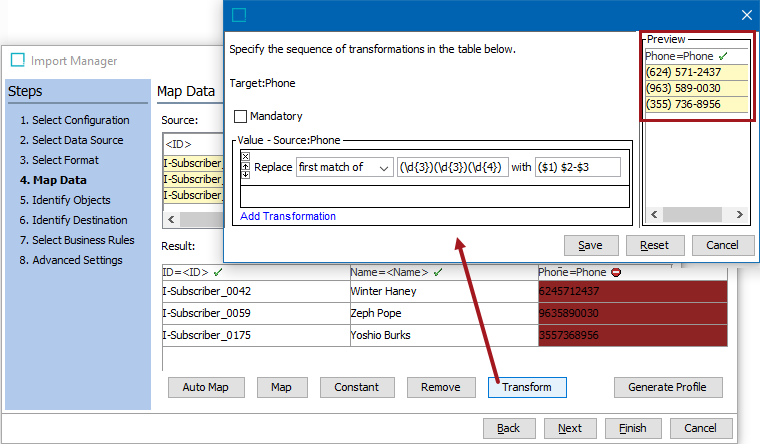
Phone numbers in the United States are a total of ten (10) digits. The common formatting is three (3) digits within a set of parentheses, followed by three (3) digits, followed by a dash (-), and then a final four (4) digits. During import, the regular expression transformation can enforce the correct number of digits, as well as the formatting of this data.
- Transformation: Replace first match of (\d{3})(\d{3})(\d{4}) with ($1) $2-$3
- Notes
- The regular expression is looking for a match of a total of ten (10) numbers and the transformation will be performed on the first match.
- Groups are created using sets of 3 numbers, 3 numbers, and 4 numbers, and their original order is retained.
- Punctuation is added to the groups, including a set of parentheses around group 1, followed by a space, and then a dash (-) between groups 2 and 3.
Search
The following example shows that STEP Search allows for matching on a regular expression.
For more information on using a regular expression to search STEP values, see the Search: Advanced Options topic in the Getting Started / User Guide documentation here.
Find Text
Using a regular expression via the Advanced search option in workbench, allows a text string to be located in STEP regardless of the object type in which it appears.
- Expression: [a-z]{6}8888
- Values Allowed: trader8888, Customer8888
- Values Rejected: Trader8888, Custom8888
- Notes
- The regular expression is looking for a match of six (6) lowercase letters followed by four (4) instances of the number '8'.
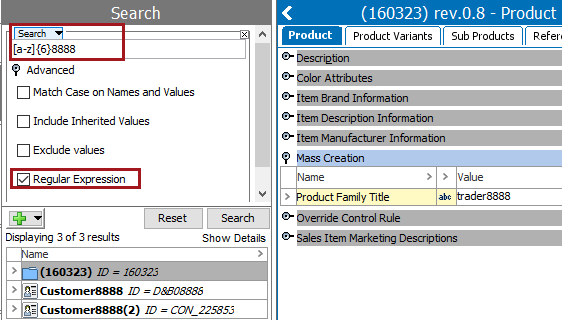
Table Transformations
The following example involves a requirement for a table where text will be modified by applying a table transformation to the Table Definition when setting up a table in STEP Workbench.
For more information on transformations in tables, see the Table Transformations Section of the Tables documentation here.
Transform row / column text formatting
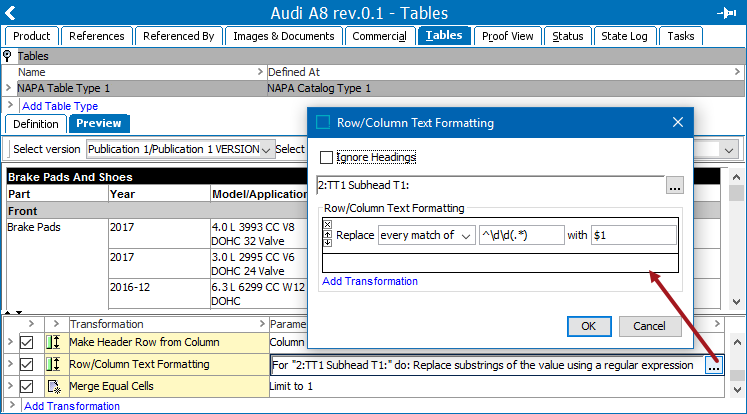
Once a table is defined in workbench, transformations can be added on the Preview tab. The Add Transformation link gives access to many transformations, including a formatting option that uses a regular expression to modify the text.
- Transformation: Replace every match of ^\d\d(.*) with $1
- Notes
- The regular expression is looking for a match of a string that starts with exactly two (2) digits, followed by any number of characters (or no other characters).
- The value is updated so that the initial two characters are stripped out.
Validation Base Type
The following examples involve requirements for restricting the values that are allowed for an attribute.
For more information on using a regular expression as a validation base type, see the Validation Rules documentation here.
Format US Zip Code
Zip codes in the United States are five (5) digits, with an additional optional dash (-) and four (4) more digits. In STEP, the regular expression validation base type can enforce the correct formatting of this data, for example, 30144-5646.
- Expression: [0-9]{5}(-[0-9]{4})?
- Values Allowed: 30144, 30144-5646
- Values Rejected: 301445646, 30144-88
- Notes
- The regular expression is looking for a match of five (5) numeric characters, and optionally allows a dash (-) followed by exactly four (4) more numeric characters.
Format US Social Security Numbers
Social Security Numbers (SSN) in the United States are a total of nine (9) digits. The common formatting is three (3) digits, followed by a dash (-), then two (2) digits, followed by another dash (-), and then a final three (3) digits. In STEP, the regular expression validation base type can be used to enforce the correct number of digits as well as formatting of this data, for example, 123456789 or 123-45-6789.
- Expression: ^\d{3}((-\d{2}-)|(\d{2}))\d{4}$
- Values Allowed: 123456789, 123-45-6789
- Values Rejected: 1234567891, 12-3456-789
- Notes
- The regular expression is looking for a match of three (3) numeric characters. It optionally allows a dash (-) followed by exactly two (2) numbers and another dash (-), or two (2) numbers without the dashes. And finally, is looking for a match of four (4) more numbers, for a total of 9 numbers.