Import Change Info Bind
Business rules can use the Import Change Info bind when running in an import. It accesses what has changed with the import (for example, new / existing objects, updated attributes). This object will be populated for each object in the import.
This bind is available within the 'Binds to' dropdown, as shown below.
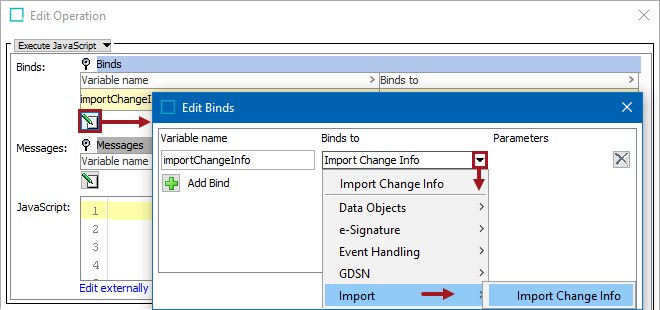
Configuration
To use any bind:
- Create a business rule as defined in the Creating a Business Rule or Library topic here.
- Edit the business rule as defined in the Editing a Business Rule topic here.
- In the Edit Operation dialog, add the bind to a business rule, as defined in the Adding a Bind topic in the Reference Materials documentation here.
- In the Edit Operation dialog, optionally add Messages, as defined in the Adding a Localized Business Rule Message topic here.
- In the Edit Operation dialog, add JavaScript to call the bind.
JavaScript Methods
The object contains the following members:
isUnmodified()
- true when an object is unchanged by the import
- false when the object is new or modified
getChanges()
- returns a 'changes' object with a getAttributes() method that lets you see which Attribute values are changed by the import
isCreatedByCurrentProcess()
- true if the Node was created by the current import process
- false if the Node already existed before the current process started
isAllDataHandled()
- true if all data was handled during the import
- false if all data was not handled during the import