Grouped Frame Parameters
Below is a description of the individual parameters available when configuring grouped frames using the STEP Template Frame panel in InDesign. One common use for grouped frames is to group an image frame together with a text frame in order to mount a linked asset and a metadata attribute connected to the asset (for example, an image caption).
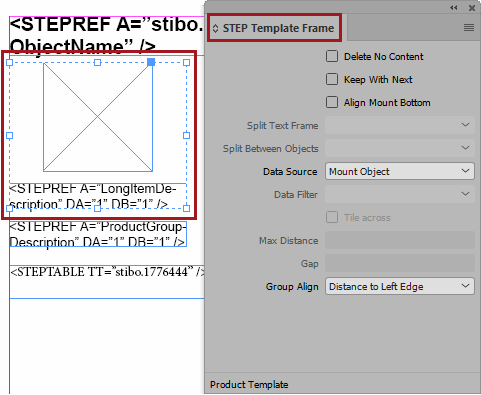
- Delete No Content: This option can be best understood as 'Delete IF No Content.' Check this box to ensure that the group of frames does not mount on pages if no content exists in STEP for all of the individual frames included in the group.
- Keep With Next: Check this box to ensure that the grouped frame remains with the frame that follows it (resides directly below) on the page. A frame with Keep With Next set cannot have a Split setting of Anywhere or Within Spread, and vice versa.
- Align mount bottom: Select this to ensure that a grouped frame will always mount at the bottom of the page. In Flatplanner, the frame will align to the bottom of the Flatplan frame. If more than one frame is designated to align mount bottom, the lowermost frame will align to the bottom and the other frame(s) will mount above it, separated by the same gap amount as on the product template.
- Split Text Frame: N/A; disabled for grouped frames.
- Split Between Objects: This option applies to repeating frames and is activated when a data source other than 'Mount Object' is selected, e.g., Mount Children. The three split options are Never, Anywhere, and Within Spread.
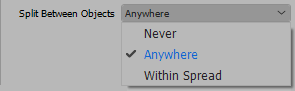
- Select Never to prevent a series of repeating grouped frames from splitting across a column or page if there are too many frames to fit in one column or on one page.
- Select Anywhere to allow the series of repeated grouped frames to split across a column or onto another page, even if the split continues from a right-hand page to a left-hand page, creating a new spread.
- Select Within Spread to only permit the repeated grouped frames to continue from a left-hand page to a right-hand page, disabling the ability to create a new spread.
- Data Source: This controls whether the grouped frames should mount content from the object that is being mounted (Mount Object; most common), from children of the mounted object (Mount Children), or from an asset or product linked to the mounted object by a reference type. By default, the data source is Mount Object, which extracts values from the mounted object only.
Select Mount Children or a product / asset reference type when the grouped frame is intended to repeat on the page. The frame repeats in instances where information is available from multiple child objects or from multiple referenced products or assets. When selected, the following options are activated in the STEP Template Frame panel: Data Filter, Tile across, Max Distance, and Gap.
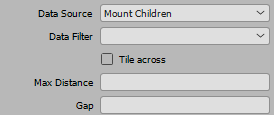
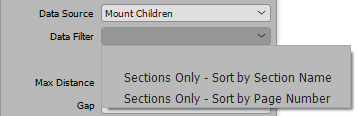
- Data Filter: Only activated when Data Source is 'Mount Children.' Used when mounting publication or section objects to pull information (such as metadata attribute values or section names) from child sections / subsections. Available options are Sections Only - Sort by Section Name and Sections Only - Sort by Page Number. This functionality is typically used in AutoPage publications to create tables of contents / section indexes. See the Creating a Table of Contents Product Template topic
- Tile across: Check this box if repeated frames should be tiled horizontally across the page instead of stacking vertically beneath one another
- Max Distance: The maximum distance that horizontally tiled frames should repeat across the page (L-R) before stopping and wrapping back around to begin a new row of repeated frames underneath
- Gap: The amount of space to place between repeated frames when tiled horizontally
- Group Align: Three options are available in the Group Align dropdown menu that enable you to set additional parameters for grouped frames.
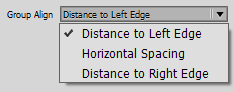
- Distance to Left Edge: Same distance as if items were not grouped.
- Horizontal Spacing: If there is text is to the right of the image with a 5 mm gap and the image changes size, the text still ends up 5 mm from the image.
- Distance to Right Edge: If the group grows or shrinks due to image size, the boxes maintain their distance to the right edge.
Grouped Frame Parameters for InDesign-created Page Templates
The below screenshot shows the available grouped frame parameters for InDesign-created page templates, which are only applicable for Flatplanner publications and typically are Galley templates. The options are Frame Type and Frame ID.
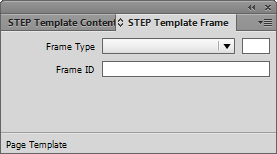
For information on how to use these options, see the Galley Templates section of the Flatplanner documentation
Grouped Frame Parameters for Publication Templates
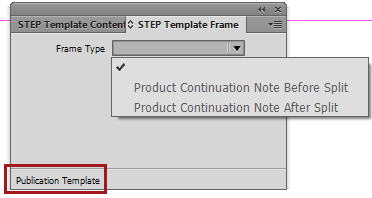
Though a 'Frame Type' dropdown list is available for grouped frames when working with publication templates, the options are grayed out, as they are not applicable to grouped frames. The dropdown exists, however, in the instance that it might have a future use if a customer need arises.
These two options (Product Continuation Note Before Split and Product Continuation Note After Split) only apply to text frames on publication templates that will be used in AutoPage publications. See AutoPage Pagination Rule Actions in the AutoPage documentation here for more information.