Identify Duplicates
The Identify Duplicates match action helps determine if duplicates exist in a dataset and allows users to confirm, reject, merge, and delete duplicates manually with only limited impact on existing functionality.
Using the Identify Duplicates match action, the matching algorithm will not automatically do anything to identify duplicates. It is possible to set up workflows and UIs for manually merging identified duplicate records in STEP, but if those setups are needed, the Identify Duplicates match action is probably not the best match action.
With the Identify Duplicates match action, as matchable objects are created and modified, events are sent to a matching event processor. In an asynchronous process, the Match Event Processor matches these objects with other matchable objects, as defined by the relevant matching algorithm. When two objects score above the create threshold, a match result is stored for future handling.
Configuration
For the Identify Duplicates match action, the Create Threshold parameter is required and specifies how equal objects must be to be identified as possible duplicates.
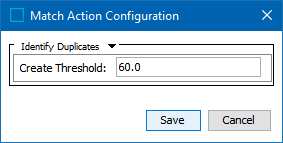
Identify Duplicates in Workbench
Identify duplicates can make use of many of the same workbench and Web UI tools as the match and link match action. For more information, see the Match and Link in Workbench topic in this documentation here.
Identify Duplicates in Web UI
The Web UI supports a number of actions on identified duplicates. See the list below for Web UI topics relevant to the Identify Duplicates solution:
- Potential Duplicates List - See the Match and Link, Potential Duplicates List topic in the Web User Interfaces / Web UI Getting Started documentation here.
- Merging Confirmed Matches - See the Match and Link, Merging Confirmed Matches topic in the Web User Interfaces / Web UI Getting Started documentation here.
- Configuring a Deduplication Clerical Review - See the Match and Link, Configuring a Deduplication Clerical Review topic in the Web User Interfaces / Web UI Getting Started documentation here.