Manual Asset Importer
Import Images and Documents wizard is used to import assets. Images are the most frequently imported asset, however, it is possible to import any electronic file using the same procedures as the ones used for images.
We recommend that users of the Import Images and Documents wizard have the following skills:
- An understanding of the basic concepts of STEP, of maintaining attributes and their values, and of creating and maintaining products, classifications or entities.
- Knowledge of the STEP system equivalent to basic STEP training
- Thorough knowledge of the files that are imported.
- Knowledge of dimensions and dimension points and whether or not you require assets to be dependent on dimensions, and how you would use such a set-up.
- Knowledge of MIME types and asset object types.
- Knowledge of asset reference types and its validity.
Also, ensure that your system is set up to accept appropriate file formats for imports of assets, and ensure that each of these formats is assigned an appropriate icon.
Preparing to Import Assets
Before starting the import process, be aware of the following:
- You can load assets and use either the file name as ID or use an automatically generated number. In either case, the file name is used as the name of the asset in STEP.
Note: Asset IDs have a maximum length of 40 bytes, and names have a maximum of 80 bytes.
- Do not to use special characters or spaces in asset IDs or names.
- Although you can upload images of almost any file format, print publications in the system accept only TIFF or EPS file formats. You can upload other formats for non-print applications.
- You should check all images for accuracy and suitability before uploading them to STEP. This includes file size, resolution, one clipping path maximum, compression type, actual image size at 100 percent, if there are embedded low-res TIFF or EPS images, and so on.
- If you have a Photoshop image that has text in it, you must outline that text. You cannot have text with font calls within an image. For Illustrator files, you can also outline the text. If you choose not to do so, you must select the option to embed the font(s) within the EPS file.
- To ensure a smooth upload of images of different file types, you are strongly advised to use extensions to the image file names that match the file type, for example, .TIFF or .EPS.
- Avoid having assets in STEP that have different IDs but the same name. Technically, IDs must be unique, but names do not have to be unique. However, having different images with the same name can be confusing with the exception of country- or market-specific assets. In this case, you can import assets with the same ID and name into different contexts.
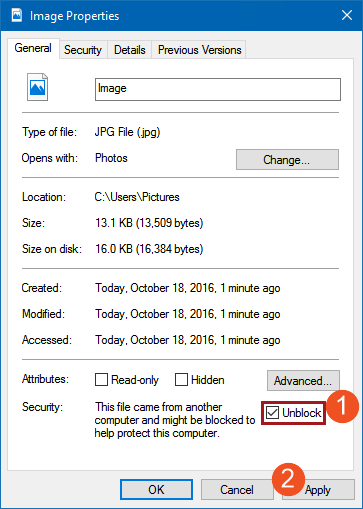
- Depending on your system security, downloaded images may be blocked. Blocked files will generate an asset creation failure when imported.
Unblocking Downloaded Image Files
- Right-click on the image, and select Properties.
- In the Image Properties dialog, under Security, ensure that the Unblock checkbox is selected.
- Select Apply to save the change.