Select Export Location
In the Select Export Location step, users can set the naming format for the output file(s) and specify the location and delivery method for the export. Users can normally choose one of two options; the third is only available to you if you have selected only one file for export.
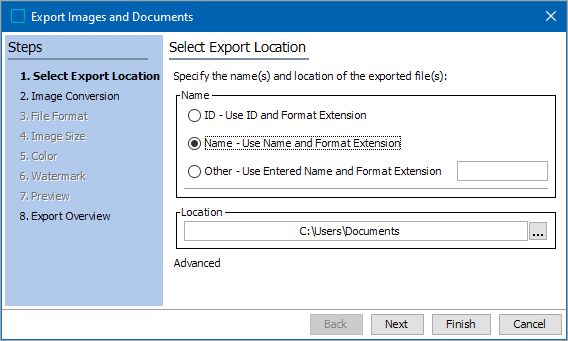
- In the Name area, select one of the following options.
- ID - Use ID and Format Extension: Builds the file names of the exported files by taking the asset’s ID and appending the file format’s associated extension. For example, a PDF document with the ID 1234567 is exported as 1234567.pdf
- Name - Use Name and Format Extension: Builds the file names of the exported files by taking the asset’s name and appending the file format’s associated extension. For example, a PDF document with the file name Installation Manual is exported as Installation Manual.pdf.
- Other - Use Entered Name and Format Extension: This option available when you have selected only one asset for export. You can enter any file name and extension that you want.
- In the Location area, select the delivery location. You can toggle between Advanced and Basic export options, by clicking the Advanced / Basic text below the location field.
- In Basic mode, click the ellipsis button (
 ), and then navigate to the preferred location. The user will be presented with a standard browse window to your local and network drives. Browse to and select the folder where you want your assets to be placed.
- In Advanced mode, use the dropdown to choose a delivery option.

-
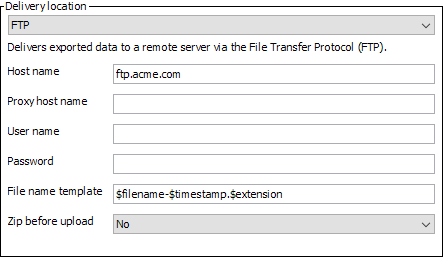
FTP delivers a file using file transfer protocol (FTP). You must specify the host name of the remote server, the proxy host name (optional), the user name and password used to log on to the remote server, a file name template, and whether the files should be zipped before uploaded. For additional details on these options, see the FTP Delivery Method topic in the Data Exchange / Export Manager documentation here.
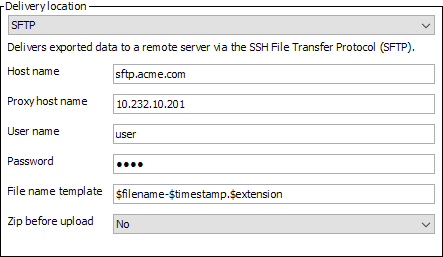
- SFTP delivers a file using the Secure File Transfer Protocol (SFTP). You must specify the host name of the remote server, the proxy host name (optional), the user name and password used to log on to the remote server, a file name template, and whether the files should be zipped before uploaded. For additional details on these options, see the SFTP Delivery Method topic in the Data Exchange / Export Manager documentation here.
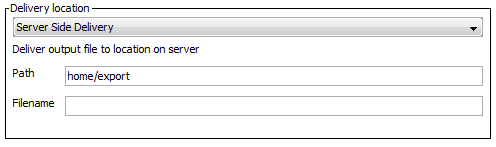
- Server Side Delivery exports the file into a folder located on the application server of the STEP system. The file is only delivered if the specified path has read / write access on the server. Enter the path of the application server and the name of the file.